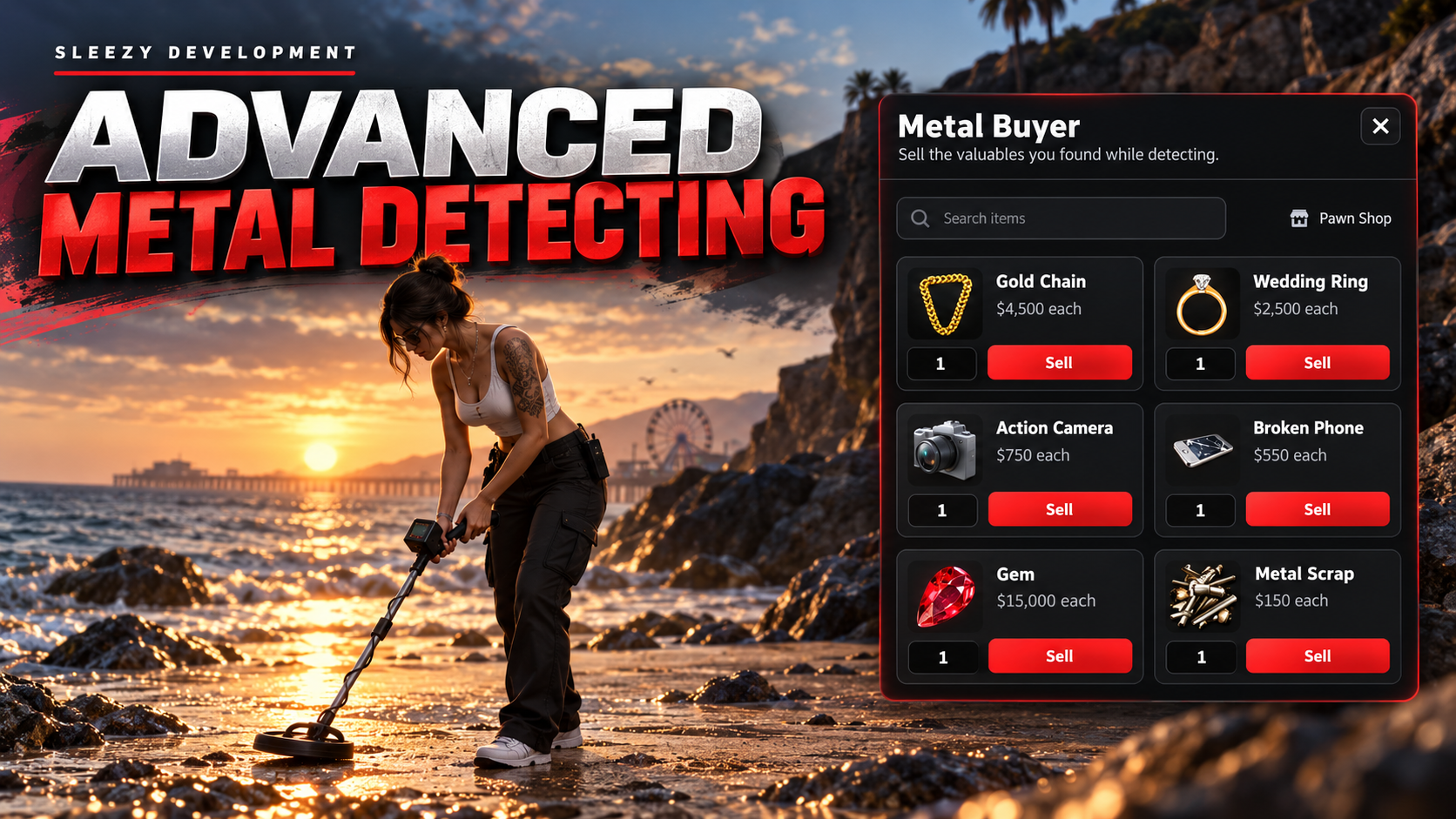
💜 Advanced Metal Detecting System
Turn exploration into a complete scavenging activity with an interactive metal detecting system for your FiveM server.
Players can equip a metal detector, explore configured search areas, listen for signals that become stronger as they approach hidden finds, dig up randomized valuables, and sell their discoveries through the included Pawn Shop system.
Designed to provide an actual searching experience rather than simply walking to markers and collecting items.
⚙️ Features
Interactive metal detector system
Included custom detector models
Usable metal detector item
Optional /metaldetector command
Multiple configurable detecting zones
Dynamically generated hidden search points
Distance-based detector signals
Multiple detector audio stages
Adjustable detector volume
Digging animations
Configurable digging duration
Configurable detector animations
Configurable detector model and positioning
Common, Rare & Epic reward categories
Fully configurable rewards
Configurable reward quantities
Configurable rarity chances
Search-zone blips
Optional zone radius blips
Built-in Pawn Shop
Custom Pawn Shop UI
Inventory item images
Searchable seller inventory
Configurable item prices
Configurable payment account
Multiple seller location support
Server-side reward validation
Server-side selling validation
Exploit protection and interaction checks
No database required
Framework auto-detection
Extensive server-owner configuration
🔎 Interactive Detecting
Players equip their metal detector and physically search configured areas for hidden objects.
The detector responds depending on how close the player is to a hidden search point.
By default, the system uses multiple signal ranges so the detector becomes increasingly responsive as the player gets closer to the find.
Server owners can configure:
Detection ranges
Signal sounds
Search controls
Detector volume
Minimum and maximum volume
Dig prompt distance
Search-point spacing
Number of active finds
Search-zone size
Detector model
Detector positioning
Detector animation
This gives players an actual searching process instead of revealing the exact location immediately.
🎵 Distance-Based Signals
The included detector audio changes depending on the player's distance from a hidden find.
Different sound stages can be configured for different ranges, allowing players to use the detector itself to locate buried items.
The detector volume can also be adjusted while searching.
All included detector sounds are stored locally inside the resource with no external audio/CDN dependency.
⛏️ Digging System
Once players locate a signal closely enough, they can dig for the buried item.
Digging includes:
Configurable interaction distance
Digging animation/scenario
Configurable digging duration
Progress system integration
Optional cancellation
Automatic detector resume after digging
Server-validated completion
Inventory capacity checks
Rewards are not given immediately from a client-side event. The server validates the interaction before completing the dig.
💎 Rarity-Based Finds
Every successful dig can select from configurable rarity pools.
Default categories include:
Common
Rare
Epic
Each category can contain completely different items.
Server owners can configure:
Rarity chances
Available items
Item labels
Minimum reward quantity
Maximum reward quantity
The included setup contains finds ranging from scrap and damaged electronics to jewelry, watches, gems and other valuables.
Everything can be replaced with your own server items.
🗺️ Custom Detecting Zones
Create your own metal detecting locations around the map.
Each zone can have its own:
Location
Radius
Enabled/disabled state
Maximum active search points
Reward pools
Rarity items
Map blip
Blip sprite
Blip color
Blip scale
Radius display
Radius transparency
Different areas can therefore have completely different loot pools and balancing.
📍 Dynamic Search Points
Hidden finds are dynamically positioned throughout configured detecting zones.
The system supports configurable:
Point spacing
Spawn limits
Ground detection
Proposal intervals
Detection distance
Claim distance
Players search for the actual generated locations using the detector rather than following permanently visible markers.
💰 Pawn Shop Selling
After finding valuables, players can visit the included Pawn Shop to sell supported items.
The seller includes its own clean in-game interface with:
Item images
Item names
Individual prices
Quantity selection
Search bar
Configurable maximum sale quantity
Automatic inventory image support
Players can quickly search through their finds and choose exactly how many items they want to sell.
🏪 Configurable Sellers
The selling system is not limited to the included default Pawn Shop.
Server owners can configure seller locations with:
Location
Shop label
Interaction distance
Draw distance
Accepted items
Item labels
Sell prices
Payment account
Seller prompt
Blip
Blip sprite
Blip color
Blip size
Map visibility
Additional seller locations can be added through the configuration.
🖼️ Inventory Images
The Pawn Shop interface can automatically display item images from supported inventory resources.
Supported image handling includes:
ox_inventory
QB inventory image paths
Automatically detected inventory images
Custom image paths
Per-item custom images
If an image cannot be loaded, the interface safely falls back instead of breaking the seller UI.
🎨 Branding & UI Configuration
Server owners can customize the Pawn Shop interface directly through the configuration.
Options include:
Resource branding name
Short name
Seller title
Seller subtitle
Search placeholder
Sell button text
Currency symbol
Custom logo URL
Accent color
Hover color
Background color
Panel color
Text color
Secondary text color
Border color
Inventory image path
UI close key
This makes it easy to match the system to your own server branding without rebuilding the interface.
🎮 Detector Configuration
The detector itself can be customized extensively.
Options include:
Required detector item
Detector item name
Usable item registration
Optional command
Command item requirement
Vehicle usage
Detector model
Alternate detector model
Attachment bone
Position offset
Rotation
Animation dictionary
Animation
Controls
Volume
Search controls
Dig control
Two streamed metal detector models are included with the resource.
🛡️ Server-Side Validation
Important actions are validated by the server rather than trusting values provided by the client.
Validation includes:
Detector item requirements
Search zone validation
Actual player position
Search-point position
Claim distance
Dig completion distance
Minimum digging time
Action expiration
Inventory capacity
Reward selection
Reward quantity
Seller distance
Item ownership
Sale quantity
Configured sale price
Payment handling
Action cooldowns
The client does not decide what reward it receives or how much money an item is worth.
💵 Configurable Economy
The Pawn Shop payout account can be configured for your server.
Supported setups include:
Cash
Bank
Custom payment handling
All sale prices are controlled through the server configuration.
🔧 Framework Support
QBOX / qbx_core
QBCore / qb-core
ESX / es_extended
Standalone
Custom framework integration
Framework detection can be set to Auto.
📦 Inventory Support
ox_inventory
QBCore inventory
ESX inventory
Custom inventory integration
QBOX setups using ox_inventory are supported through automatic detection.
🔔 Notification Support
Notification handling can use:
ox_lib
Framework notifications
Native notifications
Custom notification integration
⏳ Progress Support
Digging progress can use:
ox_lib
QBCore progress
Standalone handling
Custom progress integration
Progress cancellation and player controls during digging can also be configured.
🧩 Custom Integration Hooks
Editable custom integration files are included for servers using their own systems.
Custom hooks are available for areas including:
Inventory item counts
Inventory capacity
Adding items
Removing items
Adding money
Usable item registration
Notifications
Progress handling
This allows the system to be adapted to servers that do not use one of the default integrations.
🎨 Configurable
Server owners can control major parts of the resource through config.lua, including:
Framework
Inventory
Branding
UI colors
Logo
Notifications
Progress system
Detector item
Detector models
Detector controls
Detector animations
Detector volume
Detection ranges
Audio signals
Digging duration
Digging animation
Reward rarities
Reward items
Reward quantities
Detecting zones
Zone sizes
Search-point limits
Blips
Seller locations
Seller items
Seller prices
Currency account
Interaction distances
Security limits
Debug options
💾 No Database Required
Advanced Metal Detecting does not require a database for its core gameplay.
Search points are managed dynamically while the resource is running, making installation straightforward without requiring additional SQL tables.
📦 Included
Advanced Metal Detecting resource
Streamed metal detector models
Interactive metal detecting system
Dynamic search-point system
Distance-based detector audio
Digging system
Rarity-based reward system
Configurable detecting zones
Pawn Shop selling system
Pawn Shop UI
Inventory image support
Configurable branding
Framework integrations
Inventory integrations
Notification integrations
Progress integrations
Custom integration hooks
Security validation
QBCore item examples
ox_inventory item examples
Installation guide
Configuration files
✅ Requirements
FiveM
OneSync enabled
Your selected framework and inventory resources are required depending on your chosen configuration.
No database is required.
🔒 The resource is structured for Cfx Asset Escrow, while buyer-facing configuration, locales, custom integration hooks and installation files remain editable.
📥 The resource is delivered through the supported FiveM/Cfx asset delivery system after purchase.
Script Preview: (1) Sleezy Development - YouTube
Discord Support: Discord
