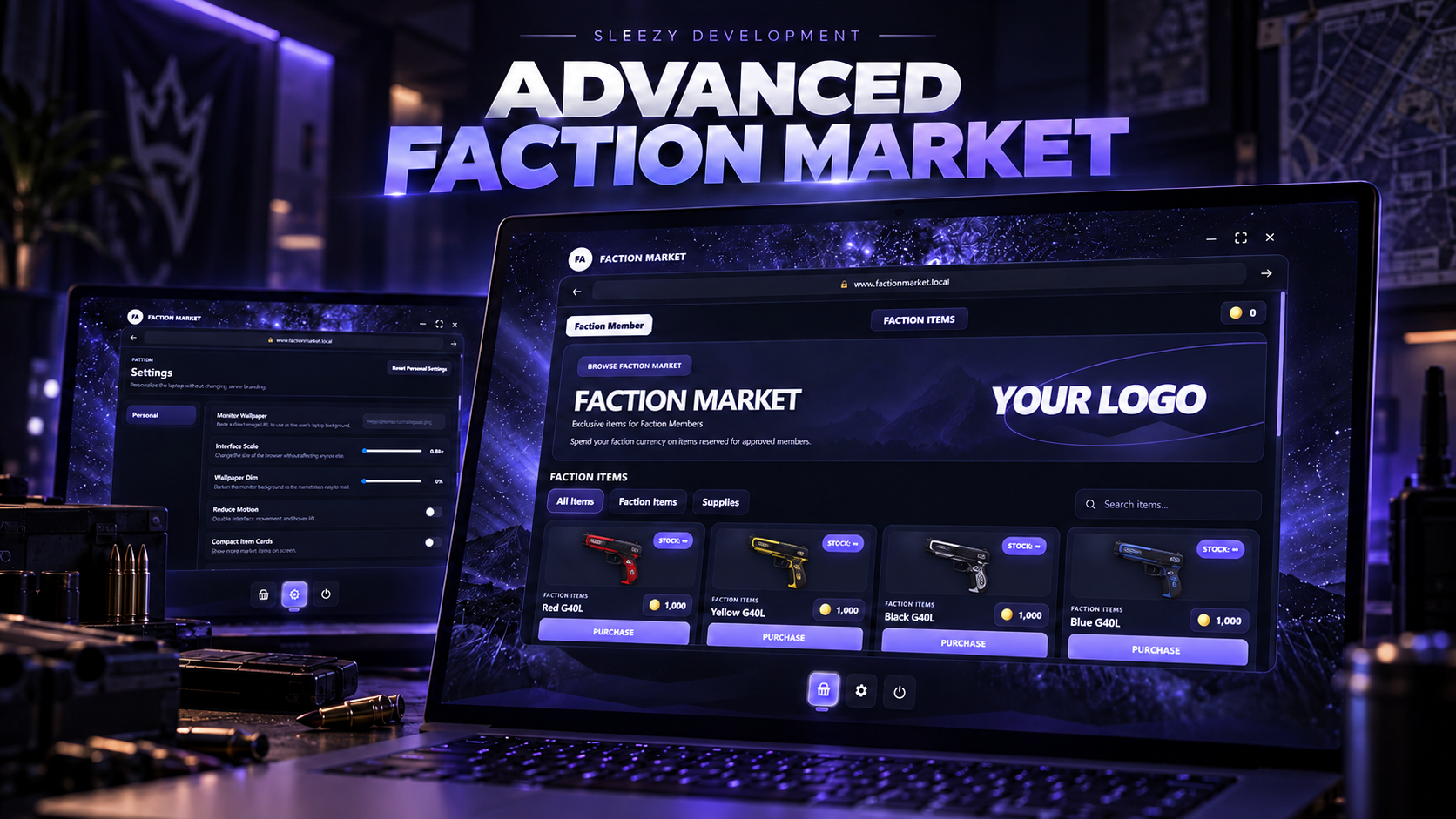
💜 Advanced Faction Market
Create a private, fully configurable marketplace for gangs, factions, organizations, jobs, crews or individually approved players.
Advanced Faction Market gives your server a polished laptop-style marketplace where authorized members can purchase exclusive weapons, supplies, equipment or completely custom items using faction coins, cash, bank money, black money or your own currency system.
Server owners have complete control over who can access the market, which items each faction can see, stock levels, prices, currencies, branding, opening methods and more, with an included in-game administration system for managing access and stock without constantly editing configuration files.
⚙️ Features
Premium laptop-style Faction Market UI
Gang-based market access
Job-based market access
Individual player access
Persistent player access grants
Temporary or permanent access grants
Player deny list
Minimum faction/job grade requirements
Per-item faction restrictions
Configurable market categories
Configurable market products
Configurable prices
Limited or unlimited stock
Persistent stock
In-game stock management
Purchase quantity limits
Item metadata support
Item image support
Item-based faction currency
Cash support
Bank support
ESX black money/account support
Per-item currency overrides
Custom currency integration
In-game admin panel
Access manager
Stock manager
Multiple opening methods
Laptop item support
Command support
World location support
Export support
Personal player wallpapers
Configurable UI scaling
Compact item cards
Reduced-motion option
Configurable wallpaper dimming
Extensive server branding
Automatic framework detection
Automatic inventory detection
Server-authoritative purchases
Inventory-full payment refunds
Persistent settings
No SQL database required for the core system
💻 Premium Laptop Market
The market is presented through a custom desktop/laptop-style interface instead of a basic shop menu.
When players open the system, they are presented with their configured desktop wallpaper and bottom application dock.
Players can then open the Faction Market, access their personal Settings, or power off the laptop.
The interface includes:
Desktop-style home screen
Market application
Settings application
Bottom application dock
Browser-style market window
Product categories
Product search
Product images
Product pricing
Currency images
Stock display
Quantity controls
Purchase controls
Fullscreen controls
Minimize controls
Configurable browser elements
The UI was designed to feel like an actual private faction marketplace rather than another standard FiveM menu.
🛒 Custom Faction Marketplace
Server owners can configure exactly what is available inside the market.
Every product can have its own:
Item
Display name
Description
Category
Price
Image
Stock amount
Maximum purchase quantity
Inventory metadata
Faction restrictions
Currency
This makes the system suitable for much more than weapons.
Markets can be created around:
Weapons
Armor
Ammunition
Gang supplies
Organization equipment
Crafting materials
Medical supplies
Custom server items
Exclusive faction equipment
Currency-based reward shops
The provided products are examples and can be completely replaced with your own server items.
👥 Advanced Faction Access
The market can be restricted to approved factions instead of being available to the entire server.
Access can be based on:
Gang
Job
Gang or job
Minimum grade
Direct player identifier
Persistent admin grant
Different access modes can also be configured depending on how your server handles factions.
For example, you can require players to belong to a configured faction, manually approve individual players, or allow either method.
🟣 QBOX / QBCore Gang Support
Native gang information can be used with supported QBOX and QBCore servers.
Faction configuration can include:
Gang name
Minimum gang grade
Custom faction label
This allows different ranks within the same gang to have different levels of access.
🔗 Optional qs-gangs Integration
The system can automatically use qs-gangs when the resource is running.
The gang provider can be configured as:
Auto
Framework
qs-gangs
Custom
This allows servers using an external gang system to integrate the Faction Market without replacing their existing setup.
🧑💼 ESX Faction Support
ESX servers can use jobs as faction groups.
This makes it possible to configure organizations such as:
Cartels
Mafias
Private organizations
Custom faction jobs
Minimum job grades can also be required.
Servers using a separate ESX gang system can connect it through the included custom integration hooks.
🔒 Per-Item Restrictions
Access does not have to stop at the market itself.
Individual products can also be restricted to specific configured groups.
This means one Faction Market can contain products for multiple factions while only showing authorized products to the correct players.
For example:
One gang can access its own weapon
Another faction can access different equipment
Higher-ranked members can receive exclusive products
General supplies can remain available to everyone with market access
Players only receive products they are actually authorized to purchase.
🪪 Persistent Player Access
Admins can grant individual players persistent Faction Market access directly through the included admin interface.
Access grants can be:
Permanent
Temporary
Given a custom faction/member label
Revoked at any time
Temporary grants automatically support expiration times.
Persistent grants are saved so they remain available after resource and server restarts.
🚫 Player Deny List
Specific player identifiers can also be explicitly denied access.
This provides an additional layer of control for servers that need to block certain players regardless of their normal faction membership.
🛡️ Admin Panel
Authorized administrators receive access to an Administration section directly inside the laptop Settings interface.
The admin panel includes tools for managing:
Online players
Current access
Persistent grants
Faction labels
Grant expiration
Market stock
Stock resets
Admin access can be controlled separately from normal Faction Market access.
📋 Access Manager
The built-in Access Manager allows admins to view online players and grant market access without manually editing configuration files.
Admins can:
View online players
View faction information
See whether a player currently has access
See whether access comes from a persistent grant
Grant persistent access
Set grant duration
Set a custom member label
Revoke persistent access
This makes managing private markets much easier for active RP servers.
📦 Live Stock Manager
The included Stock Manager allows administrators to manage product availability while the server is running.
Admins can:
View every configured market item
View current stock
Change stock
Set unlimited stock
Reset all stock to configured values
Changes can be saved persistently instead of disappearing after the resource restarts.
📊 Limited & Unlimited Stock
Each product can have its own stock configuration.
Server owners can choose between:
Limited stock
Unlimited stock
Limited stock automatically decreases after successful purchases.
Stock persistence can be enabled so remaining quantities survive resource and server restarts.
Out-of-stock items can either remain visible or be hidden depending on your configuration.
🔢 Quantity Controls
Products can support purchasing multiple items at once.
Each item can have its own maximum quantity per transaction while the entire market also has a configurable global purchase limit.
The interface automatically provides quantity controls for products that allow multiple purchases.
💰 Flexible Currency System
Advanced Faction Market supports multiple ways to pay.
Supported currency types include:
Inventory item currency
Cash
Bank
Framework money accounts
ESX accounts
ESX black money
Custom currency integrations
This means your faction market could use something like:
Faction Coins
Gang Tokens
Dirty Money
Cash
Bank balance
Reputation currency represented as an item
Completely custom currency
🪙 Faction Coin Support
The default configuration demonstrates an inventory-based Faction Coin currency.
Instead of charging normal money, players can earn faction currency elsewhere on your server and spend it exclusively inside the Faction Market.
The UI can automatically display the inventory image for the configured currency beside product prices.
💵 Per-Item Currency
Individual products can override the market's default currency.
This allows one market to contain different types of purchases.
For example:
Standard supplies using Faction Coins
Premium equipment using cash
Illegal products using black money
Special items using a custom token
All currency information is controlled server-side.
🖼️ Automatic Item Images
Product images can automatically use images from supported inventory systems.
Supported configurations include:
ox_inventory images
qb-inventory images
qs-inventory images
Local resource images
Custom image templates
Direct image URLs/paths
Each product can also be given its own exact image when needed.
🎨 Full Branding Control
The marketplace is designed so server owners can make it fit their own server instead of being locked to the default Sleezy Development presentation.
Configuration options include:
App name
Window title
Browser URL text
Header logo
Header text
Large hero logo
Hero title
Hero subtitle
Hero description
Market section title
Search placeholder
Purchase text
Stock text
Settings text
Admin text
Desktop wallpaper
Accent color
Secondary accent colors
Browser colors
Panel colors
Card colors
Text colors
Border colors
Success color
Error color
Laptop dimensions
Browser dimensions
Border radius
Product columns
Product spacing
Product image height
Dock configuration
The included configuration gives buyers control over the major visual parts of the system without having to modify the protected core code.
🌌 Personal Player Wallpapers
Players can optionally customize their own Faction Market desktop.
Personal settings can include:
Custom wallpaper URL
Interface scale
Wallpaper dim amount
Compact product cards
Reduced motion
These settings can be saved individually for each player.
Changing a personal wallpaper does not change the server's overall Faction Market branding.
📐 Adjustable UI Scale
Players can adjust the size of their laptop interface within server-configured limits.
Server owners control the minimum, maximum and default UI scale so players have customization without being able to completely break the layout.
⚡ Reduced Motion & Compact Mode
Accessibility and personal UI preferences include:
Reduced motion
Compact product cards
Wallpaper brightness/dimming controls
Server owners can individually enable or disable these settings.
🚪 Multiple Opening Methods
The Faction Market can be opened through several different methods.
Supported methods include:
Command
Usable laptop item
Configured world locations
Client export
Server export
Multiple opening methods can be enabled at the same time.
💻 Laptop Item
The market can require a usable faction_laptop item.
Server owners can configure whether:
The laptop item is enabled
Commands require the laptop
Opening the laptop consumes the item
Example item configurations are included for supported inventories.
⌨️ Command Support
Players can optionally open the market through a configurable command.
Default example:
/factionmarket
Command access can also be ACE restricted.
📍 World Locations
Server owners can create physical Faction Market access points around the map.
Location configuration includes:
Coordinates
Interaction distance
Draw distance
Interaction prompt
Marker
Marker type
Marker size
Marker color
Server-side distance validation is performed when a location is used.
🔌 Export Support
The Faction Market can also be opened from another resource using included exports.
This makes it possible to integrate the market into:
Custom phones
Gang menus
Tablets
NPC interactions
Territory systems
Missions
Other custom resources
🛡️ Server-Authoritative Purchases
Important purchase information is validated by the server.
The client does not decide its own:
Item
Price
Stock
Currency
Access permission
Quantity limit
Purchase total
The server validates market access again when a purchase is submitted.
🔐 Purchase Security
Purchase validation includes:
Faction market access
Per-item faction access
Purchase cooldowns
Quantity limits
Maximum configured price
Purchase total
Available stock
Inventory capacity
Currency balance
Payment
Item delivery
Additional request limits are also configurable.
💳 Automatic Payment Refunds
If payment succeeds but the purchased item cannot be added to the player's inventory, the resource includes a refund path.
Instead of simply taking the player's currency and failing delivery, the system attempts to return the payment when item delivery fails.
📦 Inventory Metadata
Configured products can include metadata passed into supported inventory systems.
This allows server owners to sell custom item variations while still using the same base inventory item.
This can be used for systems involving:
Weapon variations
Custom item information
Serialized equipment
Special faction item data
🔧 Framework Support
QBOX / qbx_core
QBCore / qb-core
ESX / es_extended
Standalone
Custom framework integration
Framework detection can be set to Auto.
📦 Inventory Support
ox_inventory
qs-inventory
QBCore inventory
ESX inventory
Standalone/custom inventory integration
Inventory detection can also be set to Auto.
🔔 Notification Support
Notification handling supports:
ox_lib
QBCore
ESX
Native FiveM notifications
Custom notification integration
💾 Persistent Storage
The core resource does not require an SQL database.
Persistent information is stored for:
Player access grants
Market stock
Player UI preferences
This allows important information to survive resource/server restarts without requiring an additional SQL migration.
🧩 Custom Integration Hooks
Editable custom integration files are included for servers running unsupported or heavily modified systems.
Custom hooks are available for:
Player identifiers
Jobs/groups
Gangs
Admin permissions
Money balances
Removing money
Refunding money
Inventory item counts
Inventory capacity
Adding items
Removing items
Notifications
This allows custom servers to integrate their existing systems while leaving the main Faction Market logic intact.
🎨 Configurable
Server owners can control major parts of the system through the configuration, including:
Framework
Inventory
Opening methods
Commands
Laptop item
Locations
Factions
Jobs
Gangs
Minimum grades
Player permissions
Persistent access
Denied players
Admin permissions
Currency
Market items
Categories
Prices
Stock
Purchase limits
Product metadata
Item images
Logos
Branding
UI colors
Desktop wallpaper
Laptop sizing
Product layout
Player settings
Security limits
Notifications
Persistence
📦 Included
Advanced Faction Market resource
Premium laptop-style marketplace
Desktop/home interface
Market application
Settings application
Administration panel
Access Manager
Stock Manager
Gang/job permission system
Persistent player grants
Temporary access support
Per-item faction restrictions
Persistent stock system
Multiple currency support
Faction Coin support
Item metadata support
Product search
Configurable categories
Inventory image integration
Personal wallpaper system
Player UI settings
Multiple opening methods
World location support
Laptop item support
Client/server exports
Framework integrations
Inventory integrations
Custom integration hooks
Security validation
Installation files
QBCore item examples
ox_inventory item examples
ESX item SQL example
Configuration documentation
✅ Requirements
FiveM
OneSync recommended
Your selected framework and inventory resources are required depending on the configuration you choose.
The core resource does not require an SQL database.
🔒 The resource is prepared for Cfx Asset Escrow, while buyer-facing configuration, custom integration files, installation files and persistent data files remain editable.
📥 The resource is delivered through the supported FiveM/Cfx asset delivery system after purchase.
Preview: (1) Sleezy Development - YouTube
