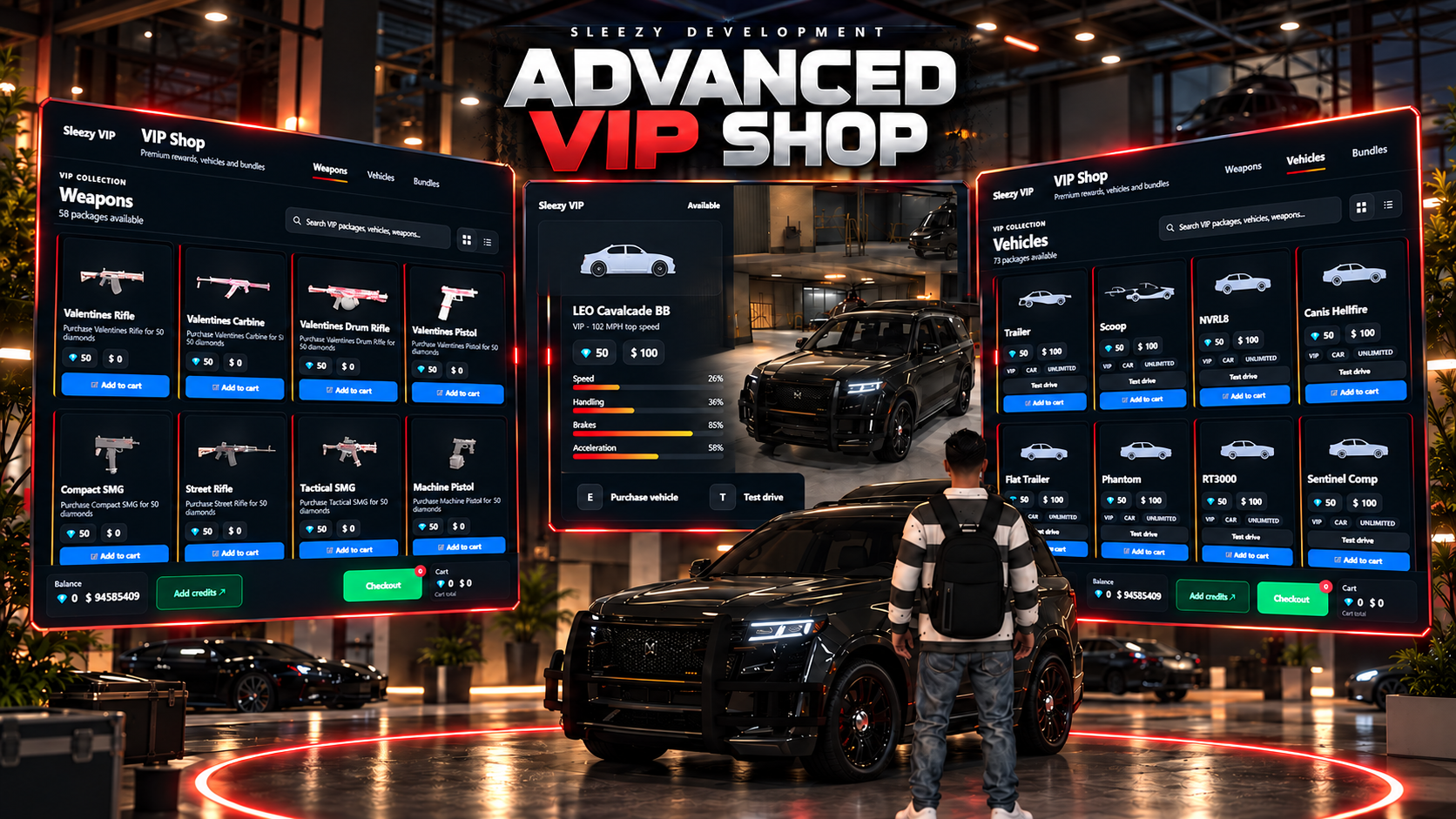
💜 Advanced VIP Shop
Give your FiveM server a complete premium/VIP marketplace connected directly to your Tebex store.
Advanced VIP Shop allows players to purchase VIP currency through Tebex, redeem their transaction in-game, and spend their balance on configurable vehicles, weapons, items, money rewards, bundles, character services and other premium packages through a polished in-game storefront.
The system includes a full shopping cart, VIP and in-game currency pricing, showroom vehicles, private test drives, automatic vehicle ownership, inventory image support, persistent VIP balances, transaction logging and extensive server-owner configuration.
⚙️ Features
Premium in-game VIP Shop
Direct Tebex purchase redemption
Persistent VIP currency balances
Custom VIP currency name and icon
VIP currency + in-game money pricing
VIP-only pricing support
Full shopping cart
Checkout system
Product categories
Product search
Grid and list layouts
Product descriptions
Product images
Sale pricing
Limited stock support
New-item labels
Configurable package quantities
Weapons
Items
Money rewards
Vehicles
Bundles
Mystery rewards
Custom license plates
Character name changes
Custom reward handlers
Vehicle showroom
Randomized showroom vehicles
Vehicle information HUD
Vehicle performance statistics
Private vehicle test drives
Automatic vehicle ownership
Optional instant vehicle delivery
Vehicle key integrations
Inventory image integration
Configurable shop locations
IPL and MLO support
Vehicle-compatible teleporting
Configurable world interactions
Extensive UI customization
Automatic framework detection
Automatic inventory detection
SQL-backed persistence
Automatic SQL installation
Legacy database migration
Administrative VIP balance commands
Purchase logging
Cfx Asset Escrow ready
🛒 Premium Storefront
Players access a modern VIP storefront with a complete shopping experience rather than a basic menu.
The interface includes:
Product categories
Search
Product cards
Product artwork
Descriptions
Current pricing
Sale pricing
Available stock
New-product indicators
Add to Cart
Shopping cart totals
Checkout page
VIP currency balance
Bank balance
Grid view
List view
Players can add multiple packages to their cart, review the complete order and purchase everything through the included checkout system.
💎 VIP Currency System
Create your own premium server currency.
Server owners can configure:
VIP currency name
VIP currency icon
VIP package values
Package prices
Player balances
For example, your server could use:
VIP Coins
Gems
Credits
Tokens
Points
Completely custom branding
VIP balances are stored persistently in the database.
🛍️ Tebex Integration
The system includes a complete Tebex redemption flow.
Server owners create currency packages through Tebex and connect them to the included purchase command.
After purchasing, players can redeem their transaction in-game using:
/redeem transaction_id
The system records the Tebex transaction and adds the configured amount of VIP currency to the correct player's balance.
Configurable Tebex packages can include different amounts such as:
Small VIP currency packs
Medium VIP currency packs
Large VIP currency packs
Promotional packages
Custom package amounts
Product-name matching and transaction handling are built into the resource.
💳 Mixed Currency Pricing
Products can require:
VIP currency only
In-game money only
VIP currency + in-game money
Server owners can decide whether the additional in-game price is enabled.
Supported account handling includes framework accounts such as:
Cash
Bank
Crypto where supported
ESX money accounts
ESX black money
This makes it possible to balance premium rewards without making every package rely entirely on Tebex currency.
🔫 Weapon & Item Rewards
Create premium packages containing configurable weapons or inventory items.
Reward configuration supports:
Item name
Display label
Amount
Metadata
Ammunition items
Multiple rewards inside a package
Modern inventory-based weapon systems are supported through the included framework/inventory bridges.
Inventory artwork can also be pulled automatically so server owners do not have to manually recreate every item image.
🎁 Bundle Packages
Create packages containing multiple rewards.
Bundles can combine:
Money
Items
Weapons
Other configured rewards
This makes it possible to create full VIP starter packs, faction packs, supporter packages or promotional bundles.
🎲 Mystery Rewards
The reward engine also supports mystery-style packages.
Mystery packages can randomly deliver configured rewards such as:
Money
Items
Weapons
This allows servers to create randomized VIP reward packages using the same shop system.
🚗 Advanced VIP Vehicle Shop
Premium vehicles can be sold directly through the VIP Shop.
Each vehicle can have:
Vehicle model
Display name
Brand
Description
Garage type
VIP price
In-game money price
Sale pricing
Stock
Product image
Custom test-drive model
Vehicles configured for the showroom can automatically appear inside the main VIP Shop vehicle category.
🏎️ Physical Vehicle Showroom
VIP vehicles can also appear physically inside the configured showroom.
The showroom supports:
Multiple display vehicles
Automatic vehicle placement
Manual vehicle placement
Randomized display vehicles
Configurable amount of displayed vehicles
Automatic vehicle rotation
Instead of only looking at an image in the menu, players can walk around the showroom and inspect available vehicles.
📊 Vehicle Information HUD
Approaching a showroom vehicle can display a dedicated vehicle information interface.
Information includes:
Vehicle name
Vehicle brand
Description
VIP price
In-game price
Stock
Sale status
Vehicle image
Performance information can also be displayed for:
Speed
Handling
Braking
Acceleration
Players can purchase or test drive the vehicle directly from the showroom.
🧪 Private Test Drives
Players can test VIP vehicles before purchasing them.
Test drives can use their own private routing bucket, separating the player from normal server traffic and other players during the test.
The system can automatically:
Close the VIP Shop UI
Save the player's original position
Move them to the test-drive area
Spawn the selected vehicle
Put the player inside
Give temporary vehicle keys
Disable ambient population
Return the player after the test
Test drives can automatically end when:
The timer expires
The player leaves the vehicle
The vehicle disappears
The player dies
The player travels outside the allowed area
The player is then returned to their original location.
⏱️ Configurable Test Drives
Server owners can configure:
Test-drive duration
Spawn location
Return location
Maximum driving distance
Routing bucket
Population
Vehicle networking
Vehicle model loading timeout
Seat-entry grace period
Exit detection delay
Exit confirmation
Automatic reseating
Windscreen ejection protection
Vehicle-jacking protection
These options are especially useful for servers running custom vehicle packs or third-party vehicle key systems.
🚘 Automatic Vehicle Ownership
When a vehicle is successfully purchased, the system can automatically save it as an owned vehicle.
Supported framework handling includes the standard vehicle ownership structures used by:
QBOX
QBCore
ESX
Server owners can configure:
Vehicle garage
Stored state
Vehicle condition
Fuel level
Vehicle modifications
Plate format
Custom vehicle database systems can also be integrated through the provided framework bridge.
🚗 Instant Vehicle Delivery
Purchased vehicles can optionally be spawned immediately after purchase.
Configuration options include:
Spawn after purchase
Delivery coordinates
Put player inside
Give vehicle keys
Alternatively, the server can disable instant spawning and have vehicles delivered directly to garage storage.
🔑 Vehicle Key Support
The resource includes configurable support for multiple key systems.
Supported options include:
qbx_vehiclekeys
qb-vehiclekeys
qs-vehiclekeys
Renewed-Vehiclekeys
wasabi_carlock
t1ger_keys
Custom integrations
Additional client/server events and exports can also be configured for private key systems.
🚪 VIP Showroom Entrance
The resource supports both:
IPL interiors
MLO interiors
Server owners can configure multiple interaction locations for:
Entering the VIP Shop
Leaving the VIP Shop
Opening the store menu
Coordinates, draw distance, interaction distance and prompts are configurable.
🚙 Drive Into the VIP Shop
Players can optionally enter the VIP Shop interior while driving a vehicle.
The system can teleport the player's vehicle with them instead of leaving it outside.
Configuration includes:
Vehicle teleporting
Driver-only restrictions
Vehicle destination coordinates
Area clearing
Entity-control timeout
This can be disabled if the server prefers an on-foot-only VIP showroom.
📍 Map Blip
The VIP Shop can have its own configurable map blip.
Options include:
Blip location
Sprite
Color
Scale
Display type
Short-range behavior
Map name
🎯 Interaction System
World interaction prompts are highly configurable.
Supported interaction styles include:
Custom NUI prompt
3D text
ox_lib text UI
QBCore-style prompts
Native help text
Disabled prompts
The included NUI prompt provides a clean bottom-screen interaction rather than large default chat-style messages.
🎨 Full UI Customization
The VIP Shop includes extensive buyer-editable branding options.
Server owners can change:
Shop title
Shop subtitle
Brand
Text logo
Logo URL
Primary accent
Secondary accent
Background
Header
Footer
Panels
Product cards
Hover colors
Input colors
Borders
Text
Muted text
Success color
Error color
Scrollbar
Shadows
UI opacity
You can completely change the shop's appearance without rebuilding the NUI.
📐 Layout Configuration
The layout can also be customized.
Options include:
Window width
Window height
Maximum width
Border radius
Header height
Footer height
Content padding
Background blur
Window opacity
Grid columns
Product spacing
Image sizes
Weapon image sizes
Vehicle image sizes
Item image sizes
Default grid/list view
View-toggle visibility
Package-count visibility
Description visibility
Stock visibility
This makes it much easier to match the shop to your server's existing branding.
📝 Editable UI Text
Major UI wording can be changed directly through configuration.
This includes text such as:
Add to Cart
Test Drive
Checkout
Purchase
Back to Shop
Add Credits
Search text
Empty-cart messages
Terms text
Balance
Cart
Vehicle purchase prompts
Server owners do not have to edit the HTML to rename common interface elements.
🖼️ Automatic Inventory Images
The VIP Shop can automatically pull artwork from supported inventory resources.
Built-in paths include:
ox_inventory
qb-inventory
lj-inventory
ps-inventory
qs-inventory
core_inventory
codem-inventory
Custom image paths can also be added.
The system can automatically try multiple filename formats and file extensions before falling back to local artwork.
This is especially useful for large custom weapon and item collections.
🔥 Sale System
Individual packages and vehicles can have their own sale pricing.
Server owners can configure:
Normal VIP price
Normal in-game price
Sale VIP price
Sale in-game price
When enabled, the shop automatically displays the active sale price and original pricing.
📦 Stock Support
Vehicles and configurable packages can display stock information.
Server owners can use stock values to represent limited-availability VIP rewards or leave products unrestricted depending on their setup.
👤 Character Services
The purchase engine includes support for character-related rewards such as:
Custom license plate changes
Character name changes
Packages that require player input can display an input field directly in the product/cart flow.
Blacklisted words can also be configured for supported text-based purchases.
💵 Money Rewards
VIP packages can directly reward configured framework money accounts.
This can be used for server setups that want purchasable:
Cash packages
Bank packages
Other supported framework accounts
Money rewards are processed through the server-side framework bridge.
🧩 Custom Reward Support
Server owners using more specialized systems can create custom reward handlers.
Custom hooks are available for:
Money
Items
Weapons
Vehicles
Plates
Names
Custom rewards
This allows the shop to integrate with systems outside the default reward types.
🛡️ Server-Side Purchase Handling
Purchases are processed server-side.
The server handles:
Package validation
Quantity validation
VIP balance
Bank balance
Payment removal
Reward delivery
Vehicle ownership
Transaction logging
Players do not determine their own package rewards or purchase price from the NUI.
📜 Purchase Logging
Completed purchases are stored in the database.
Purchase information can include:
Player identifier
Player name
Package
Purchase type
Quantity
Entered input
VIP cost
In-game money cost
Delivered rewards
Purchase date
This provides server owners with a record of VIP Shop activity.
🗄️ Persistent Tebex Data
The resource stores:
VIP balances
Pending Tebex transactions
Redeemed transactions
Purchase logs
This prevents VIP balances from disappearing after reconnects or server restarts.
🔄 Automatic Legacy Migration
Servers upgrading from an older version can enable automatic migration.
Existing:
VIP balances
Pending Tebex purchases
Redemption data
Purchase logs
can be copied into the new sleezy_vipshop database structure.
This helps existing stores update without manually rebuilding customer balances.
👮 Admin Commands
Authorized server staff can manage VIP balances using included commands.
Commands include:
/addvip
/removevip
/checkvip
Admin groups are configurable.
⌨️ Player Commands
The default player commands include:
/vipshop
Open the VIP Shop.
/redeem transaction_id
Redeem an eligible Tebex purchase.
Command names can be changed in configuration.
🔌 Developer Exports
Server-side exports are included for integrations with other resources.
Available functionality includes:
Get player VIP balance
Add VIP balance
Remove VIP balance
Check whether a player can afford a VIP purchase
This allows other scripts to use the same VIP economy.
🔧 Framework Support
QBOX / qbx_core
QBCore / qb-core
ESX / es_extended
Standalone
Custom integration
Framework detection can be set to Auto.
📦 Inventory Support
ox_inventory
QBCore inventory
ESX inventory
Custom inventory integration
The resource can automatically detect supported inventory setups.
🔔 Notification Support
Notification options include:
ox_lib
QBCore
ESX
Native GTA notifications
Chat
Custom notification event
Disabled notifications
Purchase notifications can also use clean in-shop NUI messages to avoid duplicate notifications.
💾 Database
Advanced VIP Shop uses oxmysql for persistent VIP and Tebex information.
The included database tables can be created automatically when the resource starts.
A manual SQL installation file is also included.
🎨 Configurable
Server owners can control major parts of the system through config.lua, including:
Framework
Inventory
VIP currency
VIP icon
Bank pricing
Payment account
Tebex packages
Commands
Admin permissions
UI branding
Logos
Colors
Layout
Opacity
Product images
Product categories
Weapons
Items
Rewards
Bundles
Vehicles
Vehicle prices
Vehicle sales
Vehicle showroom
Vehicle placement
Test drives
Vehicle keys
Vehicle delivery
Garage settings
Vehicle properties
Shop locations
Interior type
Teleports
Interaction prompts
Map blips
Notifications
Inventory images
Name restrictions
Database migration
Custom reward hooks
📦 Included
Advanced VIP Shop resource
Premium VIP storefront
Shopping cart
Checkout system
Tebex redemption system
Persistent VIP currency
Mixed currency pricing
Product category system
Product search
Weapon reward support
Item reward support
Money reward support
Vehicle reward support
Bundle reward support
Mystery reward support
License plate reward support
Character name reward support
Custom reward handlers
Vehicle showroom
Randomized showroom rotation
Vehicle information HUD
Vehicle performance display
Private test-drive system
Vehicle ownership integration
Vehicle delivery system
Vehicle key integrations
Inventory image integration
IPL/MLO configuration
Vehicle-compatible teleporting
Map blip
Configurable interaction prompts
SQL persistence
Automatic database setup
Legacy data migration
Admin VIP commands
Developer exports
Framework integrations
Inventory integrations
Installation documentation
Tebex setup documentation
Configuration guide
✅ Requirements
FiveM
OneSync recommended
oxmysql
Your selected framework, inventory, vehicle key and garage resources are required depending on the integrations you choose to use.
Custom vehicles, weapons and items shown in your own configuration must already exist on your server.
🔒 The resource is prepared for Cfx Asset Escrow, while buyer-facing configuration, locales, SQL and documentation remain editable.
📥 The resource is delivered through the supported FiveM/Cfx asset delivery system after purchase.
Script Preview: (1) Sleezy Development - YouTube
Discord Support: Discord
