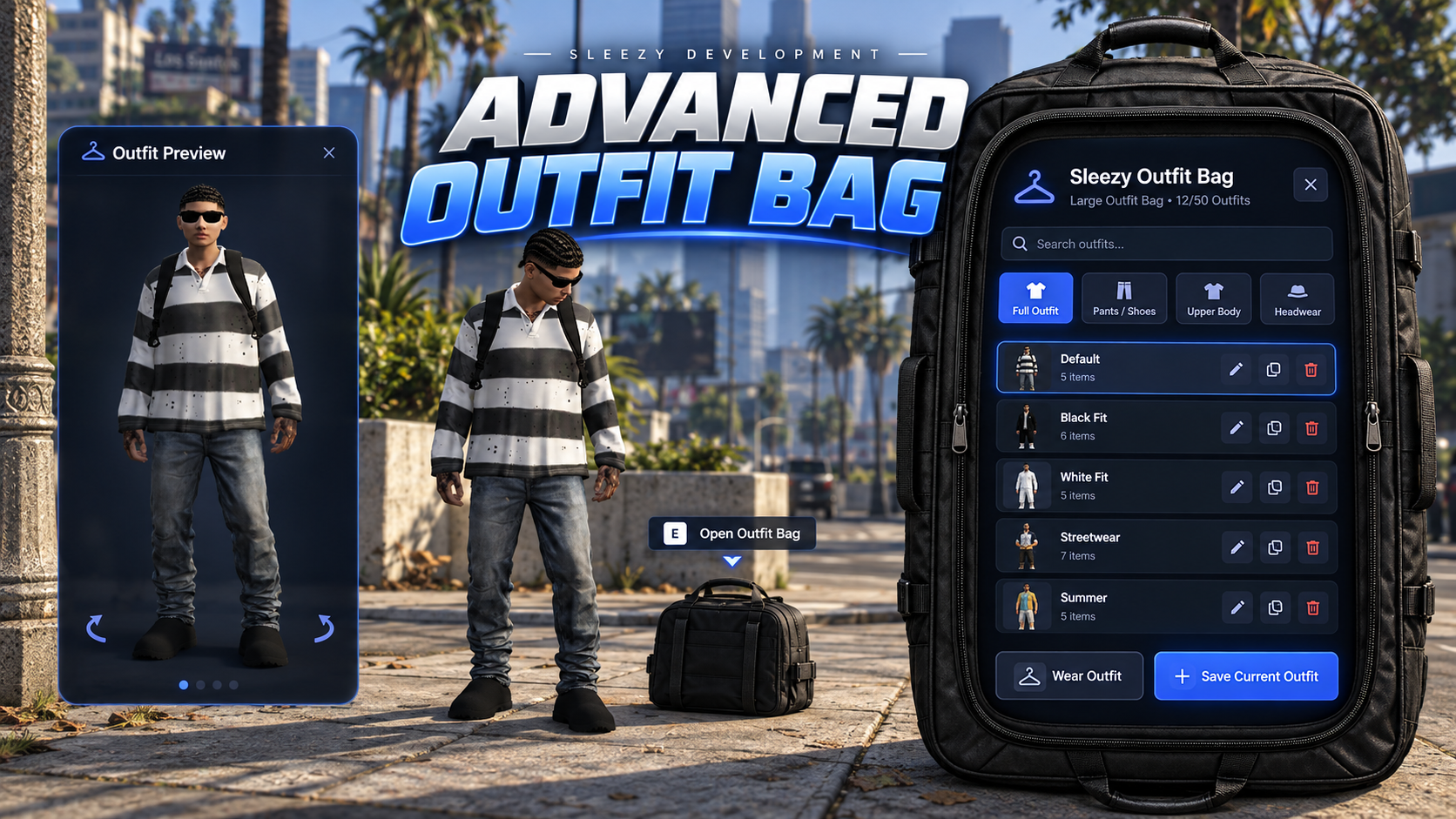
💜 Advanced Outfit Bag
Give players a portable wardrobe they can physically place anywhere in the world, store their favorite outfits inside, preview clothing on their character, mix different parts of saved outfits, share supported bags with other players, and pick the same bag back up without losing its contents.
Advanced Outfit Bag is designed to turn outfit storage into an actual roleplay system instead of another wardrobe command or static clothing menu.
Players can carry different-sized outfit bags, position them precisely in the world, open the bag through target or interaction prompts, save their current clothing, preview outfits before wearing them, combine clothing groups from multiple saved looks and keep their outfits stored persistently across server restarts.
⚙️ Features
Physical placeable outfit bags
Portable wardrobe system
Multiple configurable bag types
Small and large outfit bags included
Different outfit capacities per bag
Persistent saved outfits
Persistent physical bag placement
No SQL required
Unique bag metadata support
Searchable saved outfits
Character outfit preview
Live clothing preview before wearing
Rotate preview character left/right
Reset preview
Full outfit selection
Upper-body outfit selection
Pants/shoes selection
Headwear selection
Mix clothing from multiple saved outfits
Save current outfit
Custom outfit names
Delete saved outfits
Shared/private bags
Owner-controlled sharing
Owner-only portable bag pickup
Static wardrobe support
Job-restricted wardrobes
Grade-restricted wardrobes
Duty restrictions
ACE permission support
Separate static wardrobe management permissions
Precision bag placement
Rotation controls
Distance adjustment
Vertical placement adjustment
Configurable bag props
Configurable placement controls
ox_target support
qb-target support
qtarget support
Built-in E interaction fallback
Native GTA clothing support
Optional appearance persistence integrations
Framework auto-detection
Inventory auto-detection
Configurable UI branding
Configurable colors
Configurable logos
Configurable labels
Configurable layout
Server-side ownership validation
Server-side distance validation
Server-side slot validation
Server-side outfit validation
Inventory validation
Asset Escrow ready
🎒 Physical Outfit Bags
Players can carry an actual outfit bag in their inventory and place it into the world when they want access to their wardrobe.
Instead of opening a wardrobe anywhere through a command, the player places the physical bag before using it.
Once placed, the bag can store saved outfits until the owner picks it back up.
The included default bags are:
Large Outfit Bag – 10 outfit slots
Small Outfit Bag – 5 outfit slots
Bag types are configurable, so server owners can create additional bags with different:
Names
Descriptions
Prop models
Outfit capacities
Sharing permissions
Default sharing behavior
🎯 Precision Placement System
Players have full control while positioning their outfit bag.
Default placement controls allow players to:
Move the bag farther away
Move the bag closer
Rotate left
Rotate right
Raise the bag
Lower the bag
Confirm placement
Cancel placement
The system uses a transparent placement preview so players can see exactly where the bag will be placed before confirming.
Server owners can configure:
Placement distance
Minimum distance
Maximum distance
Distance adjustment speed
Rotation speed
Vertical adjustment speed
Maximum height adjustment
Minimum height adjustment
Ghost transparency
Collision behavior
Placement controls
👕 Save Your Current Outfit
Players can save the clothing they are currently wearing directly into the bag.
When saving an outfit, the player can give it a custom name so their wardrobe stays organized.
For example:
Everyday
Business
Streetwear
Gang Fit
Club Outfit
Work Uniform
Formal
Beach Outfit
Server owners can configure outfit-name length and outfit-saving behavior.
🔎 Searchable Wardrobe
Saved outfits are displayed through the included Outfit Bag interface.
Players can quickly search their saved looks instead of scrolling through a large collection manually.
Each bag also has its own configurable outfit capacity, preventing unlimited storage unless the server owner intentionally configures it that way.
🧍 Character Outfit Preview
Advanced Outfit Bag includes a dedicated character preview system.
When the bag is opened, players can see a local preview of their own character and inspect an outfit before actually applying it.
Preview controls include:
Select outfit
Rotate left
Rotate right
Reset preview
Wear selected look
The preview uses a cloned version of the player's character so testing clothing does not immediately alter the real player.
This gives players the ability to build and inspect a look before committing to it.
👖 Mix & Match Saved Outfits
Players are not limited to wearing an entire saved outfit exactly as it was originally stored.
Advanced Outfit Bag supports separate clothing groups.
Available groups include:
Full Outfit
Pants / Shoes
Upper Body
Headwear
Players can select clothing groups from different saved outfits and combine them into a new look inside the preview.
For example, a player could use:
Upper body from Outfit A
Pants and shoes from Outfit B
Headwear from Outfit C
The final combined outfit can then be previewed before being worn.
✨ Preserves Character Appearance
The outfit system is designed specifically around clothing components and props.
Changing outfits does not intentionally replace the player's:
Face
Hair
Tattoos
Ped model
This helps prevent wardrobe changes from unexpectedly replacing important character appearance data.
The system also validates ped models to prevent incompatible clothing indexes from being applied between unsupported character models.
🔄 Reset Preview
Players can experiment with different clothing combinations without permanently changing their current character.
Using Reset Preview restores the preview back to the player's current appearance.
Closing the Outfit Bag without wearing the previewed clothing also leaves the player's real clothing unchanged.
🔐 Private Outfit Bags
Portable outfit bags are owned by the player who placed them.
Private bags prevent other players from accessing the stored wardrobe.
Ownership is validated server-side rather than relying only on the client.
🤝 Shared Outfit Bags
Supported bag types can be switched between:
Private
Shared
When a bag is shared, other players can access its stored wardrobe.
This can be useful for:
Gang outfits
Crew clothing
Event wardrobes
Organization uniforms
Group roleplay
Shared fashion collections
Sharing support can be enabled or disabled individually for each bag type.
The owner remains responsible for management actions such as picking up the portable bag.
🏢 Static Wardrobes
Advanced Outfit Bag can also create permanent wardrobes around the map.
Static wardrobes do not require an inventory item and cannot be picked up.
Server owners can configure static wardrobes for locations such as:
Police stations
Hospitals
Fire departments
Gang hideouts
Businesses
Faction headquarters
Government buildings
Staff rooms
Public changing rooms
Each static wardrobe can have its own:
Location
Heading
Outfit capacity
Access permissions
Management permissions
👮 Job & Grade Restrictions
Static wardrobes can be restricted to specific jobs.
Configuration supports:
Job name
Minimum job grade
Optional duty requirement
For example, a police wardrobe could allow every police officer to wear saved uniforms while only higher-ranked officers can modify the wardrobe.
🛡️ Separate Management Permissions
Viewing/wearing outfits and managing the wardrobe can have completely separate permissions.
For example:
Regular Officers
Open wardrobe
Preview uniforms
Wear uniforms
Supervisors
Open wardrobe
Preview uniforms
Wear uniforms
Add new uniforms
Delete uniforms
This prevents every authorized player from being able to modify shared server wardrobes.
🔑 ACE Permission Support
Static wardrobes can also use ACE permissions instead of framework jobs.
This is useful for:
Staff wardrobes
VIP areas
Event teams
Standalone servers
Custom permission systems
Public static wardrobes are also supported.
🎯 Target Support
Advanced Outfit Bag supports:
ox_target
qb-target
qtarget
Target detection can be set to Auto.
When no supported target system is available, the resource includes a built-in interaction fallback.
⌨️ E-Key Interaction
Servers that do not want to use a target resource can use the included interaction prompt.
Players simply approach the outfit bag and press the configured key to open it.
The interaction key, distance, prompt text and prompt position are configurable.
📦 Inventory Support
Supported inventory integrations include:
ox_inventory
qb-inventory
qs-inventory
codem-inventory
origen_inventory
tgiann-inventory
Framework inventory fallback
Standalone fallback
Inventory detection can be set to Auto.
📋 Unique Bag Metadata
Where supported by the inventory, outfit bags can preserve their own unique metadata.
This means the same physical bag can be:
while retaining its saved wardrobe.
Fallback persistence is also included for older inventory systems that do not provide the same metadata functionality.
💾 Persistent Storage
Outfit Bag data is stored persistently using the included datastore.
Persistent information can include:
Bag ownership
Saved outfits
Bag type
Shared/private state
Physical placement
Bag location
Bag heading
Static wardrobe outfits
Saved information can survive resource and server restarts.
🗄️ No SQL Required
The core Outfit Bag system does not require an SQL database.
Persistent bag and outfit information is stored through the included JSON datastore.
This keeps installation simple and avoids requiring another database table just for the wardrobe system.
🧥 Native Clothing Support
The core outfit system captures and applies GTA clothing components directly.
This means players can save and wear outfits even if the server does not use a supported appearance resource.
The wardrobe itself is not dependent on a specific clothing script.
Supported clothing data includes components such as:
Masks
Arms
Pants
Bags
Shoes
Chains
Undershirts
Armor/vest clothing
Decals
Tops
Supported props include:
Hats
Glasses
Ear accessories
Watches
Bracelets
💾 Appearance Persistence
For servers that want the selected clothing to persist through character relogs, integrations are included for supported appearance systems.
Supported options include:
illenium-appearance
fivem-appearance
esx_skin / skinchanger
Native clothing
Custom integration
Because different fivem-appearance forks use different save events, the correct persistence event can be configured for the version installed on your server.
A custom persistence hook is also available for unsupported appearance systems.
🎨 Premium Outfit Bag UI
The included interface is designed around an actual open outfit bag rather than a generic rectangular menu.
The right side contains the wardrobe controls inside the bag presentation while the left side is dedicated to the player outfit preview.
The UI includes:
Outfit cards
Outfit search
Character preview
Clothing group selection
Save-outfit dialog
Delete confirmation
Sharing controls
Pickup controls
Slot information
Owner information
Status indicators
Progress states
Notifications
🎨 Full Branding Control
Server owners can customize the Outfit Bag directly through config.lua.
Branding options include:
Resource display name
Subtitle
Logo text
Remote logo URL
Local logo file
Footer branding
This allows servers to replace the default presentation with their own branding.
🌈 Configurable Colors
Major UI colors are configurable, including:
Accent color
Secondary accent
Background
Panels
Cards
Card hover
Borders
Main text
Secondary text
Success
Warning
Danger
Interaction prompt
📐 Configurable Layout
UI layout options include:
Bag interface width
Maximum height
Border radius
Opacity
Card columns
Compact mode
Footer visibility
Bag positioning
Preview positioning
Preview width
Preview height
Bag artwork
Bag artwork visibility
This gives buyers control over both branding and positioning without needing to rebuild the interface.
📝 Configurable UI Text
Major interface labels can also be changed through the configuration.
This includes text for:
Store Current Outfit
Share Bag
Make Private
Pick Up Bag
Wear Outfit
Delete Outfit
Preview
Reset Preview
Rotate Left
Rotate Right
Search
Save Outfit
Empty wardrobe messages
Owner
Shared
Private
Slots
🔔 Notification Support
Notification handling can automatically use supported frameworks or the included native fallback.
Supported options include:
QBOX
QBCore
ESX
Native notifications
Notification duration and positioning are configurable.
🛡️ Server-Side Validation
Important Outfit Bag actions are revalidated by the server.
Validation includes:
Bag ownership
Bag access
Player distance
Placement distance
Outfit slot capacity
Outfit payload size
Ped compatibility
Save permissions
Delete permissions
Sharing permissions
Pickup permissions
Inventory removal
Inventory return
Interaction cooldowns
The client does not get final authority over ownership or stored wardrobe permissions.
📏 Server Distance Validation
The system verifies that players are actually near the bag before completing protected interactions.
This helps prevent clients from remotely triggering wardrobe actions against bags they are not physically using.
🚘 Vehicle Rules
Server owners can configure behavior involving vehicles.
Options include:
Prevent placing bags while inside a vehicle
Allow or prevent opening bags from vehicles
This can be adjusted depending on the style of roleplay server.
⏱️ Optional Automatic Despawn
Portable bags can optionally be configured to automatically despawn after a specified period.
When supported conditions are met, the system can return the bag to its owner rather than leaving abandoned props around the map indefinitely.
This option is disabled by default.
🧹 Entity Cleanup
The resource handles bag and preview cleanup during situations such as:
Closing the UI
Bag pickup
Bag removal
Resource restart
Invalid access
Player moving out of range
Player death
Preview refresh
This prevents wardrobe props and preview entities from being unnecessarily left behind.
👑 Admin Outfit Bag Command
An optional administrator command is included for giving outfit bags to players.
Default example:
/giveoutfitbag [server id] [item]
Access is protected using a configurable ACE permission.
🖥️ Standalone Support
Servers that do not use QBOX, QBCore or ESX can still use the resource through the standalone fallback.
A standalone placement command is included for development or custom setups.
Custom integrations can then be added around the resource as needed.
🔧 Framework Support
QBOX / qbx_core
QBCore / qb-core
ESX / es_extended
Standalone
Framework detection can be set to Auto.
🎯 Interaction Support
ox_target
qb-target
qtarget
Built-in E-key interaction
📦 Included
Advanced Outfit Bag resource
Physical placeable outfit bags
Small Outfit Bag
Large Outfit Bag
Precision placement system
Persistent wardrobe storage
Persistent physical bags
Character outfit preview
Preview rotation controls
Preview reset
Full outfit system
Pants/shoes outfit group
Upper-body outfit group
Headwear outfit group
Mixed outfit creation
Outfit search
Outfit naming
Shared/private bags
Static wardrobes
Job/grade restrictions
ACE restrictions
Separate wardrobe management permissions
Target integrations
E-key fallback
Native clothing support
Appearance persistence integrations
Framework integrations
Inventory integrations
Configurable branding
Configurable UI colors
Configurable layouts
Configurable labels
Server-side validation
JSON persistence
Bag item installation files
QBCore item examples
ox_inventory item examples
ESX item SQL example
Installation documentation
Configuration documentation
✅ Requirements
Your selected framework, inventory, target and appearance resources are only required depending on the integrations you choose to use.
The core outfit storage system does not require a third-party appearance resource or SQL database.
For best server-side entity/distance handling, a modern OneSync-enabled FiveM server is recommended.
🔒 The resource is prepared for Cfx Asset Escrow, while buyer-facing config.lua, locales, persistence data, installation files and documentation remain editable.
📥 The resource is delivered through the supported FiveM/Cfx asset delivery system after purchase.
Script Preview: (1) Sleezy Development - YouTube
Discord Support: Discord
