Sleezy Development • Advanced Chop Shop System (ESX, QBCore, QBOX & Standalone)
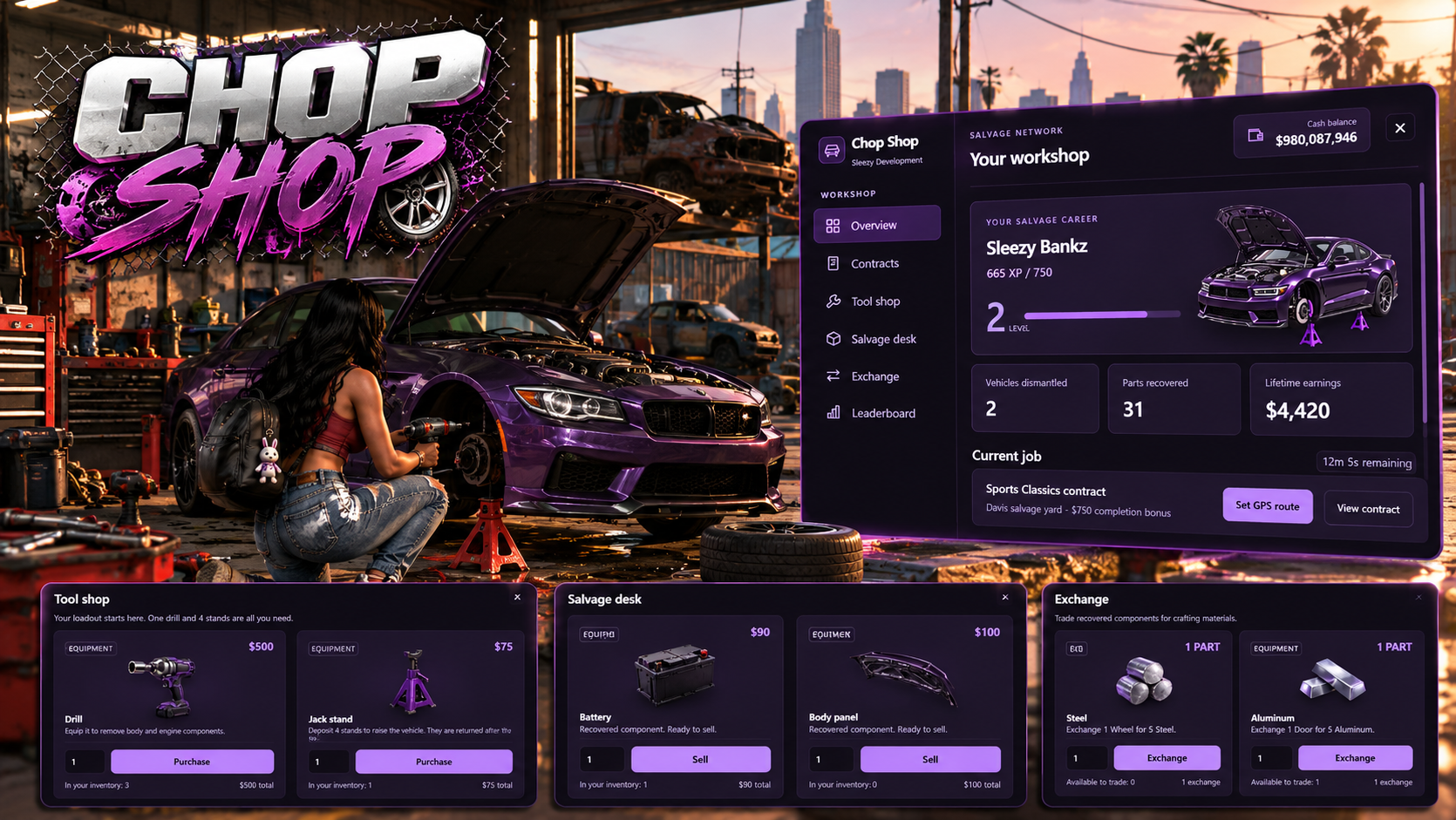
Bring interactive vehicle dismantling, salvage contracts, workshop activities, and career progression to your FiveM server with the Sleezy Development Advanced Chop Shop System.
Designed for immersive roleplay communities, this system allows players to accept vehicle salvage contracts, locate eligible vehicles, transport them to configured chop yards, and dismantle individual components through interactive minigames.
Players can purchase workshop equipment, install jack stands, operate a handheld drill, remove vehicle components, collect valuable salvage materials, and exchange recovered parts for additional resources or in-game cash.
The system also includes cooperative dismantling, timed contracts, multiple contract tiers, character progression, leaderboards, GPS guidance, persistent rewards, and a dedicated in-game administrator panel.
Built with a custom workshop interface, detailed item artwork, configurable locations, multi-framework compatibility, and server-side validation.
⚙️ Features
- Advanced interactive chop shop system
- Vehicle salvage contracts
- Multiple contract difficulty tiers
- Configurable vehicle classes
- Timed contract completion bonuses
- Contact NPCs with interaction support
- Configurable chop yard locations
- Automatic GPS route guidance
- On-screen contract guidance
- Interactive vehicle dismantling
- Physical jack stand installation
- Vehicle lifting mechanics
- Equippable handheld drill
- Drill animations and sound effects
- Four interactive minigame types
- Individual vehicle component removal
- Dedicated engine dismantling interface
- Cooperative vehicle dismantling
- Shared vehicle progress
- Individual salvage rewards
- Configurable drill durability
- Recoverable workshop equipment
- Salvage material collection
- Salvage part selling
- Material exchange system
- Configurable tool shop
- Career levels and XP progression
- Unlockable contract tiers
- Player leaderboards
- Persistent character progression
- In-game administrator dashboard
- Live gameplay configuration
- Customizable UI and branding
- Framework and inventory integration
- Server-side gameplay validation
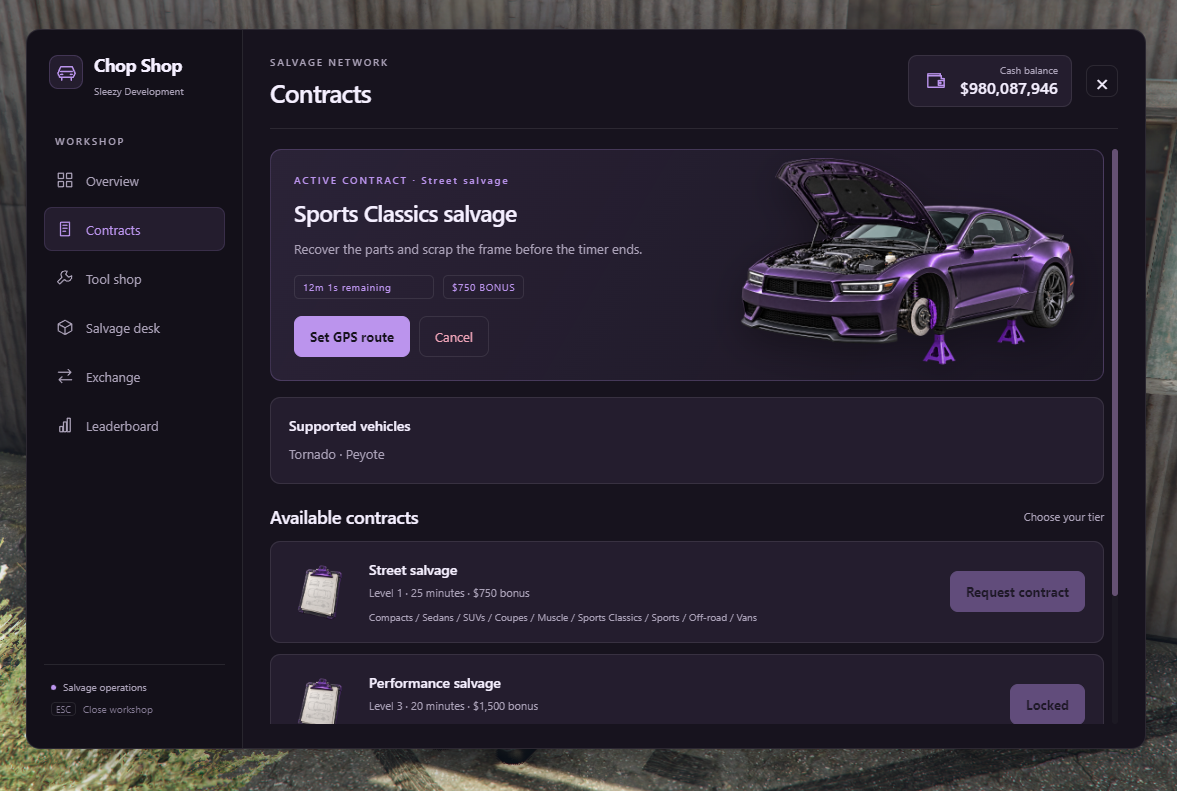
🚗 Vehicle Salvage Contracts
Players can visit a configured workshop contact to receive vehicle salvage contracts.
- Interactive contract selection
- Multiple contract tiers
- Vehicle class requirements
- Individual contract assignments
- Configurable contract deadlines
- Contract completion bonuses
- Character-specific contracts
- Inventory-based contract items
- Level requirements for higher tiers
- Configurable contract cooldowns
- Contract cancellation
- Automatic contract expiration
- GPS route assistance
- Persistent contract information
Default Contract Tiers
Street Salvage
- Unlocks at Level 1
- Standard supported vehicle classes
- 25-minute contract timer
- $750 completion bonus
Performance Salvage
- Unlocks at Level 3
- Performance and sports vehicle classes
- 20-minute contract timer
- $1,500 completion bonus
Executive Salvage
- Unlocks at Level 5
- Selected premium vehicle classes
- 15-minute contract timer
- $2,500 completion bonus
Contract rewards, time limits, vehicle classes, and level requirements are configurable through the resource settings.
📍 Workshop Contacts & Chop Yards
Configure where players receive contracts, purchase equipment, and dismantle vehicles.
- Configurable workshop contacts
- Custom contact NPC models
- Adjustable NPC coordinates
- Custom NPC heading
- Multiple contact locations
- Fixed or randomized contact selection
- Optional map blips
- Configurable chop yards
- Adjustable yard radius
- Multiple salvage yard support
- Optional yard restrictions
- ox_target integration
- qb-target integration
- E-key interaction fallback
Default Locations
- Workshop Contact: Strawberry area
- Chop Yard: Davis Salvage Yard
All locations can be changed or expanded through configuration.
🗺️ Contract GPS & Navigation
The system provides guidance to help players complete their assigned contracts.
- Automatic route to a configured chop yard
- Set GPS route from the contract menu
- Nearest-yard route selection
- Configurable map blips
- Optional route display
- On-screen objective guidance
- Contract destination information
- Vehicle delivery instructions
- Workshop preparation instructions
- Dismantling progress guidance
- Configurable HUD visibility
- Automatic navigation cleanup
The guidance system helps players move through each stage of the salvage process.
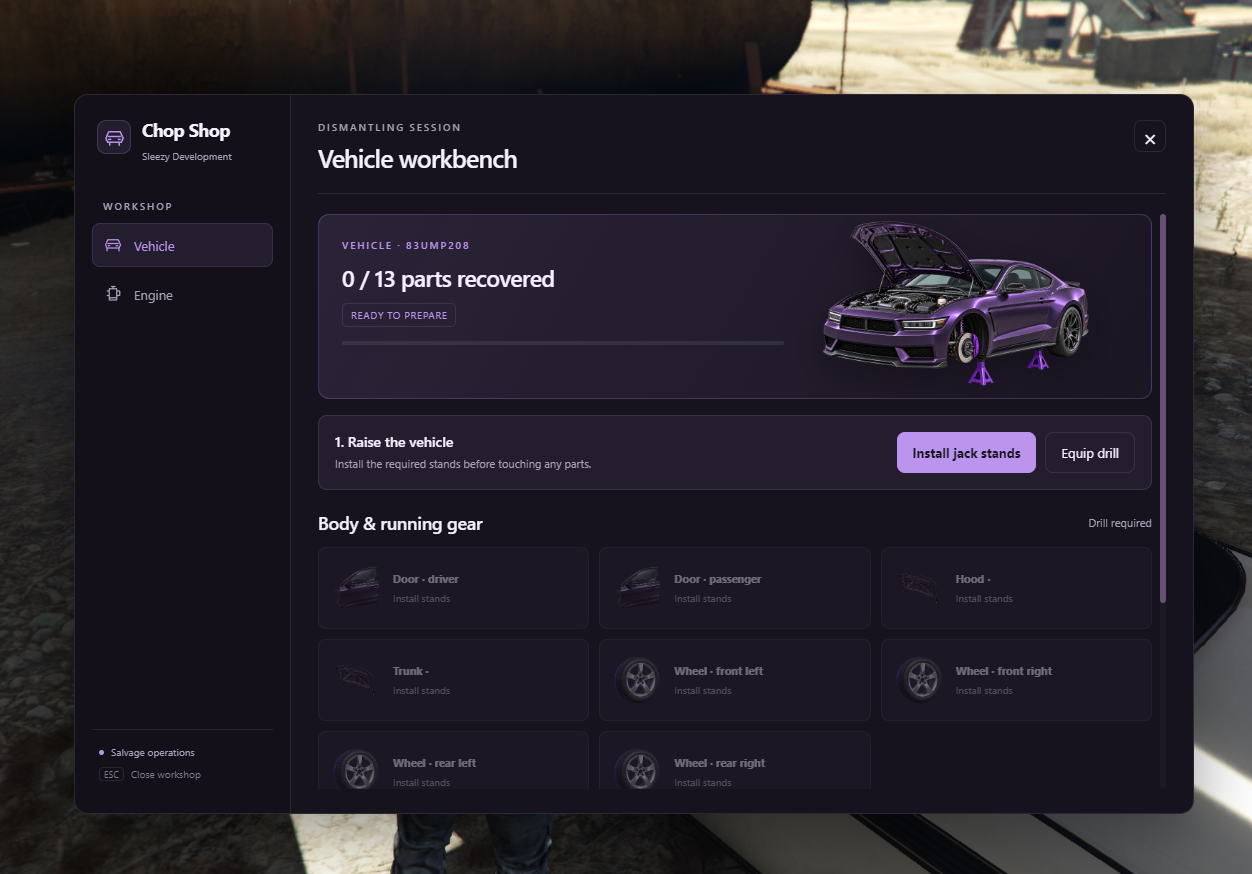
🛠️ Interactive Vehicle Dismantling
Dismantle supported vehicles through a complete workshop process instead of collecting rewards with a single interaction.
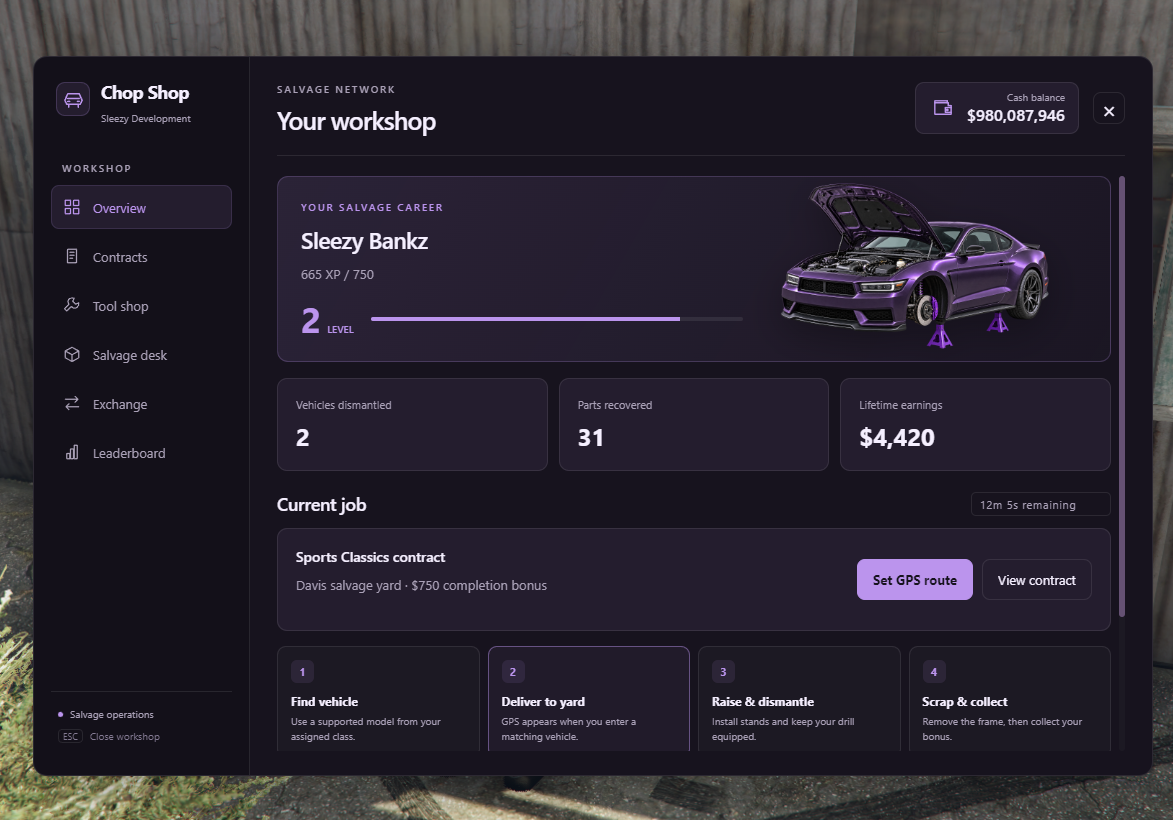
- Deliver an eligible vehicle to the chop yard
- Park and exit the vehicle
- Prepare the vehicle for dismantling
- Install workshop jack stands
- Raise the vehicle
- Equip a salvage drill
- Select individual vehicle components
- Complete component minigames
- Receive recovered salvage items
- Continue dismantling remaining components
- Remove the engine components
- Scrap the remaining vehicle frame
- Complete the vehicle salvage session
- Collect eligible contract bonuses and returned equipment
The vehicle must be empty, stationary, and compatible with the configured vehicle catalog before dismantling begins.
🔩 Physical Jack Stand System
Players must prepare their vehicles using physical jack stand equipment.
- Purchasable jack stands
- Four jack stands required by default
- Physical jack stand props
- Vehicle-side placement
- Adjustable prop positioning
- Configurable jack rotation
- Vehicle lifting
- Configurable lifting height
- Shared installation status
- Workshop equipment recovery
- Return unused or deposited equipment
- Cleanup after interrupted sessions
Jack stands are returned to their depositor after eligible completion or cleanup. If immediate inventory delivery is unavailable, returned equipment can be held for collection.
🔧 Handheld Drill System
Use an equippable drill to perform vehicle dismantling activities.
- Purchasable salvage drill
- Inventory-based drill item
- Equip and put away drill
- Visible handheld drill prop
- Configurable attachment offsets
- Adjustable drill rotation
- Drill sound effects
- Interactive drill minigames
- Configurable drill break chance
- Replacement drill requirements
- Optional custom tool settings
Default Drill Configuration
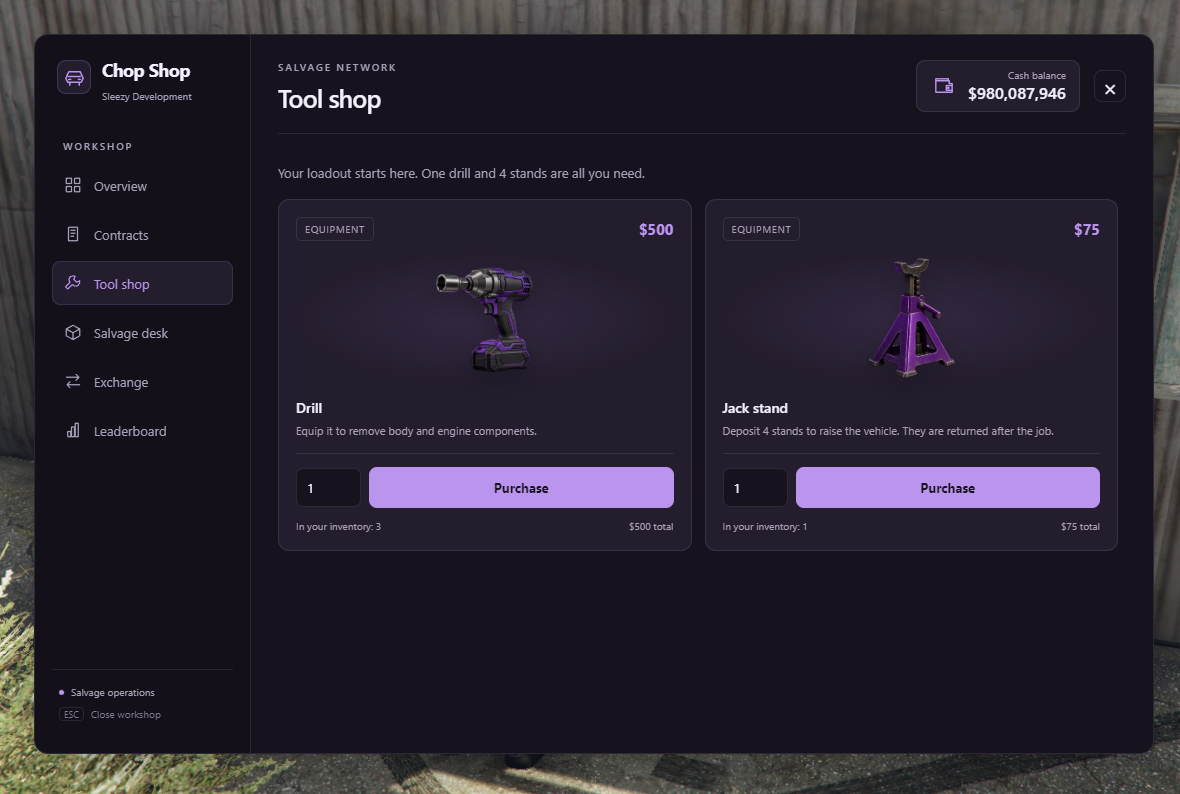
- Drill Price: $500
- Jack Stand Price: $75 each
- Drill Break Chance: 3%
- Minimum Part Interaction: 4 seconds
Tool prices and difficulty settings can be adjusted.
🎮 Interactive Dismantling Minigames
Each vehicle component uses an assigned interactive activity.
Bolt Removal
- Interactive bolt fasteners
- Hold-based dismantling
- Configurable completion timing
- Component-specific visual feedback
Rotary Components
- Rotation-based tool interaction
- Adjustable rotation requirements
- Interactive component movement
- Completion feedback
Wiring
- Interactive wiring sequence
- Configurable sequence length
- Component-specific interface
- Input validation
Tapping
- Repeated-input dismantling
- Configurable tap requirements
- Interactive progress tracking
- Completion feedback
Minigame Settings
- Configurable time limits
- Adjustable difficulty
- Custom minigame artwork
- Component-specific illustrations
- Completion and cancellation handling
- Interaction timeout protection
The default minigame timeout is 90 seconds, with configurable settings for the individual activities.
🚘 Vehicle Component Removal
Players can recover multiple components from compatible vehicles.
Supported Salvage Components
- Hood
- Wheels
- Doors
- Trunk
- Battery
- Alternator
- Radiator
- ECU
- Vehicle Frame
Component Features
- Individual component selection
- Dedicated component minigames
- Visual component removal
- Shared dismantling progress
- Salvage inventory rewards
- Configurable component values
- Per-component XP rewards
- Server-side completion checks
The final vehicle frame can only be scrapped after the required components have been removed.
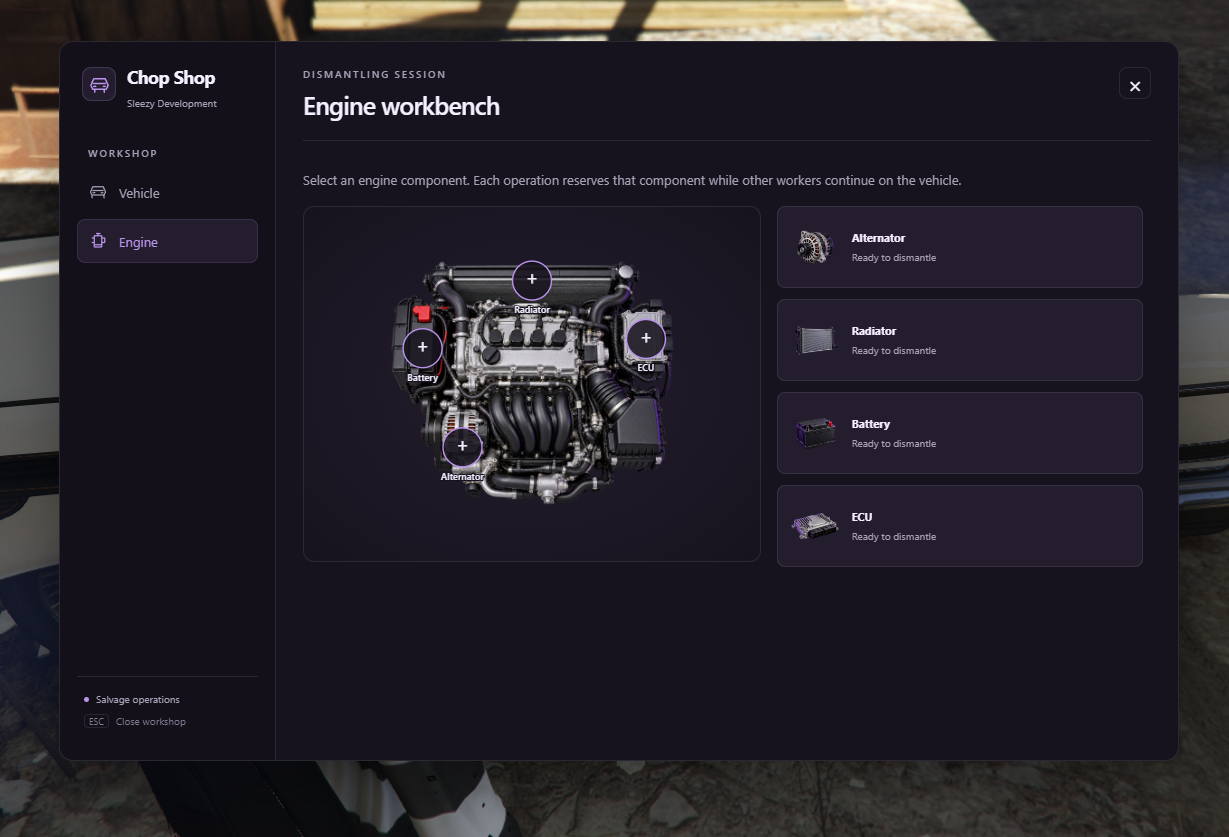
⚙️ Engine Dismantling
A dedicated engine interface allows players to work on individual engine components.
- Interactive engine workbench
- Custom engine illustration
- Individual component selection
- Alternator removal
- Radiator removal
- Battery removal
- ECU removal
- Component progress tracking
- Custom component artwork
- Assigned minigame interactions
- Individual salvage rewards
🤝 Cooperative Vehicle Dismantling
Multiple players can work together on the same supported vehicle.
- Shared vehicle salvage sessions
- Multiple nearby workers
- Individual part selection
- Cooperative component removal
- Synchronized dismantling progress
- Individual salvage item rewards
- XP rewards for contributing workers
- Prevention of duplicate component collection
- Automatic component reservations
- Shared vehicle completion progress
Workers can help dismantle a prepared vehicle without requiring a separate invitation.
The original contract holder remains responsible for the contract and is the only player eligible for its timed completion bonus.
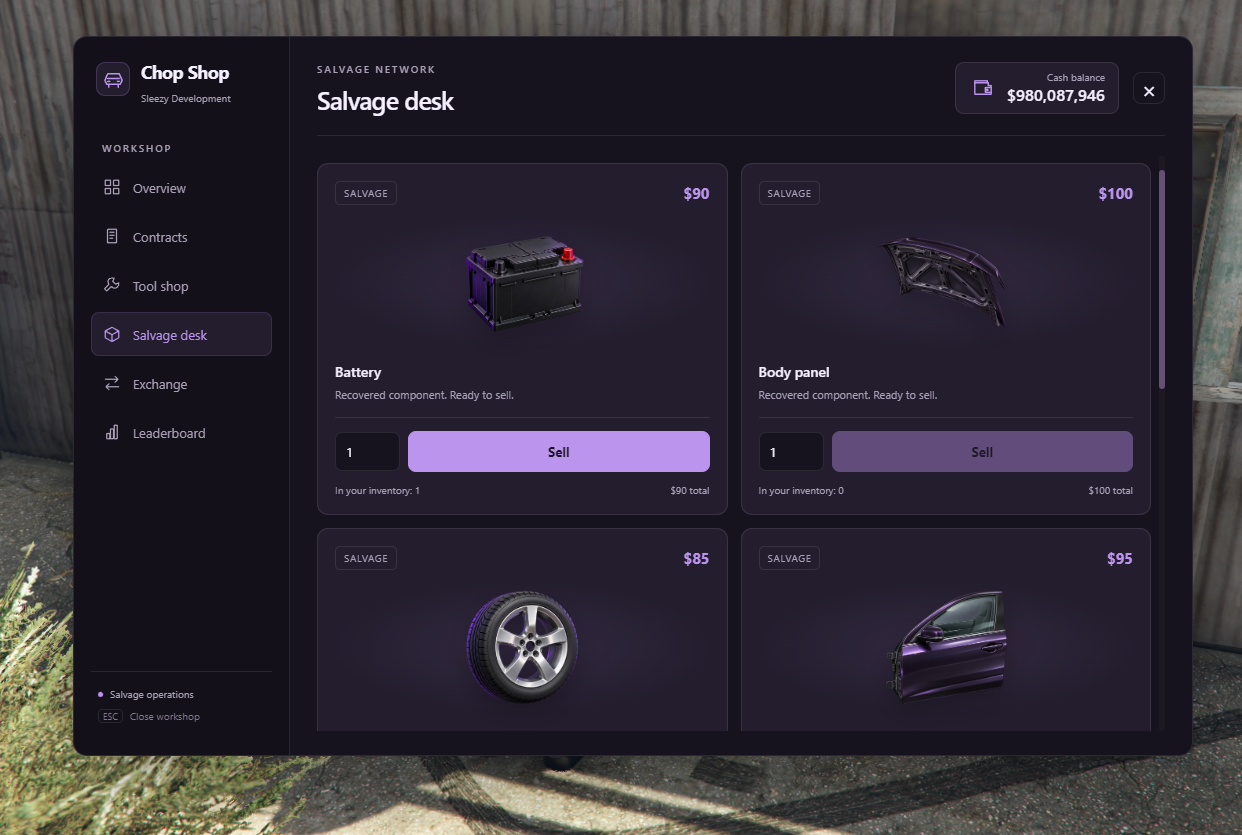
💰 Salvage Selling System
Sell recovered vehicle components at the configured workshop contact.
- Built-in salvage selling interface
- Individual component pricing
- Configurable sale quantities
- Cash payment support
- Adjustable salvage values
- Inventory item validation
- Server-side payment processing
- Transaction error handling
Default Salvage Values
- Hood: $100
- Wheel: $85
- ECU: $175
- Alternator: $125
- Frame: $200
- Battery: $90
- Radiator: $140
- Trunk: $100
- Door: $95
All prices can be modified by the server owner.
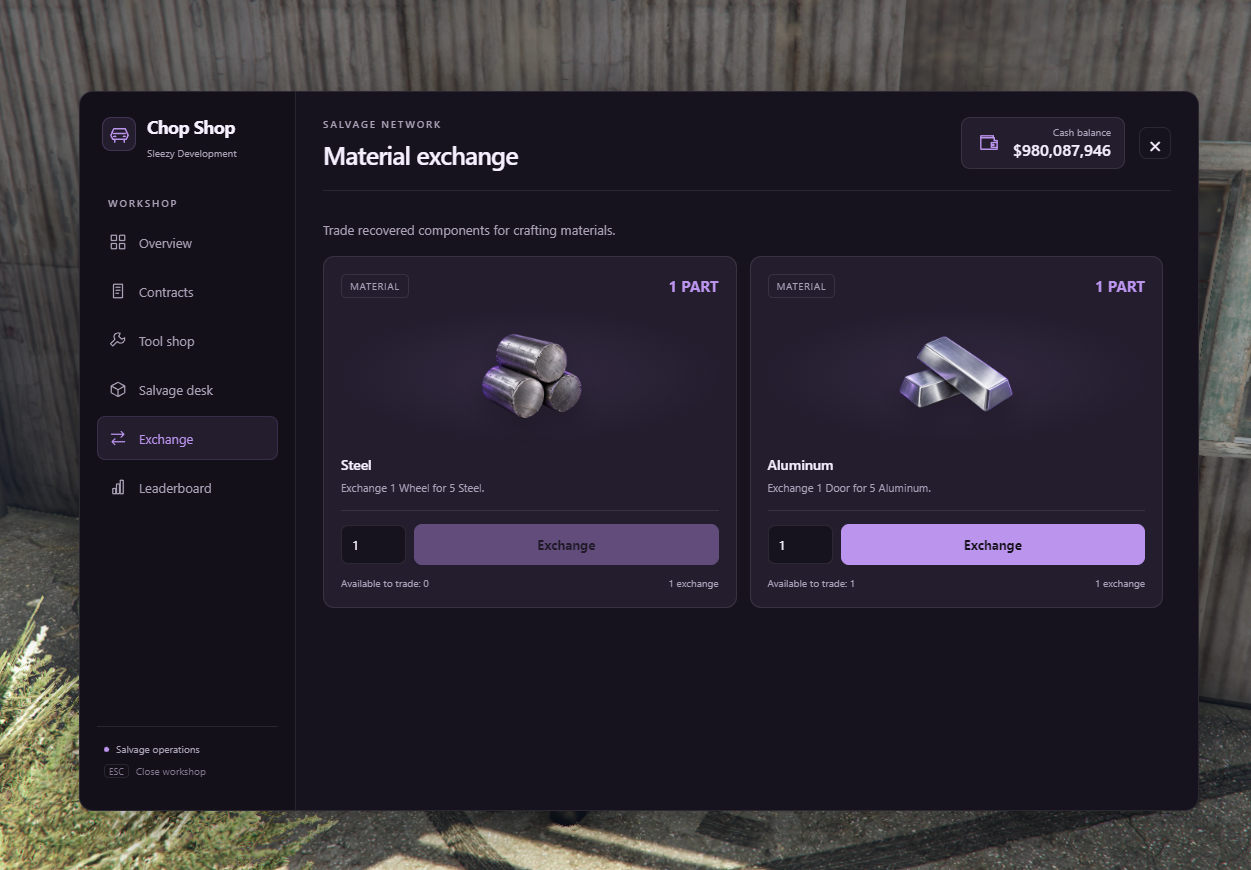
♻️ Material Exchange System
Exchange recovered components for other configured in-game materials.
- Dedicated material exchange interface
- Salvage-to-material exchanges
- Configurable exchange recipes
- Custom input items
- Adjustable exchange quantities
- Custom material rewards
- Item image support
- Readable item display names
- Inventory validation
- Failed transaction recovery
Default Exchanges
- Salvaged Wheel → 5 Steel
- Salvaged Door → 5 Aluminum
Default material reward items must exist in the selected inventory system or be replaced through configuration.
🏪 Workshop Equipment Store
Players can purchase equipment needed for salvage activities.
- Interactive equipment store
- Custom tool artwork
- Purchasable drills
- Purchasable jack stands
- Configurable item pricing
- Adjustable purchase quantities
- Cash balance display
- Purchase total calculation
- Inventory capacity validation
- Server-side payment checks
- Refund handling for unsuccessful purchases
⭐ Career Progression
Players can develop their salvage career by completing workshop activities.
- Character-specific XP
- XP for dismantled components
- XP for vehicle completion
- Configurable XP rewards
- Multiple career levels
- Higher-tier contract unlocks
- Persistent character progression
- Total vehicle completion tracking
- Salvage component statistics
- Earnings tracking
- Personal career dashboard
Default XP Rewards
- 15 XP per salvaged component
- 100 XP per completed vehicle
- Six configurable progression thresholds
Career information is saved through the resource's database.
🏆 Player Leaderboard
Compare player progression through the included leaderboard.
- Career XP rankings
- Player display names
- Completed vehicle statistics
- Top 20 players
- Persistent career records
- Leaderboard interface
🎨 Custom Workshop UI
The resource includes a custom interface designed around its salvage activities.
- Dark violet workshop theme
- Custom Sleezy Development branding
- Interactive dashboard
- Contract management
- Career progression
- Leaderboard
- Equipment store
- Salvage selling
- Material exchanges
- Vehicle dismantling screen
- Engine workbench
- Minigame interfaces
- Component illustrations
- Custom item images
- Vehicle and workshop artwork
- Readable item labels
- Cash balance display
- Customizable accent colors
- Configurable interface text
- Editable branding and logo
- Configurable interface positioning
🎨 Branding & Customization
- Editable interface title
- Custom subtitle
- Logo support
- Local and HTTPS images
- Custom accent color
- Custom background color
- Text color customization
- Surface color customization
- Adjustable interface position
- Editable button labels
- Configurable part names
- Custom vehicle display names
- Custom item artwork paths
- Adjustable contract tiers
- Custom vehicle catalog
- Configurable rewards and prices
- Editable chop yard locations
- Configurable NPC contacts
- Minigame difficulty settings
- Workshop equipment settings
- Adjustable navigation settings
- Editable
config.lua
🛡️ Vehicle & Gameplay Validation
The system includes server-side checks for supported salvage interactions.
- Configurable vehicle model catalog
- Vehicle class validation
- Parked vehicle requirement
- Vehicle occupancy checks
- Chop yard location validation
- Player distance checks
- Routing bucket validation
- Supported vehicle layout checks
- Player-owned vehicle protection
- Duplicate session prevention
- Duplicate component reward prevention
- Server-side inventory checks
- Tool requirement verification
- Action cooldowns
- Session time limits
- Character session validation
- Interrupted operation handling
Player-Owned Vehicle Protection
Player-owned vehicles are protected by default through the configured ownership integration.
The system checks supported garage ownership tables and can be configured for additional garage schemas.
Chopping a vehicle does not delete its ownership database record.
📊 In-Game Administrator Dashboard
Manage the system through the dedicated administration interface.
- Open admin panel with
/chopshopadmin
- View registered player statistics
- Seven-day workshop activity
- Salvage activity breakdown
- Active vehicle sessions
- Clear selected active sessions
- Recover deposited workshop equipment
- Searchable gameplay settings
- Edit contract tiers
- Edit supported vehicle models
- Change NPC contact locations
- Edit chop yard settings
- Modify tool prices
- Adjust salvage rewards
- Change material exchanges
- Modify minigame difficulty
- Edit progression requirements
- Capture coordinates in-game
- Save gameplay configuration
- Import and export settings
Saved gameplay settings apply to future sessions. Existing active sessions retain the settings and reward values they started with.
🔐 Administrator Permissions
- ACE permission support
- QBCore administrator permissions
- QBOX-compatible permissions
- ESX administrator groups
- Manual identifier allowlist
- Server-side admin validation
- Restricted configuration access
- Protected session cleanup
- Configuration revision validation
Default Admin Groups
ACE Permission
sleezy.chopshop.admin
Administrators can also be added through the editable identifier configuration.
🎮 Available Commands
/chopshop — Open the workshop career and contract menu.
/chopshopdrill — Equip or put away the salvage drill.
/chopshopadmin — Open the administrator dashboard.
Commands are configurable through the resource settings.
💾 Persistent Saving & Recovery
- Persistent character progression
- Saved career XP
- Saved contract information
- Stored gameplay configuration
- Saved leaderboard data
- Persistent vehicle salvage ledger
- Pending equipment returns
- Pending contract payouts
- Database-backed activity records
- Reward recovery after reconnection
- Cleanup of interrupted vehicle sessions
Once a vehicle begins recorded salvage, its model and plate identity are stored to prevent the same vehicle identity from being repeatedly used for component rewards.
🧩 Framework Support
- ESX
- QBCore
- QBOX
- Standalone
- Automatic framework detection
Inventory Support
- ox_inventory
- qb-inventory
- ESX Legacy inventory
- Built-in standalone workshop inventory
Standalone mode includes its own resource-specific cash wallet and inventory. Custom ownership validation may require additional configuration.
🎯 Interaction Support
- ox_target
- qb-target
- E-key proximity interactions
- Usable inventory items
- Configurable interaction distances
📦 What's Included
- Advanced Chop Shop Resource
- Custom Workshop UI
- Vehicle Contract System
- Three Default Contract Tiers
- NPC Workshop Contact System
- Configurable Chop Yards
- GPS Route Guidance
- Interactive Vehicle Dismantling
- Physical Jack Stand System
- Equippable Drill System
- Four Minigame Types
- Engine Dismantling Interface
- Cooperative Salvage System
- Salvage Item Rewards
- Equipment Shop
- Material Exchange System
- Career Progression
- Player Leaderboards
- Administrator Dashboard
- In-Game Configuration Editor
- Custom UI Artwork
- Inventory Item Images
- Framework & Inventory Bridges
- Editable Configuration Files
- SQL Installation Files
- Installation Instructions
🏠 Perfect For
- FiveM Roleplay Communities
- Vehicle Salvage Roleplay
- Automotive Roleplay
- Workshop Businesses
- Economy-Based Servers
- Criminal Roleplay Storylines
- Group Activities
- Player Progression Systems
- Vehicle Dismantling Activities
- Custom Vehicle Roleplay
- Interactive Job Systems
⚙️ Requirements
- FiveM Server
- OneSync Enabled
- ox_lib
- oxmysql
- MySQL-Compatible Database
- ESX, QBCore, QBOX, or Standalone Configuration
- Compatible Inventory Integration
- Optional ox_target or qb-target
⚙️ Installation
- Install ox_lib and oxmysql.
- Add
sleezy_chopshop to your server resources.
- Import the included SQL schema.
- Add the provided inventory items and images.
- Configure framework and inventory settings.
- Review the vehicle ownership integration.
- Configure workshop contacts and chop yards.
- Adjust contract tiers, rewards, and gameplay settings.
- Start the resource after its dependencies.
- Test contracts, minigames, inventory rewards, and vehicle cleanup in-game.
⚙️ Important Information
This resource provides fictional vehicle dismantling and salvage activities exclusively within FiveM roleplay environments.
Only configured and supported vehicles can be dismantled.
The default vehicle system targets compatible four-wheel cars with supported two-door or four-door layouts, a hood, and a trunk or tailgate.
Motorcycles, aircraft, boats, six-wheel vehicles, and unusual vehicle layouts require additional compatibility work.
Player-owned vehicles are protected by default. Custom garage systems may require ownership query configuration.
Completing a vehicle salvage operation removes the corresponding in-game world vehicle entity, but does not delete vehicle ownership database records.
Contract rewards, progression, equipment costs, and salvage prices are configurable for individual server economies.
The system does not include custom vehicle models, custom MLOs, or third-party framework dependencies.
💎 Why Choose This System?
The Sleezy Development Advanced Chop Shop System provides an interactive vehicle salvage experience rather than a simple vehicle deletion or instant reward interaction.
Players can accept contracts, follow GPS guidance, prepare vehicles with physical jack stands, operate a handheld drill, complete custom dismantling minigames, recover individual components, and work alongside other players.
With career progression, equipment purchasing, salvage exchanges, configurable rewards, and an in-game administrator dashboard, the system gives server owners control over the gameplay experience and its economy.
Designed for FiveM communities looking for an interactive automotive roleplay activity with progression, customization, and multiplayer support.
Developer: Sleezy Development
Version: 1.0.5
Frameworks: ESX • QBCore • QBOX • Standalone
Resource: sleezy_chopshop
Database: MySQL / oxmysql
Dependencies: ox_lib • oxmysql • OneSync
Support: discord.gg/sleezydevelopment
Sleezy Development • Premium FiveM Systems
Script Preview: (1) Sleezy Development - YouTube
Discord Support: Discord