Sleezy Development • Advanced Hopouts System (ESX, QBCore, QBOX & Standalone)
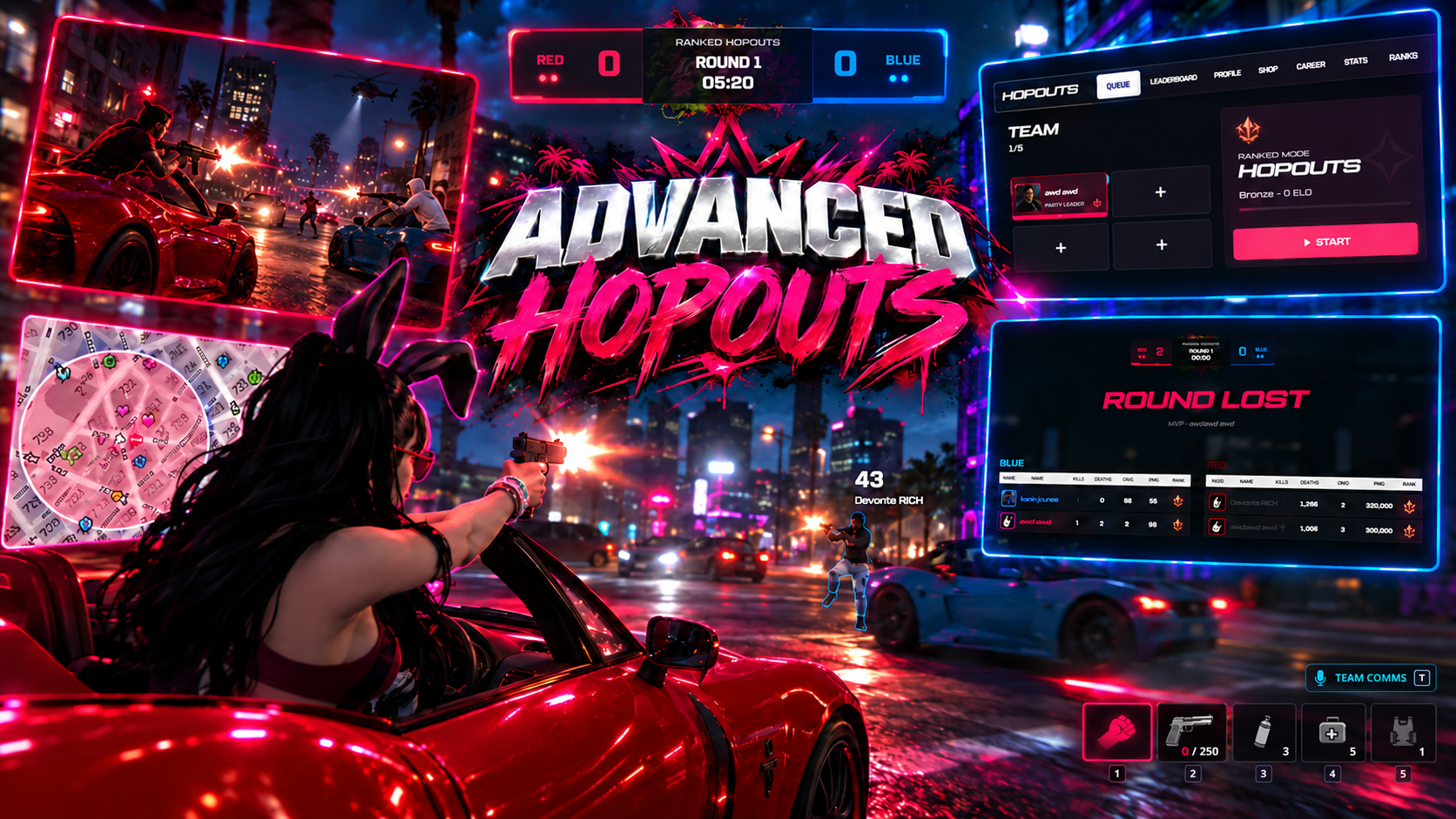
Bring competitive street battles, ranked team matches, vehicle combat, and progression-based multiplayer gameplay to your FiveM server with the Sleezy Development Advanced Hopouts System.
Designed for PvP communities, roleplay servers, and organized competitive events, Advanced Hopouts allows players to create parties, queue for matches, compete across multiple arenas, earn ranked progression, and customize their competitive profiles.
Players can join solo or alongside friends, accept match invitations, participate in arena selection, and compete in elimination-based rounds featuring vehicles, custom weapon loadouts, a moving storm zone, usable match equipment, and live combat statistics.
The system includes a fully designed competitive interface, 11 configurable arenas, automatic team matchmaking, team-colored player outlines, vehicle spawning, match spectating, seasonal rankings, player leaderboards, unlockable cosmetics, an earned-credit shop, and administrator controls.
Built with persistent player progression, configurable gameplay rules, character restoration, multi-framework compatibility, and extensive customization.
⚙️ Features
- Advanced ranked Hopouts system
- Competitive team elimination matches
- Solo and party matchmaking
- Automatic team assignment
- Configurable 1v1 through 5v5 matches
- Optional uneven team matchmaking
- Five-player party system
- Party invitations and management
- Player friends list
- Match acceptance system
- Arena selection and map banning
- Late queue joining during match preparation
- 11 configurable arenas
- Custom arena preview images
- Separate Red and Blue teams
- Team-colored player outlines
- Teammate-only outline visibility
- First-to-five-round victory system
- Configurable round countdowns
- Vehicle-based combat
- Automatic vehicle spawning
- Configurable vehicle models
- Custom weapon loadouts
- Pistol and rifle round configurations
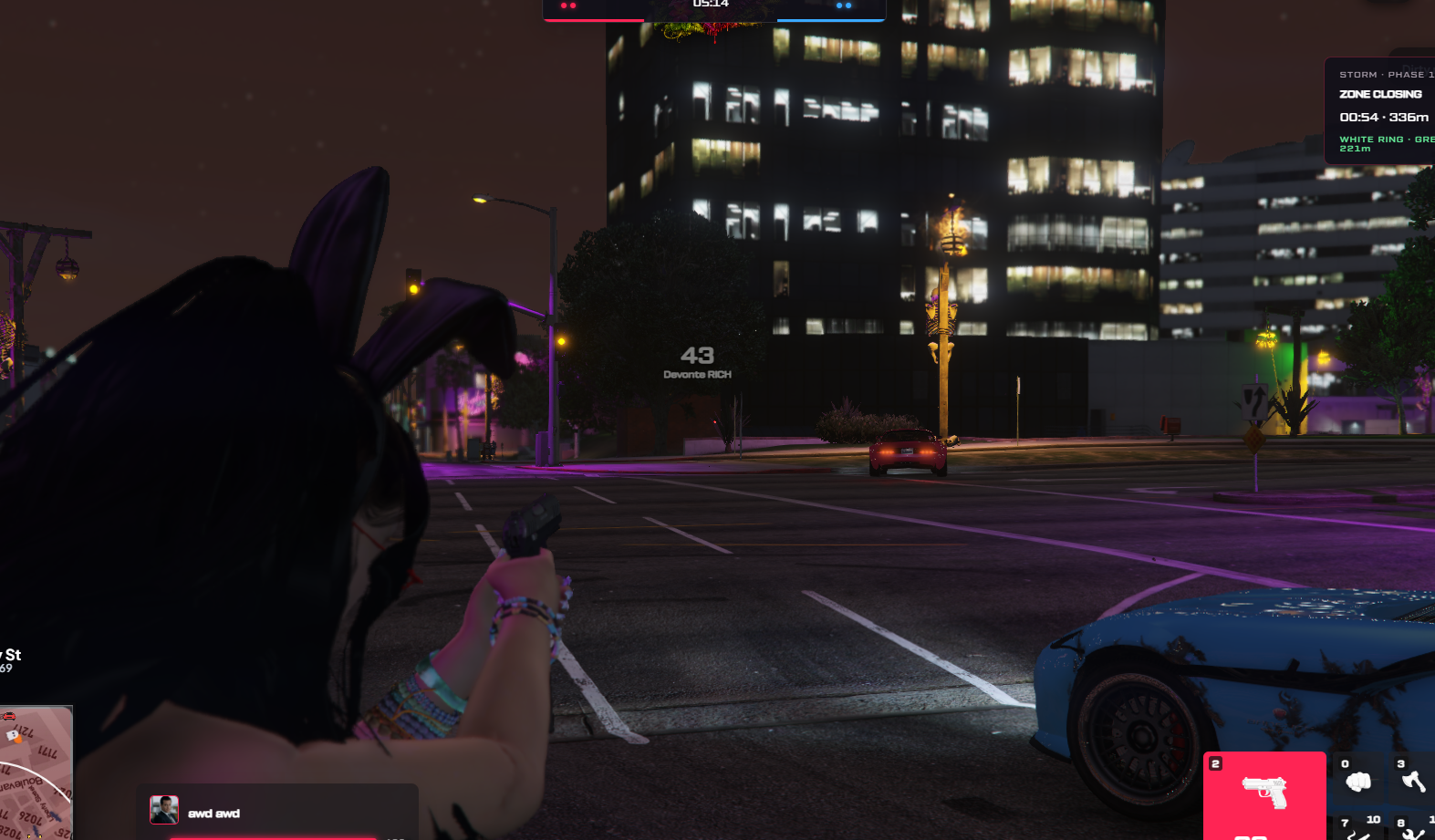
- Moving storm and shrinking safe zone
- Configurable storm damage
- Match consumables and equipment
- Armor and healing items
- Vehicle repair equipment
- Smoke utility system
- Custom competitive HUD
- Live health and armor indicators
- Damage and hit feedback
- Elimination and spectating system
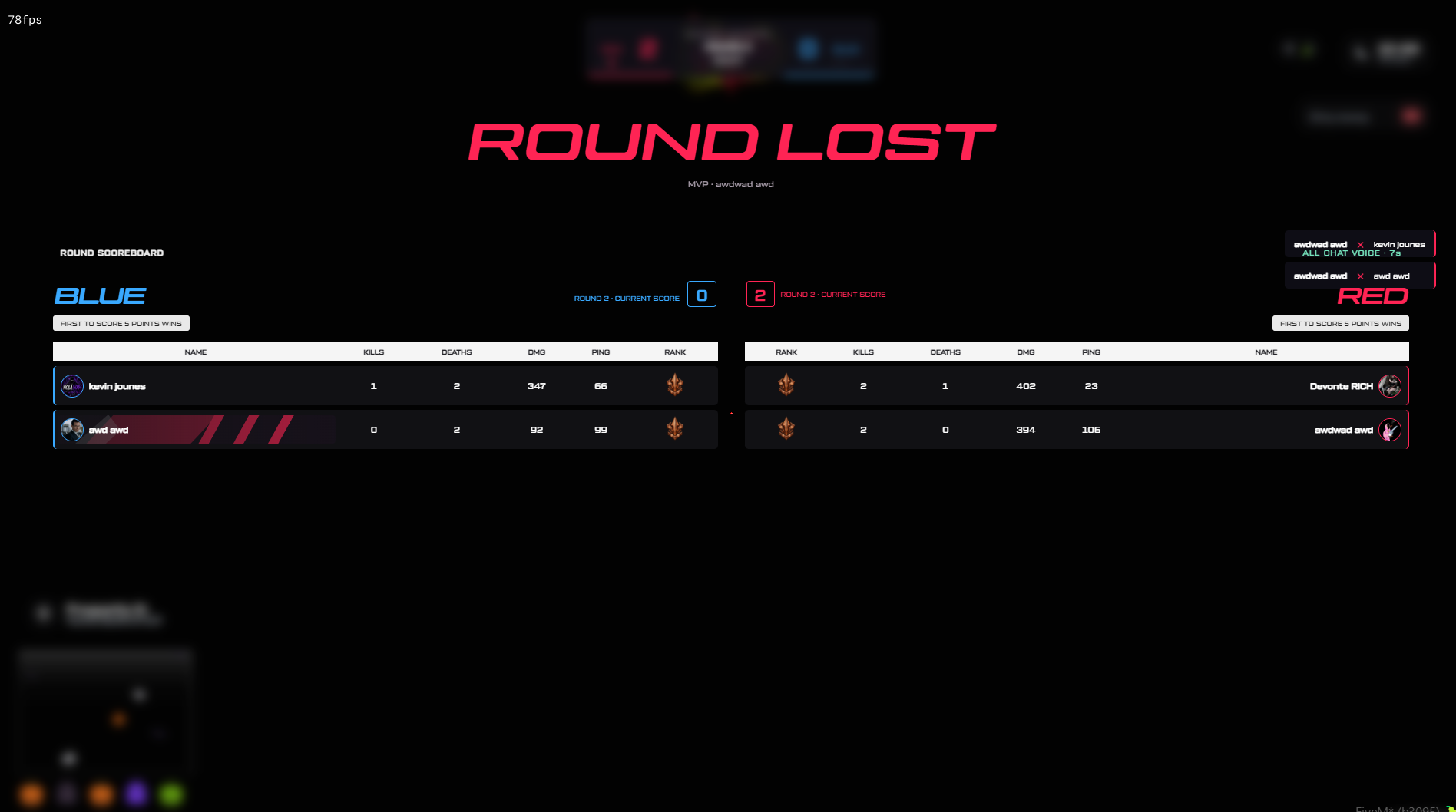
- Round and match scoreboards
- Player MVP and match results
- Ranked ELO progression
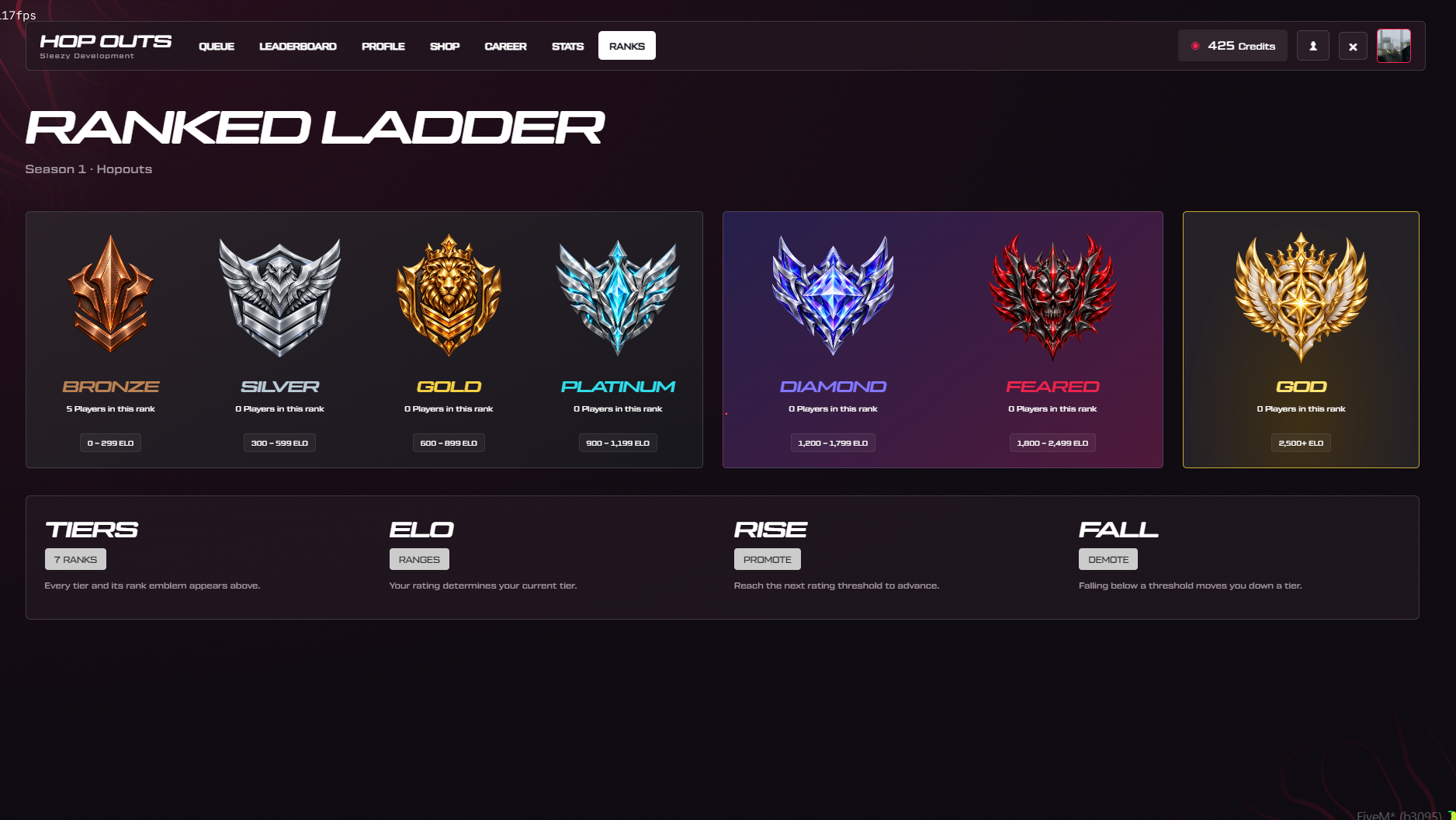
- Seven competitive rank tiers
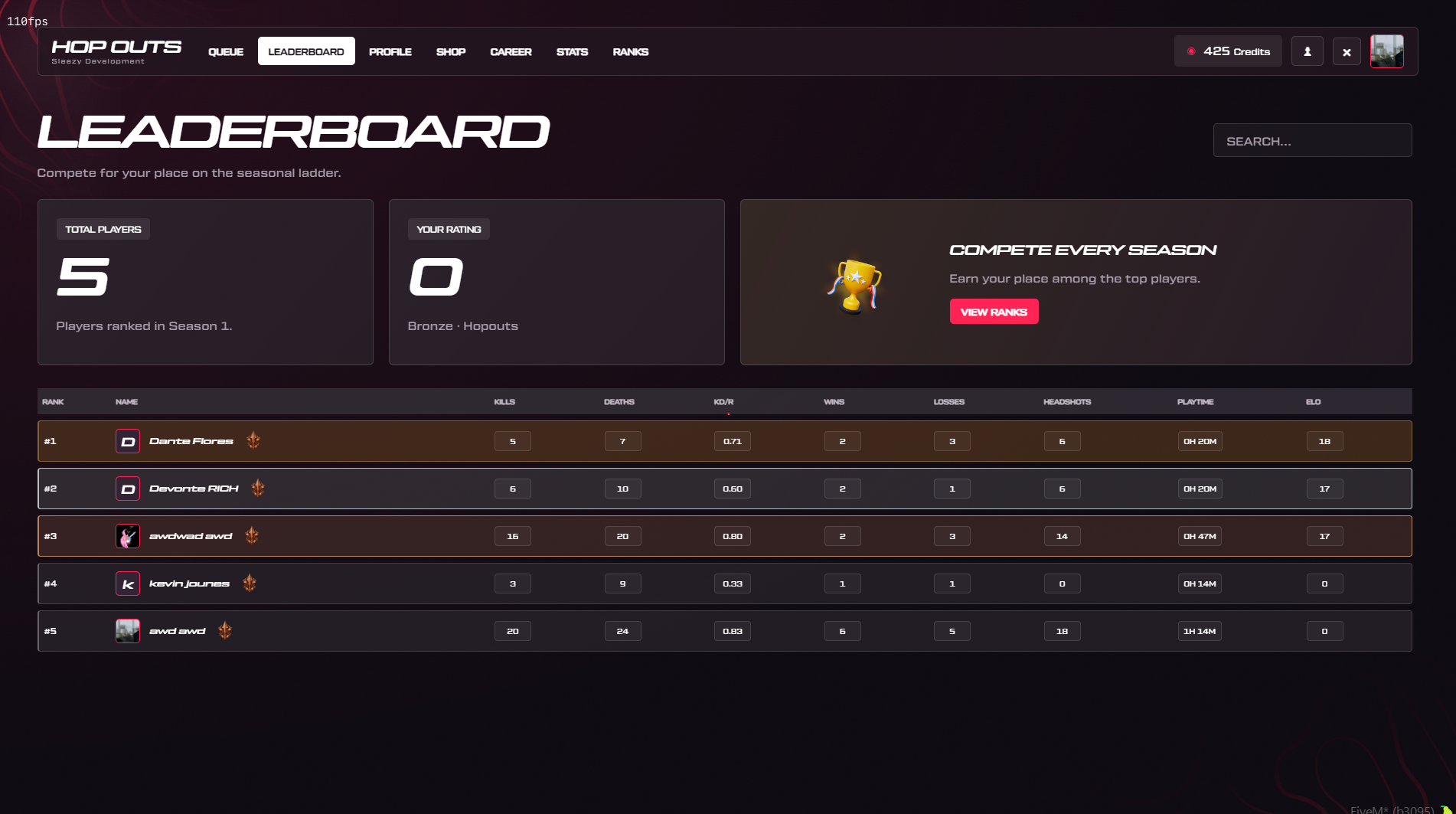
- Seasonal leaderboard
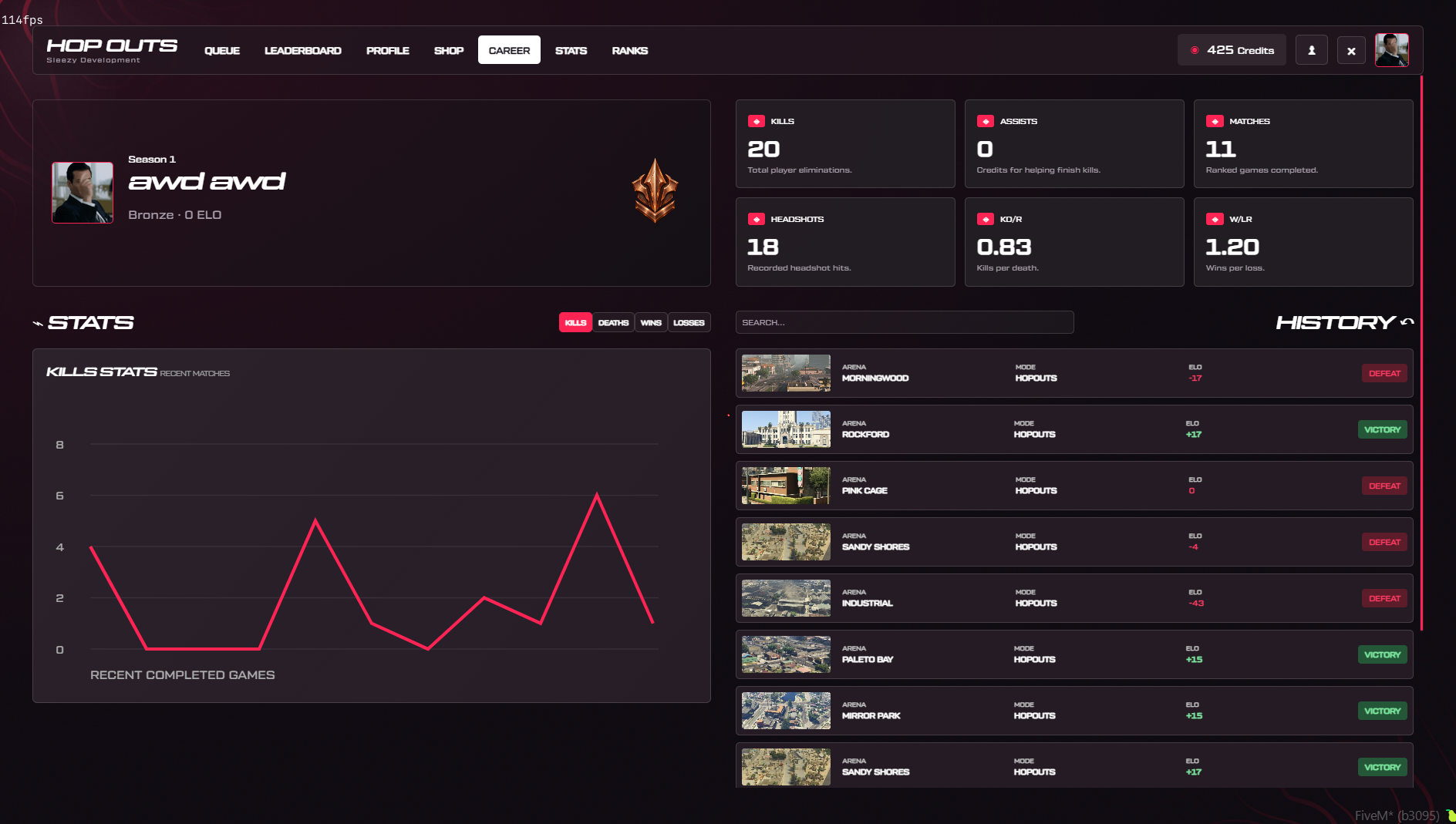
- Personal career statistics
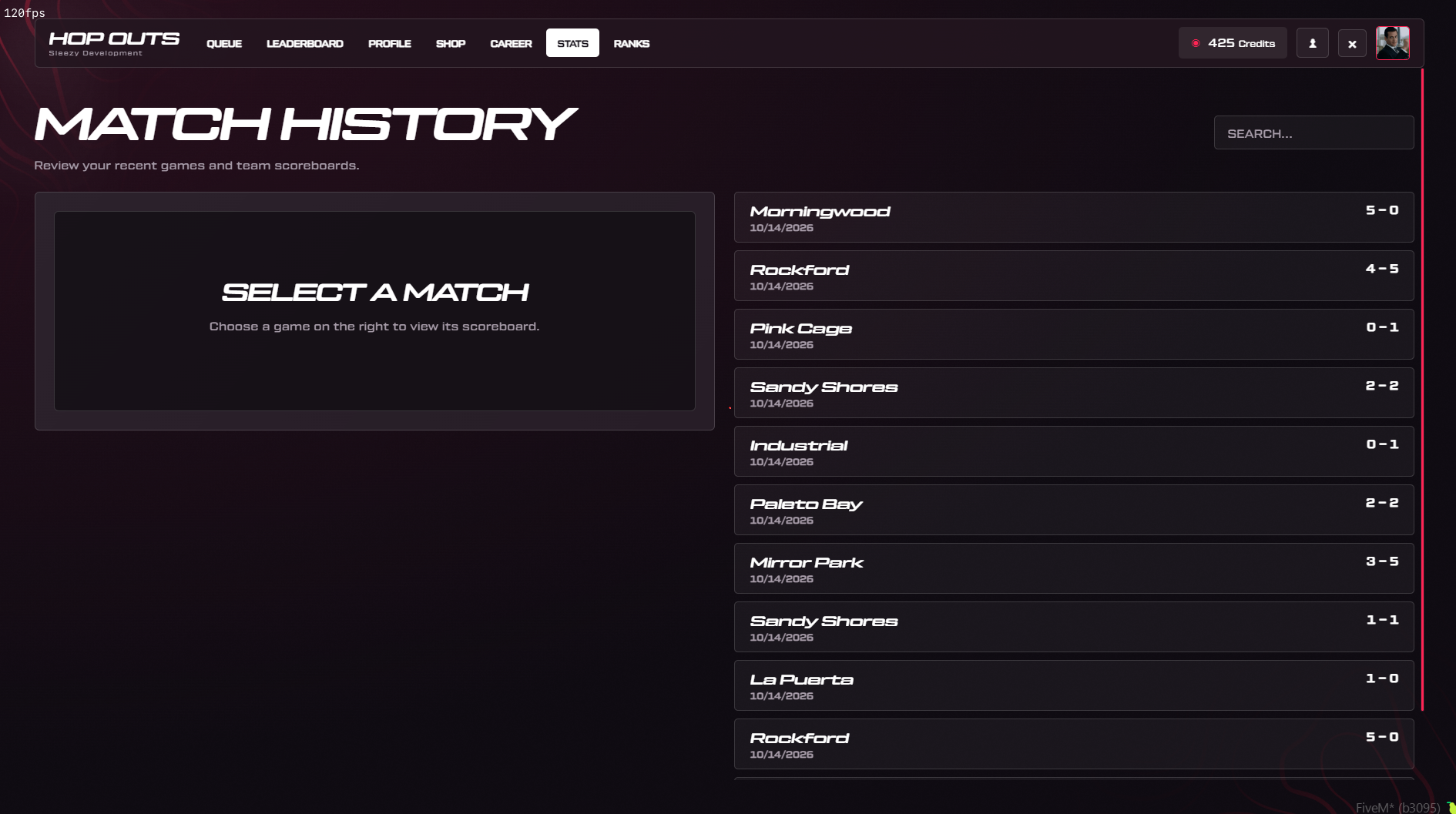
- Match history
- Earnable in-game credits
- Custom cosmetic shop
- Calling cards and player banners
- Exclusive leaderboard rewards
- Discord avatar integration
- Configurable team voice channels
- Administrator match controls
- Persistent database saving
- Multi-framework compatibility
🎮 Ranked Hopouts Gameplay
Compete against opposing teams in elimination-based rounds.
- Create or join a party
- Queue for a ranked match
- Automatically match with other players
- Accept the match invitation
- Participate in arena selection
- Load into a separate match instance
- Spawn with your assigned team
- Use vehicles and match equipment
- Eliminate the opposing team
- Survive the closing storm
- Win rounds for your team
- Reach the required round victories
- View match results and performance
- Earn ranked progression and credits
Default Match Configuration
- First team to 5 round wins
- 7-second round countdown
- 6-minute round time limit
- Maximum 5 players per team
- Automatic team assignment
- Friendly fire disabled
- Headshots enabled
- 200 starting health
- 100 starting armor
- 25 ELO abandonment penalty
All settings can be adjusted through config.lua.
👥 Solo & Party Matchmaking
The system supports individual players and organized groups.
- Queue individually
- Create a five-player party
- Invite online players
- Accept or decline party invitations
- Leave existing parties
- Party leader management
- Promote another player to leader
- Remove party members
- Queue as a complete party
- Keep party members together
- Automatic team assignment
- Configurable matchmaking requirements
- Adjustable ELO matchmaking range
- Matchmaking window expansion
- Configurable queue cooldowns
Automatic Matchmaking
With automatic team sizing enabled, matches can form with different numbers of players, up to five on each team.
For example:
- 2 Players — 1v1
- 3 Players — 2v1
- 4 Players — 2v2 or another permitted distribution
- 6 Players — 3v3 or another permitted distribution
- 10 Players — 5v5
Team assignments consider available players, party sizes, and configured rating restrictions.
Fixed Team Matchmaking
Server owners can require an exact number of players on each team.
Fixed-size matches wait until both teams meet their required player counts.
⏳ Match Acceptance & Late Joining
The system includes an interactive match acceptance process.
- Match found notification
- Match acceptance countdown
- Individual player acceptance
- Accept or decline options
- Accepted player indicators
- Automatic cancellation when required players decline
- Return eligible players to matchmaking
- Configurable acceptance duration
- Configurable decline cooldown
Late Queue Joining
When automatic team sizing is enabled, additional queued players can join eligible match reservations during the preparation window.
- Late joining enabled by default
- Configurable 30-second joining window
- Additional players receive an acceptance request
- Existing player acceptances are preserved
- Existing map selections are preserved where applicable
- Party members remain together
- Team limits remain enforced
Once the reservation closes or gameplay begins, additional players cannot join that match.
🗺️ Arena Selection & Map Banning
Players can participate in selecting their match arena.
- Random arena candidate selection
- Up to three arena choices per reservation
- Custom arena preview images
- Interactive map selection interface
- Player map ban voting
- Configurable voting duration
- Vote count display
- Automatic tie handling
- Final arena selection
- Individual arena coordinates
Included Arenas
- Little Seoul
- Morningwood
- Pink Cage
- Mirror Park
- Rockford
- Sandy Shores
- Southside
- Paleto Bay
- La Puerta
- Industrial
- Barrios
All 11 arenas include configurable coordinates, spawn locations, vehicle positions, and combat-zone settings.
🔴 Red Team & Blue Team
Matches feature two opposing teams with customizable identities.
- Red and Blue team configuration
- Custom team names
- Custom team colors
- Individual team spawn locations
- Team-based player assignment
- Configurable team blip colors
- Team membership tracking
- Individual team scoreboards
- Team voice channels
- Team-based player outlines
Server owners can customize team colors and names through the configuration.
✨ Team-Colored Player Outlines
The system includes a teammate-only player highlighting feature.
- Configurable player outlines
- Red outline for Red Team members
- Blue outline for Blue Team members
- Teammate-only outline rendering
- Local player excluded from outlines
- Automatic outline updates
- Outline removal after elimination
- Outline cleanup following matches
- Configurable outline opacity
- Adjustable rendering settings
Players see the configured outlines on their own teammates rather than having every player highlighted.
Outline rendering depends on supported GTA/FiveM client functionality and should be tested alongside other visual resources.
🚗 Vehicle-Based Combat
Bring vehicle combat into ranked team matches.
- Automatic match vehicle spawning
- Configurable vehicle models
- Separate vehicle spawn positions
- Adjustable vehicle handling
- Configurable traction and braking
- Team vehicle access
- Automatic vehicle seat assignment
- Spawn inside vehicles by default
- Vehicle entry support
- Instant vehicle seating option
- Optional entry animation
- Configurable vehicle distance checks
- Vehicle key integration
- Automatic vehicle cleanup
- Configurable seat assignments
Default Vehicle Models
The default configuration supports two-seat and four-seat vehicle layouts.
Vehicle Entry
Players can press F or use /hopoutscar to enter a nearby permitted match vehicle.
Vehicle entry is checked by the server and supports configurable seating behavior.
🔫 Advanced Match Weapon System
The system provides temporary competitive weapon loadouts that are separate from normal roleplay equipment.
- Configurable pistol
- Configurable assault rifle
- Configurable melee weapon
- Fists and unarmed combat
- Temporary match weapons
- Custom ammunition settings
- Automatic loadout preparation
- Weapon selection keybinds
- Weapon holstering
- Configurable round weapon restrictions
- Weapon availability indicators
- Temporary weapon cleanup
- Supported roleplay weapon restoration
Default Weapon Configuration
- Pistol: Combat Pistol
- Rifle: Carbine Rifle
- Melee: Hatchet
- Starting ammunition: 250
Default Weapon Rounds
- Round 1 — Pistol
- Round 2 — Rifle and Pistol
- Round 3 — Pistol
- Round 4 — Rifle and Pistol
The pattern continues according to the configured round mode.
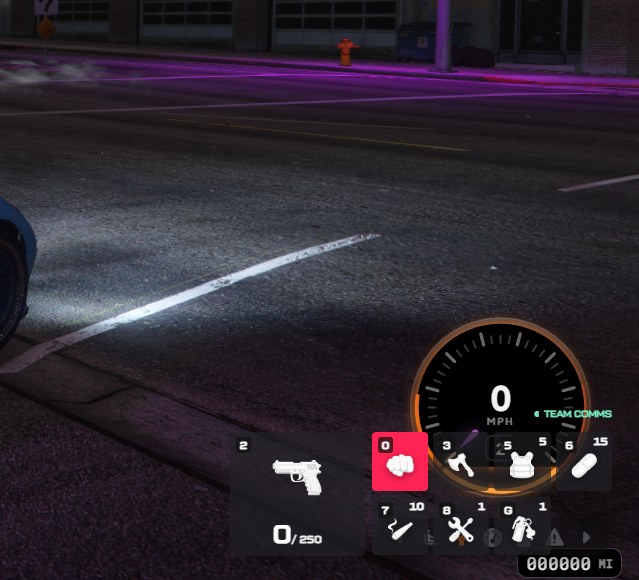
Weapon Keybinds
-
0 — Fists
-
1 — Rifle
-
2 — Pistol
-
3 — Melee
Players spawn unarmed and can select their permitted equipment during the match.
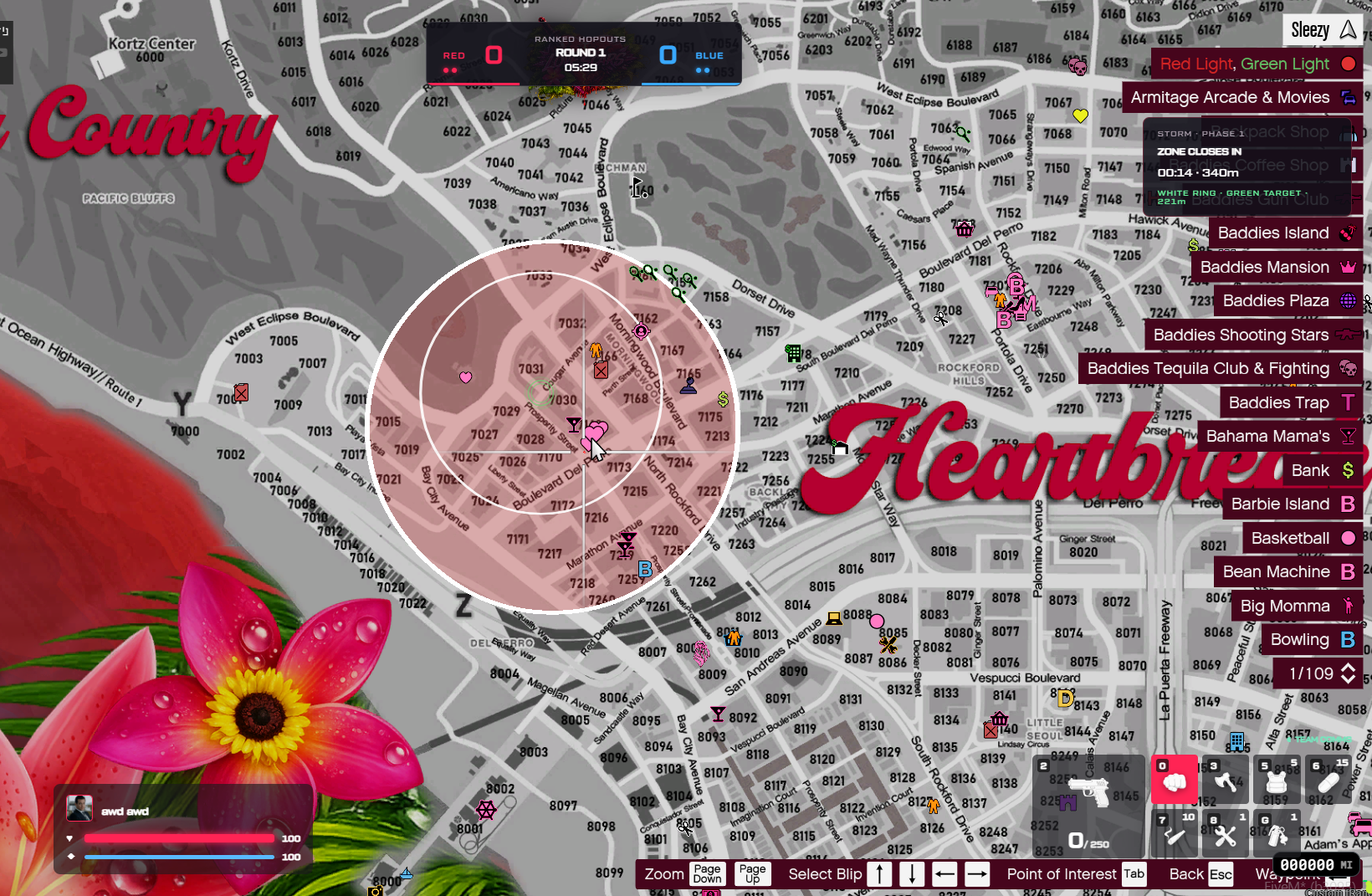
🌪️ Dynamic Storm System
The system includes a moving storm zone designed to encourage combat as rounds progress.
- Shrinking combat boundaries
- Moving safe-zone center
- Configurable storm stages
- Red storm visual effects
- Configurable sphere opacity
- Current storm boundary markers
- Next safe-zone indicators
- Configurable storm damage
- Adjustable storm timing
- Automatic storm progression
- Storm movement sound effects
- Outside-zone warnings
- Storm status on the match HUD
Default Storm Stages
- Stage 1 — Initial zone reduction
- Stage 2 — Smaller combat zone
- Stage 3 — Limited remaining safe area
- Stage 4 — Final zone closure
Each stage includes configurable waiting time, shrinking duration, radius, and damage.
The safe-zone center can move while remaining within the previous circle's permitted area.
🛡️ Match Consumables & Equipment
Players receive dedicated match equipment for combat and survival.
Armor Vest
- Restores armor
- Configurable usage duration
- Custom animation
- Up to 5 uses per round by default
Healing Pill
- Restores health gradually
- Configurable healing amount
- Custom usage animation
- Up to 15 uses per round by default
Armor Joint
- Provides a configurable in-game armor effect
- Custom animation and prop
- Adjustable effect amount
- Up to 10 uses per round by default
Repair Kit
- Repairs a nearby permitted match vehicle
- Configurable interaction distance
- Custom repair animation
- One use per round by default
Smoke Utility
- Configurable smoke effect
- Quick-use or throwable mode
- Adjustable smoke duration
- One use per round by default
All consumables are fictional match mechanics and are separate from the player's normal roleplay inventory.
Default Utility Keybinds
-
5 — Armor Vest
-
6 — Healing Pill
-
7 — Armor Joint
-
8 — Repair Kit
-
G — Quick Smoke
-
4 — Throwable Smoke
-
X — Cancel supported actions
Item counts, animations, effect durations, and configuration can be customized.
❤️ Health, Armor & Damage Feedback
The competitive HUD includes live combat information.
- Health bar
- Armor bar
- Current weapon selection
- Weapon ammunition
- Remaining consumables
- Damage number indicators
- Hit confirmation sound
- Armor break sound
- Headshot sound
- Configurable damage indicator duration
- Opponent damage display
- Kill and damage statistics
- Current storm stage
- Match score information
💀 Elimination & Spectating
Eliminated players can observe the remaining round.
- Player death detection
- Elimination state tracking
- Configurable death pose
- Ragdoll death behavior
- Automatic spectating
- Cycle through eligible teammates
- Spectator camera controls
- Round elimination tracking
- Player availability validation
- Automatic spectator cleanup
- New-round character preparation
Eliminated player characters remain in their configured death pose until the next round.
🔊 Team Voice Communication
The resource includes configurable match voice handling.
- Team communication during gameplay
- Arena-wide teammate voice
- Separate team voice channels
- Shared voice during results
- Automatic match voice assignment
- Original voice state restoration
- pma-voice integration
- Native Mumble support
- Custom voice adapter hooks
Players continue using their normal configured microphone and push-to-talk settings.
Custom voice systems may require additional integration.
🏆 Seven Ranked Tiers
Players can climb through seven configurable competitive ranks.
Default Ranks
- Bronze — 0 ELO
- Silver — 300 ELO
- Gold — 600 ELO
- Platinum — 900 ELO
- Diamond — 1,200 ELO
- Feared — 1,800 ELO
- God — 2,500 ELO
Rank Features
- Custom rank artwork
- Individual rank colors
- Configurable ELO thresholds
- Rank progression tracking
- Rank promotion and demotion
- Player rank display
- Profile rank badges
- Seasonal leaderboard placement
- Configurable ranking calculations
Players earn or lose rating based on completed ranked matches and configured results.
📊 Seasonal Leaderboard
The system includes a dedicated ranked leaderboard.
- Top 100 ranked players
- Seasonal ELO rankings
- Player names and profile pictures
- Current rank display
- Total kills
- Total deaths
- Kill/death ratio
- Match wins
- Match losses
- Headshots
- Total playtime
- Searchable player rankings
- Season population statistics
⭐ Career & Player Statistics
Players can review their competitive progress through dedicated menu pages.
- Lifetime match statistics
- Total kills and deaths
- Win and loss records
- Current win streak
- Best win streak
- Headshot statistics
- Assist tracking
- Total playtime
- Career XP progression
- Current ranked rating
- Match history
- Previous match results
- Seasonal performance information
💾 Match History
Completed matches are recorded through the resource database.
- Match arena
- Match winner
- Final team score
- Participating players
- Individual kills
- Individual deaths
- Headshots
- Damage statistics
- Rating changes
- Match timestamps
- Player-specific history
🎴 Calling Cards & Player Customization
Players can personalize their competitive identities using available cosmetics.
- Custom calling cards
- Player profile banners
- Rank emblems
- Weapon tint selections
- Vehicle paint options
- Victory sound selections
- Cosmetic ownership tracking
- Equipped cosmetic saving
- Cosmetic previews
- Configurable cosmetic categories
- Custom item images
- Editable cosmetic labels
Exclusive Top 1–5 Banners
The system includes five leaderboard-exclusive calling cards.
- Top 1 Exclusive
- Top 2 Exclusive
- Top 3 Exclusive
- Top 4 Exclusive
- Top 5 Exclusive
Exclusive banners are assigned to qualifying current-season leaderboard holders rather than purchased through the normal shop.
Eligibility depends on the configured ranked population and minimum rank requirements.
If a player loses the required leaderboard position, the exclusive entitlement is updated accordingly.
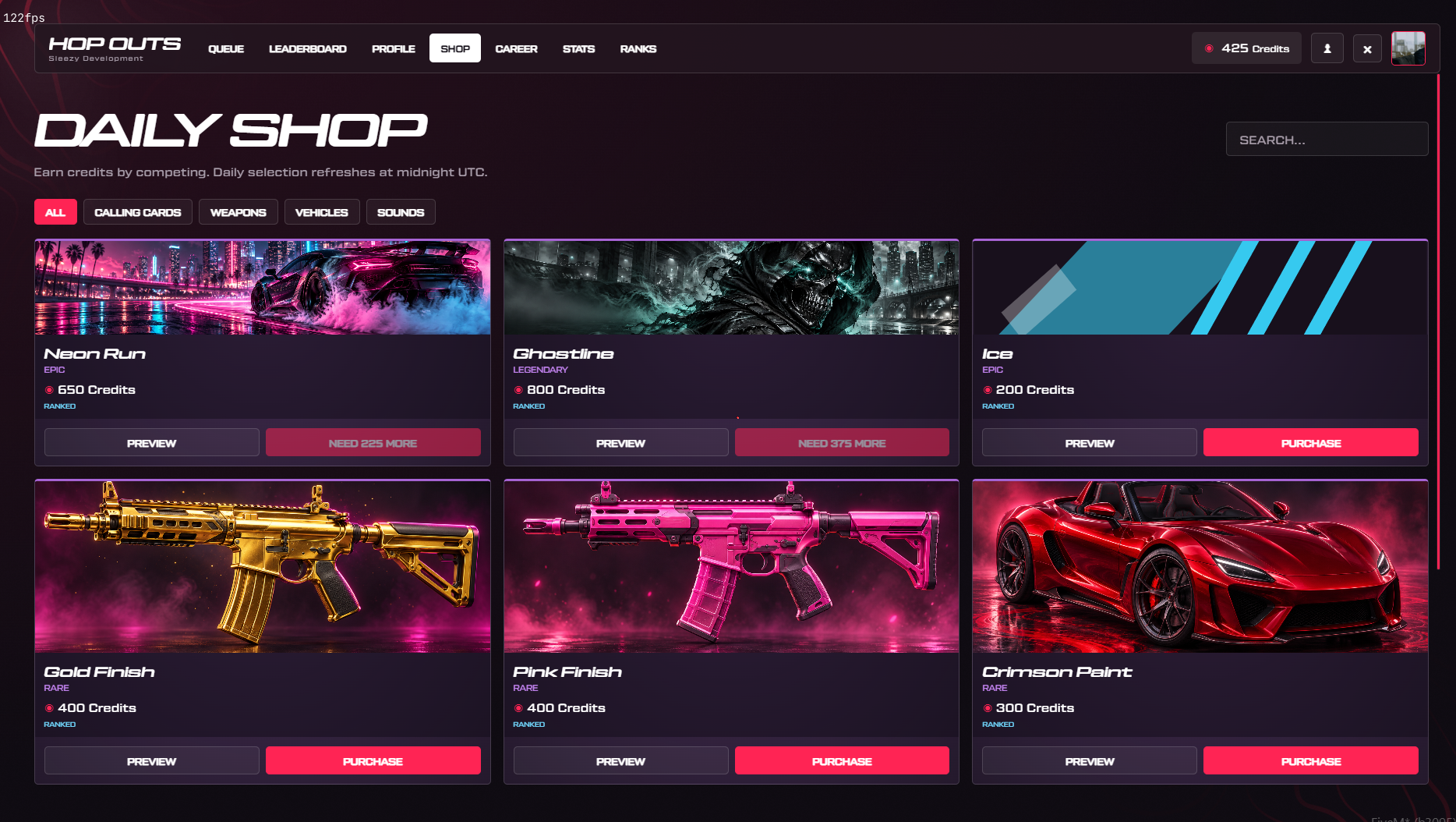
🛍️ In-Game Cosmetic Shop
Players can use credits earned from matches to unlock supported customization items.
- Earn credits through ranked gameplay
- Browse cosmetic categories
- Daily rotating catalog
- Featured calling cards
- Custom weapon finishes
- Custom vehicle paint styles
- Victory sounds
- Saved cosmetic ownership
- Equip and unequip supported cosmetics
- Custom catalog artwork
- Configurable credit prices
- Fixed item prices
- Configurable daily rotation size
- Persistent purchase records
Default Earned Credit Rewards
- Match Victory — 100 Credits
- Match Defeat — 25 Credits
Daily Shop Settings
- Six rotating items by default
- Configurable daily rotation
- Featured always-available cosmetics
- Configurable item categories
- Adjustable item prices
Credits described here are earned through gameplay. No real-money credit purchases are required for the competitive or cosmetic progression systems.
👥 Friends & Social System
Manage friends and teammates through the included social interface.
- Player friends list
- Online player list
- Incoming friend requests
- Recent players
- Blocked players
- Add and remove friends
- Accept friendship requests
- Block and unblock players
- View player online status
- View whether a player is in a match
- Invite eligible friends to your party
- Dedicated social panel
🎨 Custom Competitive UI
The system includes a dedicated competitive interface with custom artwork and animations.
- Dark red and black default theme
- Custom Sleezy Development branding
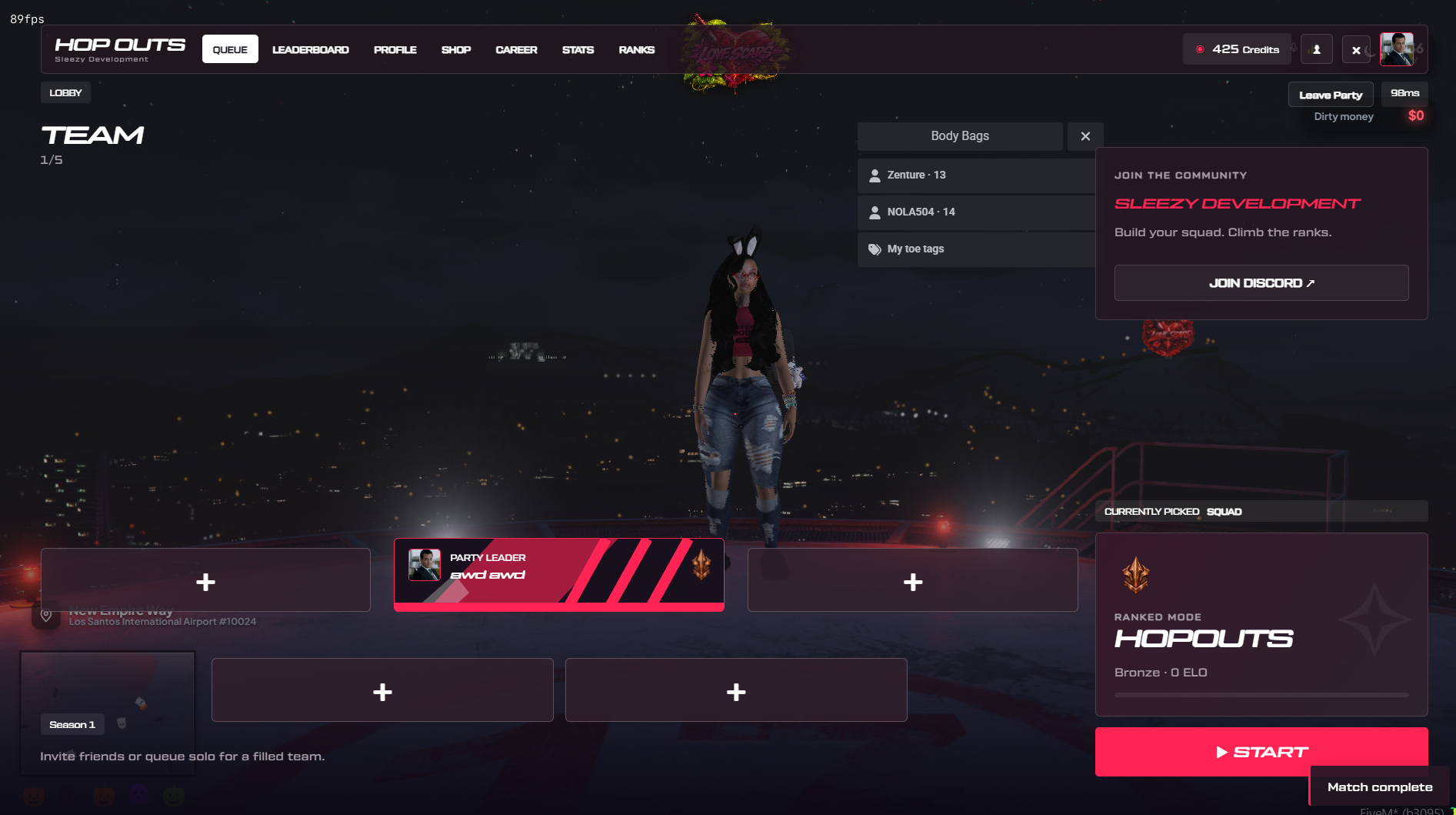
- Interactive ranked lobby
- Five-player party display
- Character preview scene
- Player rank artwork
- Discord profile pictures
- Matchmaking controls
- Friends and social interface
- Match acceptance overlay
- Arena selection interface
- Ranked leaderboard
- Profile collection
- Cosmetic shop
- Career page
- Statistics page
- Ranked tier display
- Round scoreboard
- Match results screen
- Competitive in-game HUD
- Custom sound effects
- Custom images and icons
Main Menu Pages
- Queue
- Leaderboard
- Profile
- Shop
- Career
- Stats
- Ranks
🎬 Character Preview Lobby
The lobby includes a configurable character preview scene.
- Character preview models
- Party member previews
- Configurable scene location
- Adjustable camera distance
- Camera field-of-view settings
- Custom preview animation
- Configurable preview weapon
- Custom background support
- Automatic preview cleanup
The player's actual roleplay character remains at its current world location while browsing the preview lobby.
🎨 UI & Branding Customization
- Custom interface title
- Editable subtitle
- Custom server logo
- HTTPS and local logo support
- Custom Discord link
- Community name
- Custom accent color
- Background color customization
- Panel color customization
- Editable text colors
- Custom rank names
- Custom rank artwork
- Team color customization
- Custom arena images
- Editable shop artwork
- Configurable HUD positions
- Adjustable HUD scaling
- Custom weapon icons
- Custom item icons
- Sound effect configuration
- Custom interface labels
- Configurable scene positioning
- Editable
config.lua
🔊 Audio & Sound Effects
The resource includes local sound effects for gameplay feedback.
- Match found
- Party invitation
- Match countdown
- Round start
- Victory
- Defeat
- Hit confirmation
- Headshot
- Armor break
- Storm movement
Individual sound files and playback volume are configurable.
🛠️ Administrator Controls
Authorized administrators can manage ranked matchmaking and active matches.
- Enable ranked matchmaking
- Disable ranked matchmaking
- Stop selected matches
- Run an unranked solo practice test
- Configure ranked seasons
- Reset seasonal ratings through rollover
- Manage administrator permissions
- Configurable ACE access
- Supported framework administrator groups
- Manual identifier allowlist
- Server-side permission validation
Available Commands
-
/hopouts — Open the ranked Hopouts menu
-
/hopoutsleave — Leave an active match
-
/hopoutscar — Enter a nearby permitted match vehicle
-
/hopoutsspectate — Switch eligible spectator targets
-
/hopoutsdebug — View local match diagnostics
-
/hopoutsversion — Display resource and UI build information
Administrator Commands
-
/hopoutsadmin on — Enable ranked matchmaking
-
/hopoutsadmin off — Disable ranked matchmaking
-
/hopoutsadmin stop [matchId] — Stop a selected match
-
/hopoutsadmin test [arena] — Start an unranked practice session
-
/hopoutsadmin season [name] — Start a new ranked season
ACE Permission
sleezy.hopouts.admin
Administrator access also supports configurable framework groups.
🌐 Match Instances & Player Restoration
Matches run in separated OneSync routing buckets.
- Independent match instances
- Multiple simultaneous matches
- Configurable routing bucket allocation
- Original player location saving
- Original routing bucket saving
- Temporary match equipment
- Character appearance restoration
- Supported weapon restoration
- Match vehicle cleanup
- Player state restoration
- Disconnect recovery handling
- Resource interruption handling
- Persistent recovery records
The system is designed to separate ranked combat from the player's normal roleplay session.
Restoration behavior depends on the installed inventory, medical, and character systems.
🛡️ Security & Gameplay Validation
- Server-side matchmaking validation
- Party membership checks
- Player identity validation
- Configurable matchmaking limits
- Match acceptance verification
- Team assignment validation
- Match instance validation
- Weapon restrictions
- Damage event validation
- Elimination verification
- Match item usage limits
- Server-validated vehicle entry
- Item cooldown handling
- Duplicate purchase protection
- Request rate limiting
- Persistent profile transactions
- Database-backed progression
- Match cleanup and recovery handling
🧩 Framework Support
- ESX
- QBCore
- QBOX
- Standalone
- Automatic framework detection
Inventory Support
- ox_inventory
- qb-inventory
- Native ESX inventory
- Standalone inventory entitlement integration
Additional Integrations
- pma-voice
- Native Mumble
- Compatible medical and ambulance resources
- QB and QBOX vehicle-key integrations
- Configurable HUD adapters
- Custom inventory and framework bridges
Some custom or modified third-party systems require additional configuration.
📦 What's Included
- Advanced Hopouts Resource
- Ranked Matchmaking System
- Solo & Party Queue System
- Friends & Social Management
- Match Acceptance UI
- Arena Selection & Map Banning
- 11 Configurable Arenas
- Vehicle Combat System
- Team-Colored Player Outlines
- Dynamic Storm System
- Temporary Match Weapon Loadouts
- Match Consumables
- Spectating System
- Competitive Match HUD
- Round & Final Scoreboards
- Seasonal ELO Ranking
- Seven Rank Tiers
- Player Career & Match History
- Ranked Leaderboards
- Earned-Credit Cosmetic Shop
- Custom Calling Cards
- Exclusive Top 1–5 Banners
- Character Preview Lobby
- Custom UI Artwork
- Rank Icons & Arena Images
- Sound Effects
- Administrator Commands
- Framework & Inventory Bridges
- Medical Integration Tools
- Editable Configuration
- SQL Installation File
- Framework Installation Guides
- Integration Documentation
🏠 Perfect For
- FiveM Roleplay Communities
- Competitive PvP Servers
- Organized Team Battles
- Street Combat Events
- Ranked Multiplayer Communities
- Custom PvP Arenas
- Community Competitions
- Team-Based Elimination
- Competitive Player Progression
- Player Leaderboards
- Multiplayer Training Sessions
- Server Events
⚙️ Installation & Requirements
- FiveM Server
- OneSync Enabled
- oxmysql
- MySQL-Compatible Database
- ESX, QBCore, QBOX, or Standalone Configuration
- Compatible Inventory Integration for Inventory-Based Features
Optional Integrations
- ox_inventory
- qb-inventory
- pma-voice
- Supported Medical Resources
- Supported Vehicle Key Resources
- Custom HUD Systems
Quick Installation
- Install and ensure oxmysql.
- Add
sleezy_hopouts to your server resources.
- Import the included SQL file.
- Configure framework and inventory integration.
- Configure arena positions and vehicle spawns.
- Adjust matchmaking and team size settings.
- Set up weapon loadouts and match items.
- Configure voice and medical integration.
- Adjust ranked tiers and progression settings.
- Configure UI branding and cosmetic rewards.
- Set up administrator permissions.
- Disable real-money credit purchasing.
- Start the resource after its dependencies.
- Test matches, vehicles, restoration, and medical compatibility in-game.
⚙️ Important Information
This resource provides fictional competitive multiplayer gameplay exclusively within FiveM.
Matchmaking supports up to five players per team. Automatic team sizing can allow uneven teams, while fixed-size matchmaking requires equal team counts.
The included 11 arena configurations use GTA V world locations. Custom arena maps and MLOs are not included.
Character restoration and temporary weapon isolation depend on the installed framework, inventory, and medical resources. Custom integrations may require adjustments.
Optional Discord profile pictures require a properly configured Discord bot token and successful access to the relevant avatar service.
The cosmetic shop can operate with credits earned through gameplay. Real-money credit sales must remain disabled to comply with applicable Creator Platform monetization rules.
The system does not include cash prizes or real-money tournament payouts.
Custom arena locations, vehicle configurations, animations, team outlines, voice integration, and character restoration should be tested with the server's installed resources before public use.
💎 Why Choose This System?
The Sleezy Development Advanced Hopouts System brings ranked team combat, vehicle battles, player progression, and community matchmaking together in one resource.
Instead of basic arena teleportation and instant deathmatch rounds, players can build parties, find opponents, participate in arena selection, enter vehicle-based combat, survive the closing storm, and compete for seasonal ranking positions.
With a complete competitive interface, eleven arenas, configurable match rules, custom loadouts, player outlines, earned cosmetics, and administrator controls, Hopouts provides a flexible PvP experience for different FiveM communities.
Designed for servers looking to introduce organized ranked competition with persistent progression, customizable gameplay, and social features.
Developer: Sleezy Development
Version: 1.0.16
Frameworks: ESX • QBCore • QBOX • Standalone
Resource: sleezy_hopouts
Database: MySQL / oxmysql
Dependencies: OneSync • oxmysql
Support: discord.gg/sleezydevelopment
Sleezy Development • Premium FiveM Systems
Script Preview: (1) Sleezy Development - YouTube
Discord Support: Discord