Sleezy Development • Advanced Wars System (ESX, QBCore, QBOX & Standalone)
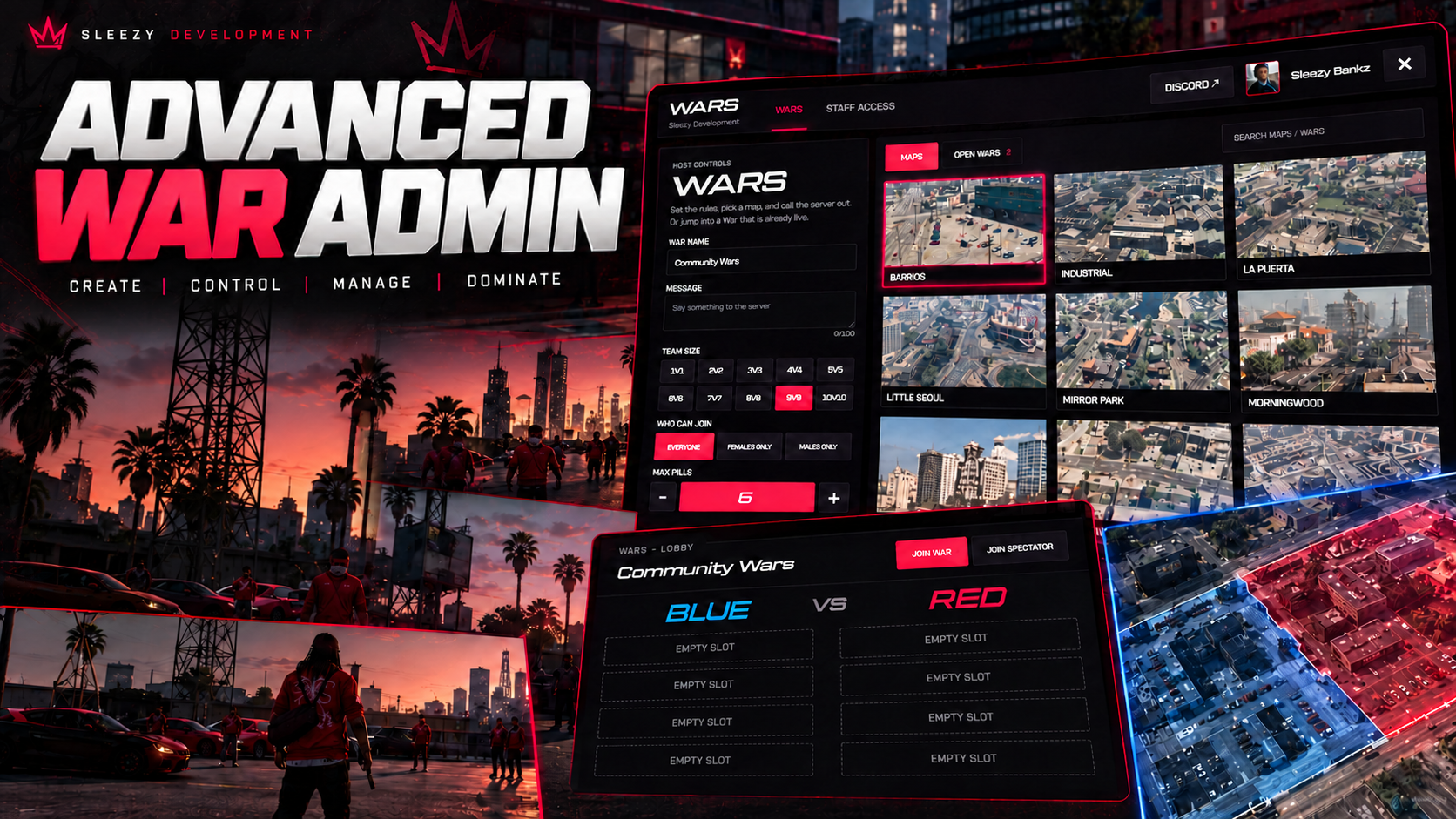
Bring organized team battles, customizable combat rules, interactive war lobbies, and competitive multiplayer events to your FiveM server with the Sleezy Development Advanced Wars System.
Designed for roleplay communities, PvP servers, and organized team competitions, this system allows authorized administrators to create and host wars, assign players to opposing teams, customize combat equipment, select arenas, and manage matches directly in-game.
Players can browse available wars, join waiting lobbies, communicate with their teammates, participate in elimination-based rounds, and compete for victory through a fully designed competitive interface.
Administrators have control over team sizes, available weapons, starting armor, consumables, match duration, arena selection, and the number of rounds needed to win.
The system also includes Discord profile pictures, team-colored player outlines, synchronized voice channels, spectator support, combat statistics, POV requests, match result screens, early war termination, and Discord webhook logging.
Built with a custom UI, server-side validation, persistent match results, configurable branding, and multi-framework compatibility.
⚙️ Features
Advanced administrator-hosted Wars system
Custom in-game Wars interface
Public war browser
Private staff creation controls
Multiple simultaneous wars
Configurable 1v1 through 10v10 team capacities
Eleven included arena configurations
Custom arena support
Red and Blue teams
Manual team assignments
Random team generation
Waiting and spectator slots
Unique war lobby codes
Custom war names and messages
Character-based participation filters
Configurable first-to-win scoring
Custom weapon loadouts per war
Pistols-only battles
Assault-rifles-only battles
Mixed pistol and rifle battles
Optional hatchet weapons
Configurable starting armor
Custom armor vest quantities
Adjustable healing pill limits
Configurable smoke quantities
Configurable armor joint quantities
Team-based voice communication
Discord profile picture integration
Team-colored player outlines
Live match scoreboard
Squad health and armor indicators
Player kill and death tracking
Damage statistics
In-game kill feed
Spectator camera controls
POV request notifications
Final-kill slow-motion presentation
Custom victory and defeat screens
Early war termination
Configurable arena boundaries
Automatic match cleanup
Player state restoration
Persistent SQL match results
Discord webhook match logs
Customizable UI branding and colors
Framework and inventory integration
Server-side permissions and validation
🎮 Advanced War Creation
Authorized administrators can create and configure wars through the in-game menu.
Open the Wars interface
Select Create War
Enter a custom war name
Add a custom war message
Choose an available arena
Set the number of players per team
Configure the first-to-win target
Select who can participate
Adjust available weapons
Configure combat equipment
Set healing pill limits
Create the waiting lobby
Manage participants before starting
Default War Settings
First to 5 round wins
6-minute round time limit
7-second round countdown
200 starting health
100 starting armor
Friendly fire disabled
Headshots enabled
On-foot combat
Equal team sizes required by default
Each war can use its own permitted settings, allowing administrators to organize different types of battles.
👥 Custom Team Sizes
Create wars using a variety of team sizes.
1v1
2v2
3v3
4v4
5v5
6v6
7v7
8v8
9v9
10v10
Team capacity is configurable.
The eleven included arenas provide five player spawn locations per team by default. Larger matches require custom or expanded arena spawn configurations.
🔴 Red Team & Blue Team
The system includes two configurable opposing teams.
Red Team
Blue Team
Custom team names
Custom team colors
Individual spawn positions
Team-specific voice communication
Team-colored player outlines
Separate squad information
Live team scores
Team player lists
Configurable team assignments
Administrators can manually organize teams or use automatic random assignment before starting a war.
🛡️ Administrator Team Management
Control team participation directly through the war lobby.
View all registered players
View player names and Discord avatars
View player server IDs
View connection ping
Assign players to Red Team
Assign players to Blue Team
Move players into waiting slots
Assign spectator slots
Remove players from the lobby
Change the selected arena
Start with manually assigned teams
Start using randomized teams
End active wars early
Manual Teams
Administrators choose exactly which players participate on each side.
Random Teams
The system randomly divides eligible participants into opposing teams before starting.
Default Team Rules
Equal team sizes required
At least one player per team
Up to 10 spectators
Team balancing validation
Configurable uneven-team allowance
👤 Custom Participation Filters
Administrators can configure which characters are eligible to enter individual wars.
Available Filters
Everyone
Female Characters Only
Male Characters Only
Character eligibility is checked through supported framework character information or compatible freemode character models.
This is an optional character-based roleplay filter, not an account-level verification of a player's real-world identity.
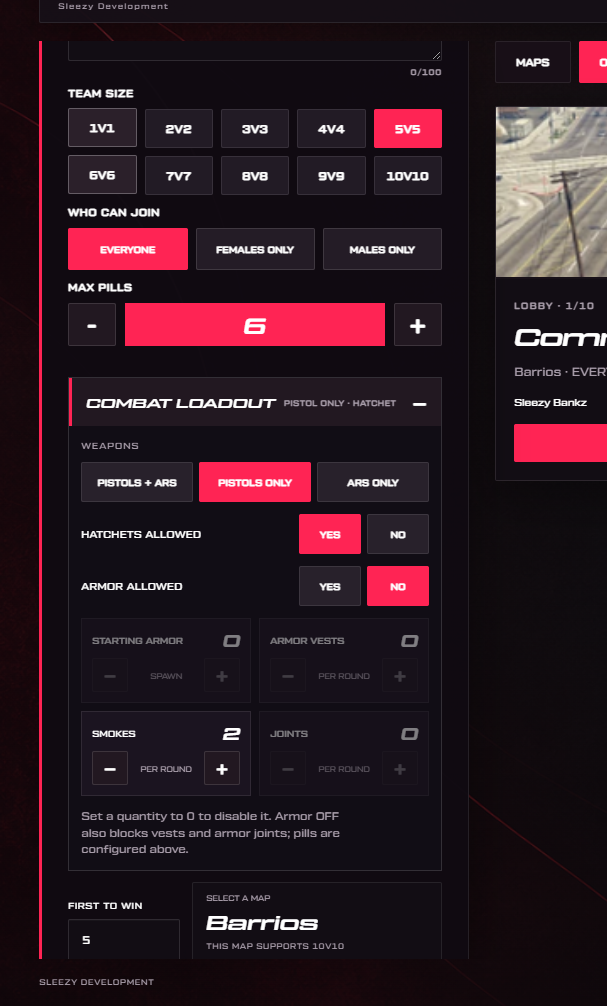
🔫 Advanced Combat Loadout Configuration
One of the system's main features is the ability to customize available combat equipment for each war.
Weapon Selection
Pistols Only
Assault Rifles Only
Both Pistols & Assault Rifles
Hatchet Settings
Allow hatchets
Disable hatchets
Armor Settings
Enable armor
Disable armor
Configure starting armor
Set maximum armor vest quantity
Consumable Settings
Configure healing pill quantity
Configure smoke quantity
Configure armor joint quantity
Disable individual items by setting the quantity to zero
All equipment limits are validated by the server.
Default Combat Equipment
Pistol: Combat Pistol
Rifle: Carbine Rifle
Melee: Hatchet
Starting Armor: 100
Armor Vests: 5
Healing Pills: 6
Armor Joints: 10
Smokes: 1
The maximum healing pill limit is 15 by default.
Individual quantities can be adjusted for each war, while server owners control the overall limits through the configuration.
🎯 Weapon Selection & Keybinds
Players receive temporary match weapons according to the rules selected by the administrator.
Automatic weapon preparation
Configurable weapon models
Temporary match ammunition
Weapon switching
Unarmed starting state
Individual round loadouts
Weapon cleanup after matches
Supported original weapon restoration
Default Weapon Controls
0 — Fists
1 — Assault Rifle
2 — Pistol
3 — Hatchet
Unavailable weapons cannot be selected during restricted weapon modes.
🛡️ Armor & Healing System
Players receive configured in-match consumables that are separate from their regular roleplay equipment.
Armor Vest
Restores armor
Configurable usage duration
Custom use animation
Adjustable armor amount
Per-war quantity control
Healing Pill
Restores health
Configurable healing amount
Timed healing effect
Custom use animation
Adjustable usage limit
Armor Joint
Provides an in-game armor effect
Configurable armor amount
Custom smoking animation
Handheld prop support
Per-war quantity configuration
Smoke
Configurable smoke utility
Custom smoke duration
Adjustable quantity
Quick-use and throwable controls
Repair Kit
Optional vehicle repair equipment
Custom repair animation
Configurable repair duration
Intended for vehicle-enabled arena configurations
Repair kits are disabled by default because standard Wars are on foot.
Default Equipment Controls
5 — Armor Vest
6 — Healing Pill
7 — Armor Joint
8 — Repair Kit
G — Smoke
4 — Throwable Smoke
All keybinds and supported item settings can be configured.
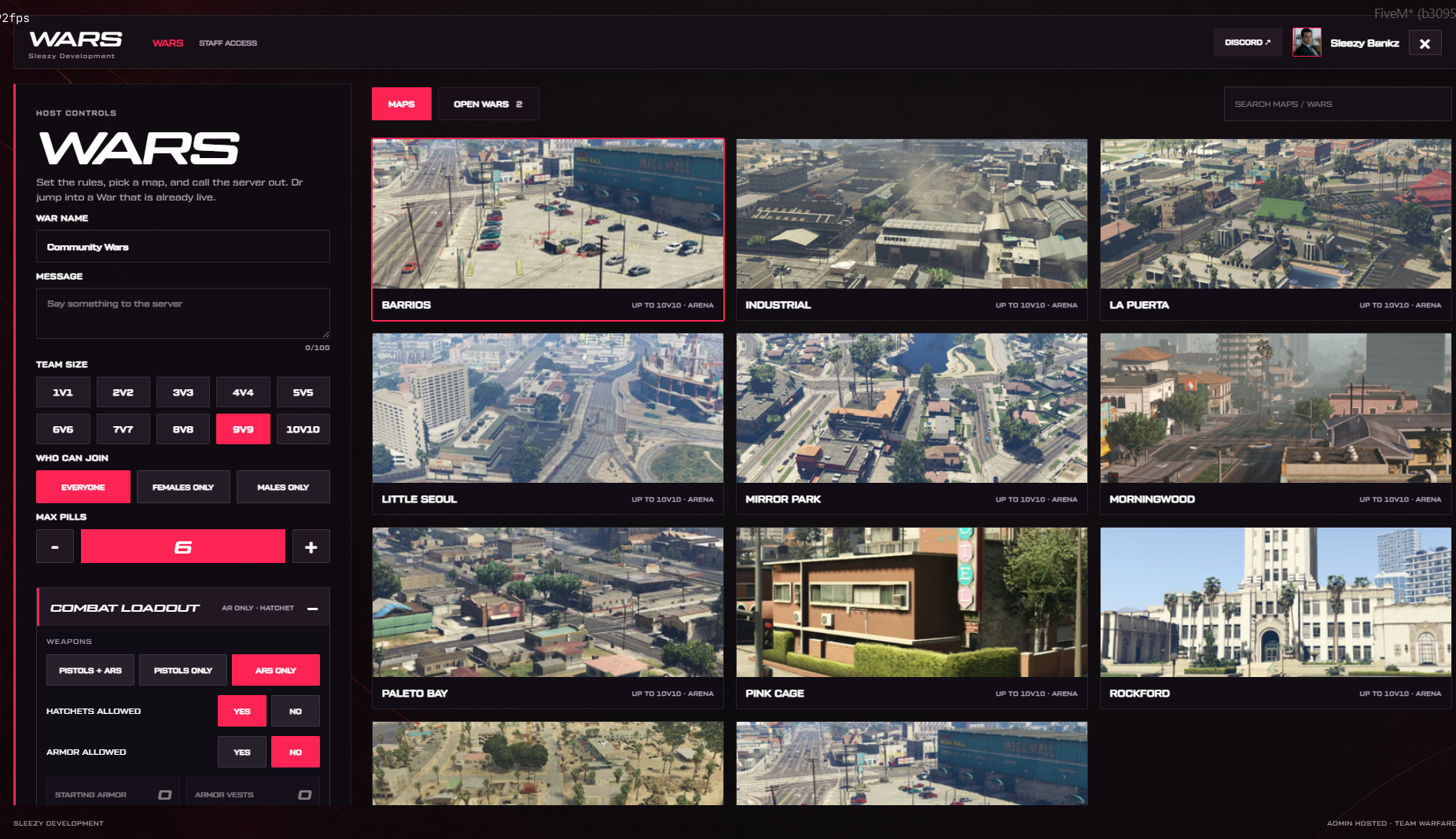
🗺️ Eleven Included Arenas
The system includes eleven configurable arena locations with corresponding map preview images.
Included Maps
Little Seoul
Morningwood
Pink Cage
Mirror Park
Rockford
Sandy Shores
Southside
Paleto Bay
La Puerta
Industrial
Barrios
Arena Features
Custom arena names
Individual spawn coordinates
Separate Red Team spawns
Separate Blue Team spawns
Configurable arena centers
Adjustable arena boundaries
Arena preview images
Custom map availability
Configurable team capacity
Custom arena definitions
Administrators can choose an arena while creating a war and change it before the match begins.
Custom Arena Support
Server owners can add custom arenas by configuring their own map definitions and spawn coordinates.
Custom MLOs, rooftop arenas, and additional map geometry are not included.
🌐 War Lobby System
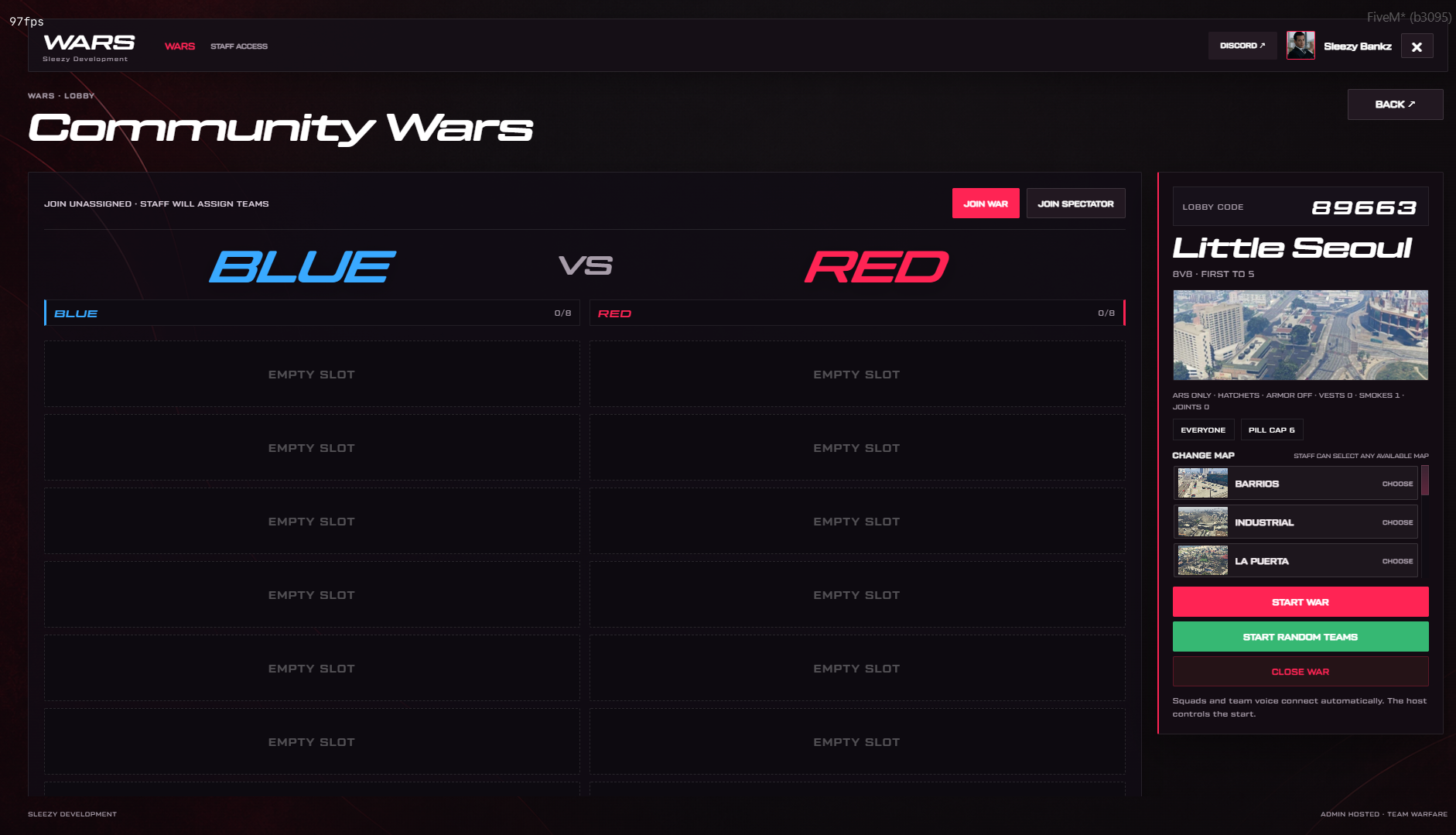
Each created war has its own waiting lobby.
Unique lobby code
Custom war title
Custom host name
Arena preview
Custom war message
Configurable team capacity
War participation settings
Waiting player list
Red and Blue rosters
Spectator list
Player Discord avatars
Player ping information
Custom combat rules summary
Start War button
Start Random Teams button
Early End War button
Lobby Management
Public war browsing
Player registration
Staff team assignment
Spectator registration
Player removal
Arena changes
Manual match starting
Automatic lobby expiration
Default Lobby Settings
Maximum 12 simultaneous war rooms
30-minute waiting lobby timeout
Five-digit public lobby codes
Up to 10 spectators
Configurable room limits
🎙️ Team Voice Communication
The system includes voice integration for communicating with teammates during matches.
Dedicated team voice channels
Red Team communication
Blue Team communication
Separate team voice routing
Shared communication during results
Automatic voice setup
Original voice state restoration
Configurable voice settings
Spectator voice handling
Voice Integrations
pma-voice
Native Mumble
Custom voice adapters
The system uses existing microphone and push-to-talk controls rather than requiring a separate microphone interface.
Compatibility with modified voice resources should be tested.
✨ Team-Colored Player Outlines
War participants can see configurable outlines on their teammates.
Red team outlines
Blue team outlines
Custom outline colors
Teammate-only visibility
Adjustable outline opacity
Automatic updates
Outline cleanup after matches
Configurable rendering settings
Outlines use supported GTA/FiveM rendering functionality and can be disabled through the configuration.
📊 Live Match Scoreboard
Track the progress of every round through the competitive HUD.
Current round number
Red Team score
Blue Team score
Match countdown
Current round timer
Team player avatars
Living and eliminated player indicators
Squad health bars
Squad armor bars
Player health and armor display
Equipped weapon information
Available ammunition
Remaining match items
Team communication indicator
Kill feed
Arena boundary warnings
The scoreboard updates during the match to reflect the current server-authorized state.
💀 Elimination & Spectator System
Players who are eliminated can continue observing the battle.
Elimination state tracking
Configurable death pose
Eliminated player spectator mode
Cycle through living teammates
Dedicated spectator slots
Spectator camera controls
Automatic spectator cleanup
Player availability validation
Round-end transitions
New-round player preparation
Spectator Controls
RIGHT ARROW — Cycle available spectator targets
/warsspectate — Cycle spectator targets
Dedicated spectators can observe living participants, while eliminated competitors are restricted to eligible living teammates.
🎬 Final-Kill Slow Motion
The system includes an optional cinematic presentation for the final confirmed elimination of a winning round.
Configurable slow-motion effect
Short cinematic duration
Automatic activation on eligible final kills
Participant-only visual presentation
Adjustable playback speed
Optional feature toggle
Default Cinematic Settings
1.5-second duration
0.35 playback speed
The effect is applied locally to eligible war participants rather than changing the game speed for the entire server.
🏆 Match Results & Player Statistics
After a round or completed war, players can review the match results.
Winning team announcement
Defeat announcement
Round score
Final war score
Player names
Player Discord avatars
Kill statistics
Death statistics
Damage dealt
Player ping
MVP display
Team result tables
Custom victory and defeat artwork
Configurable result duration
Victory and defeat sounds
Default Result Timing
12-second round results
18-second final results
📹 Player POV Requests
The scoreboard includes a dedicated POV request option.
Request another participant's POV
Player-specific notification
Requesting player's name
Requesting player's avatar
Custom POV request message
Configurable notification duration
Request cooldown
F7 scoreboard cursor control
Default POV Settings
8-second request notification
30-second request cooldown
Customizable request message
The POV system sends an in-game request asking the selected participant to save or share their own footage.
It does not automatically capture, record, upload, or access player video.
⛔ Early War Termination
Administrators can stop a running war without waiting for the scheduled match conclusion.
In-Game Controls
Open the active war lobby
Select End War Early
Confirm the action
Stop the active match
Restore participating players
Clear the war room
Command Controls
/warsend — Begin the early-end confirmation
/warsend again — Confirm the pending request
/warsend confirm — Confirm explicitly
/warsend cancel — Cancel the request
/warsend [lobby code] — Select a specific war
/warsend help — View command usage
Default Confirmation Window
If multiple wars are active and the administrator is not participating in one, the lobby code can be used to select the correct match.
Ending a war early does not award a winner.
📤 Discord Webhook Logging
Keep track of hosted wars and match outcomes using the integrated Discord webhook system.
War Started Logs
War title
Host name
Arena name
Lobby code
Number of participants
First-to-win target
Red Team roster
Blue Team roster
Spectator roster
Start timestamp
War Completed Logs
Winning team
Final match score
Arena
Lobby code
War duration
Number of rounds
Red Team roster
Blue Team roster
Individual player kills
Individual player deaths
Player damage statistics
Match timestamp
Database result confirmation
Early End & Interrupted War Logs
Early termination status
Staff member ending the war, when available
Interruption reason
Current score
Arena
Lobby code
Team rosters
Available player statistics
Webhook Configuration
Dedicated War Started webhook
Dedicated Completed War webhook
Dedicated Stopped War webhook
Shared webhook fallback
Custom webhook username
Configurable event toggles
Discord embed formatting
Server-side webhook settings
Upload retry and queue handling
Webhook URLs are loaded through private server configuration variables and are not exposed through the player interface.
Failed webhook deliveries do not stop the active war.
💾 Persistent War Results
Completed match results are stored using oxmysql.
Saved match identifiers
Selected arena
Winning team
Final match score
Player participation records
Kill statistics
Death statistics
Damage statistics
Match timestamps
Database-backed recovery information
Discord result logs are sent after successful database result saving.
🎁 Optional Winner Rewards
The resource provides an optional server-side integration for winner rewards.
Enable or disable custom winner rewards
Server-side reward callback
Winning team eligibility validation
Match result information supplied to the callback
Custom economy integration support
Custom item integration support
Automatic money or item rewards are not included by default. Server owners must configure their own compatible reward callback.
🔐 Administrator Permissions
Only authorized staff can create, manage, start, and end wars.
ACE permission support
QBCore administrator permissions
QBOX-compatible administrator permissions
ESX administrator groups
Standalone ACE support
Manual identifier allowlist
Server-side administrator verification
Protected lobby management
Restricted war creation
Restricted early termination
Restricted team assignments
Default Permission
sleezy.wars.admin
Default Framework Groups
admin
god
superadmin
🛠️ Administrator Commands
/warsadmin — Open staff controls
/warsadmin on — Enable the Wars system
/warsadmin off — Disable new Wars activity
/warsadmin stop [match-id] — Stop a selected match
/warsend — Begin early war termination
The administrator command and early-end command can be changed through config.lua.
🎮 Player Commands
/wars — Open the public Wars browser
F6 — Open the Wars interface
/warsleave — Leave an active war
/warsspectate — Change eligible spectator targets
/warsversion — Display resource information
/warsdebug — Display local diagnostic information
Additional Controls
F7 — Toggle scoreboard cursor during results
RIGHT ARROW — Cycle spectator targets
0–3 — Weapon selection
5–8 — Match consumables
G — Smoke utility
Player key mappings are editable through FiveM's key binding settings.
🎨 Custom Wars Interface
The system includes a custom competitive interface with configurable styling.
Custom war browser
Create War panel
Open Wars list
Arena preview cards
Player Discord avatars
Team roster panels
Host management controls
Combat loadout editor
Interactive quantity controls
Live scoreboard
Squad status interface
Weapon and equipment HUD
Match results screen
Custom victory and defeat visuals
POV request notifications
Custom audio effects
Configurable colors and branding
🎨 Branding & Customization
Server owners can adjust supported interface settings through the configuration.
Custom server branding
Editable interface title
Custom logo support
Custom Discord link
Community name
Interface subtitle
Custom accent color
Background colors
Panel colors
Text colors
Border colors
Success color
Custom UI background image
Editable labels
Custom map images
Custom team names
Custom team colors
Configurable HUD positions
Adjustable interface scale
Configurable roster panel dimensions
Adjustable host panel width
Custom map card height
Editable combat settings
Configurable match timers
Custom loadout limits
Editable config.lua
Editable arena definitions
🛡️ Match Safety & Validation
The resource includes checks to help keep war sessions separate from normal roleplay gameplay.
Server-side lobby validation
Administrator permission checks
Player identity checks
Team capacity validation
Duplicate match prevention
Character availability checks
Match preparation checks
Spawn collision validation
Routing bucket isolation
Weapon restrictions
Item quantity limits
Action cooldowns
Combat event validation
Player death-state checks
Duplicate reward prevention
Server-side scoring
Interrupted match handling
Player disconnect cleanup
Resource shutdown cleanup
Persistent recovery records
🌐 Player State Restoration
The system saves supported player information before entering a war.
Original player coordinates
Original routing bucket
Health and armor state
Character appearance snapshot
Supported inventory state
Supported weapon state
Recovery information
Roleplay Mode
Players normally return to their original entry location after leaving or completing a war.
PvP Mode
Players return to a configurable spawn location instead.
Player restoration depends on compatible framework, inventory, character, and medical integrations.
🏥 Medical & HUD Integration
The system provides integration bridges for supported medical and HUD resources.
QBCore ambulance compatibility
QBOX medical integration
ESX death and ambulance integration
Editable medical callbacks
Custom HUD compatibility hooks
Native match HUD
Optional integration validation tools
An optional console integration utility can inspect recognized resource versions and install selected compatibility guards after creating backups.
This utility does not run automatically. Modified or unsupported medical/HUD resources may require manual integration.
🎙️ Discord Avatar Integration
Display player profile images in the Wars interface.
Discord avatar support
Configurable server-side bot token
Player profile image caching
Discord identifier lookup
Fallback avatars
Player profile display
Lobby player avatars
Team roster pictures
Scoreboard avatars
Discord avatar functionality requires the relevant Discord identifiers and API access.
The system can use fallback avatar images when Discord information is unavailable.
🧩 Framework Support
ESX
QBCore
QBOX
Standalone
Automatic framework detection
Inventory Support
ox_inventory
qb-inventory
ESX inventory/loadout integration
Standalone native weapon handling
Editable inventory bridge
Voice Support
pma-voice
Native Mumble
Custom voice callbacks
Database
oxmysql
MySQL-compatible database
📦 What's Included
Sleezy Advanced Wars Resource
Custom Wars Interface
Public War Browser
Administrator War Creator
Team Lobby Management
Red & Blue Team System
Manual & Random Team Assignment
Spectator System
Eleven Arena Configurations
Arena Preview Images
Combat Loadout Configuration
Pistol & Rifle Restrictions
Armor & Consumable Configuration
Temporary Match Equipment
Team Voice Integration
Team-Colored Player Outlines
Competitive Match HUD
Match Scoreboard
POV Request System
Final-Kill Cinematic
Early War Termination
Discord Webhook Logging
Discord Profile Picture Integration
Match Results Database
Player Restoration System
Medical & Inventory Integration Bridges
Editable Configuration
SQL Installation File
Installation Instructions
Asset Escrow Configuration
🏠 Perfect For
FiveM Roleplay Communities
Competitive PvP Servers
Organized Team Battles
Community War Events
Red vs. Blue Competitions
Custom Arena Battles
Gang Roleplay Events
Staff-Hosted Events
Organized Team Training
Community Tournaments Without Wagering
Server Administration
Competitive Roleplay Experiences
⚙️ Requirements
FiveM Server
OneSync Enabled
oxmysql
MySQL-Compatible Database
ESX, QBCore, QBOX, or Standalone
Optional Integrations
ox_inventory
qb-inventory
pma-voice
Compatible medical resources
Compatible HUD resources
Custom inventory and voice adapters
⚙️ Installation
sql/install.sql into your database.sleezy_wars to your resources./warsadmin to manage hosted wars.⚙️ Important Information
This resource is designed for administrator-hosted team battles inside FiveM.
Players can browse and join hosted wars, but creating and managing wars requires administrator permission.
The eleven included arenas use native GTA V world locations. Custom rooftop arenas, custom MLOs, and additional map geometry are not included.
The default arenas support up to five players per team. Larger team sizes require additional verified spawn locations.
Wars use on-foot combat by default. Vehicle battles require additional vehicle and arena configuration.
The POV request feature provides a notification only and does not record or upload gameplay footage.
Discord profile images and webhook logging require valid credentials and external service availability.
The system does not include a ranked matchmaking queue, paid-credit shop, or automatic cash reward economy.
Optional winner rewards require server-owner integration and must comply with the server's permitted in-game economy.
Match restoration should be tested with the installed inventory, appearance, medical, and voice resources before public use.
💎 Why Choose This System?
The Sleezy Development Advanced Wars System gives server administrators control over organized team battles without requiring players to manage teams manually outside the game.
Administrators can create wars, choose arenas, configure equipment, set team sizes, manage rosters, start matches, and end active competitions through an interactive interface.
Players receive a dedicated competitive experience with team voice communication, configurable loadouts, live scoreboards, combat statistics, spectating, and custom match results.
With integrated Discord webhook logging, server-side match validation, persistent results, and extensive customization options, Advanced Wars provides a flexible way to organize team competitions across FiveM communities.
Developer: Sleezy Development
Version: 1.0.10
Frameworks: ESX • QBCore • QBOX • Standalone
Resource: sleezy_wars
Database: MySQL / oxmysql
Dependencies: OneSync • oxmysql
Support: discord.gg/sleezydevelopment
Sleezy Development • Premium FiveM Systems
Script Preview: (1) Sleezy Development - YouTube
Discord Support: Discord
