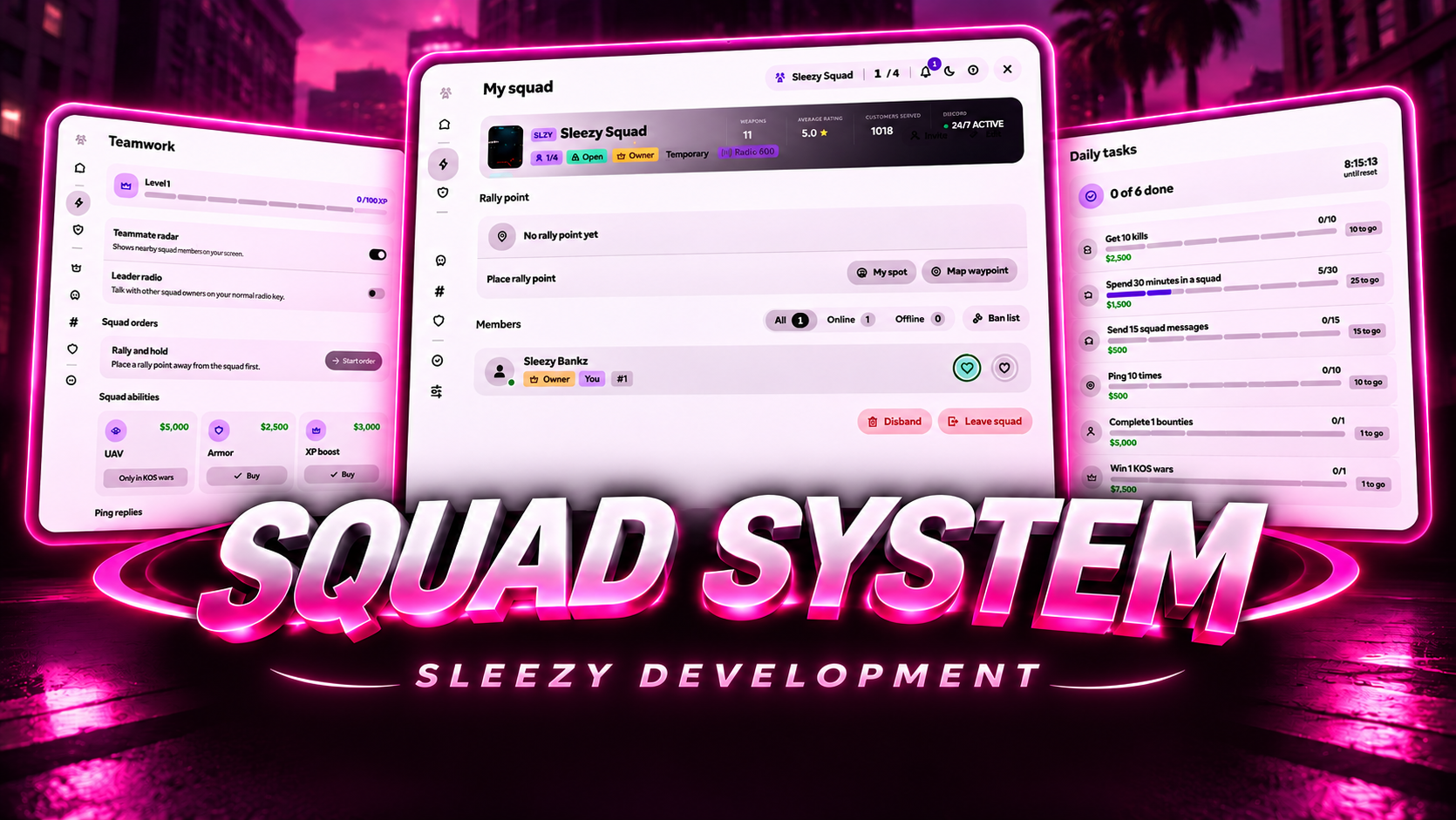
Bring advanced squad management, team communication, tactical coordination, and competitive group activities to your FiveM server with the Sleezy Development Advanced Squads System.
Designed for roleplay communities, PvP servers, and organized player groups, this system allows players to create their own squads, recruit members, customize ranks, communicate privately, manage shared funds, and participate in squad-based activities.
Players can create public or private squads, customize their squad identity, invite friends, assign ranks, manage member permissions, and coordinate with teammates using an interactive HUD, tactical ping wheel, map tracking, and private radio channels.
Advanced Squads V2 also introduces consensual squad wars, configurable bounties, daily objectives, squad abilities, rally missions, player profiles, shared finances, and a dedicated administrator management interface.
Built with a custom purple-and-black UI, persistent squad data, extensive configuration settings, framework integrations, and server-side validation.
👥 Advanced Squad Management
🎮 Custom Squad Interface & Profiles
📡 Private Squad Radios & Tactical Pings
⚔️ Squad Wars & Bounty System
💰 Shared Squad Funds & Daily Rewards
🏆 Ranks, Permissions & Team Progression
🛠️ In-Game Administrator Dashboard
🧩 ESX / QBCore / QBOX / Standalone
⚙️ Features
Advanced squad creation and management
Public and private squads
Configurable squad passwords
Permanent and temporary squad options
Up to 40 members per squad by default
Custom squad names and tags
Custom squad logos and banners
Configurable squad colors
Custom member ranks
Rank-based permissions
Squad ownership transfers
Member invitations and applications
Nearby player recruitment
Player kick and ban management
Squad member profiles
Custom profile pictures
Player biographies and status indicators
Personal profile image galleries
Private squad chat
Quick chat keybind
Private squad radio channels
Optional squad leader radio
Interactive squad HUD
Live teammate health and armor
Teammate map blips
Player name tags
Friendly-fire configuration
Tactical ping wheel
Enemy and danger pings
Loot and vehicle pings
Ping acknowledgments
Squad radar
Rally points and team orders
Squad XP progression
Squad abilities
Squad-versus-squad wars
Configurable bounty contracts
Shared squad finances
Deposits and withdrawals
Transaction history
Daily objectives and rewards
In-game administrator dashboard
Live configuration management
Optional Discord webhook logging
Persistent database storage
Automatic framework detection
👥 Advanced Squad Creation
Players can create and customize their own squads through the dedicated interface.
Custom squad name
Optional squad tag
Custom squad logo
Custom banner
Adjustable squad color
Configurable member capacity
Public or private visibility
Password-protected squads
Optional membership approval
Permanent or temporary squad selection
Optional squad creation fee
Configurable creation cooldown
Squad name availability checks
Default Squad Configuration
Maximum Members: 40
Squad Tag Length: 2–5 Characters
Creation Fee: Disabled
Optional Creation Fee: $5,000
Squad Persistence: Enabled
Custom Rank Support: Enabled
Server owners can adjust these settings through the configuration.
🔐 Public & Private Squads
Choose how players discover and join squads.
Public Squads
Search available squads
Browse public squad information
View current member counts
Join without a password when approval is not required
Optional application approval
Private Squads
Password-protected access
Invite-based recruitment
Membership applications
Authorized member approval
Restricted squad access
Configurable member limits
Permanent Squads
Retain membership across reconnects
Save squad information
Preserve offline members
Persistent ranks and permissions
Persistent squad funds
Saved squad customization
Temporary Squads
Designed for short-term groups
Remove disconnected members
Automatically disband when empty
Do not persist across resource restarts
👑 Custom Ranks & Permissions
Squad owners can create and manage their own rank hierarchy.
Custom rank names
Adjustable rank levels
Assign ranks to members
Configure individual permissions
Promote and demote members
Restrict management actions
Owner-controlled rank editing
Server-side rank verification
Up to 12 configured ranks
Default Ranks
Owner
Officer
Member
Supported Permission Categories
Invite players
Remove members
Manage squad settings
Edit squad appearance
Deposit squad funds
Withdraw squad funds
Manage squad wars
Manage bounties
Access authorized squad features
Rank restrictions are validated by the server.
🤝 Recruitment & Invitations
Grow your squad through an integrated recruitment system.
Invite nearby players
Invite players using server IDs
Send squad invitations
Accept or decline invitations
Submit squad applications
Accept or reject applications
Cancel pending requests
Automatic invitation expiration
Configurable recruitment distance
Prevent duplicate invitations
Respect squad capacity
Enforce existing squad bans
Default Recruitment Settings
Nearby Invitation Distance: 15 Meters
Application Expiration: 10 Minutes
Invitation Expiration: 60 Seconds
Rejoin Cooldown: 1 Minute
Recruitment Interactions
Squad menu
ox_target
qb-target
Aim-based invitation command
💬 Private Squad Chat
Communicate directly with members of your squad.
Dedicated squad chat
Real-time squad messages
Player names and profile images
Quick chat interface
Custom message limits
Squad-only message delivery
Configurable chat notifications
Chat activity tracking
Daily chat objective support
Default Chat Controls
Y — Open Quick Squad Chat
/squadchat — Open Squad Chat
/sqc [message] — Send a squad message
📻 Private Squad Radio System
The resource includes optional integration with pma-voice for private squad communication.
Automatic squad radio assignment
Dedicated squad channels
Configurable radio range
Automatic channel changes
Previous channel restoration
Squad membership validation
Unauthorized radio access protection
Radio access updates after leaving a squad
Configurable radio settings
Default Radio Channels
Squad Channels: 800–899
Leader Radio: 987.5
Optional Leader Radio
Squad leaders can access an additional configured communication channel.
Restricted leader access
Toggle leader communication
Dedicated channel configuration
Permission validation
Automatic access removal when no longer eligible
Leader Radio Command
/squadleaders
Private squad radio functionality requires pma-voice. The remainder of the resource can operate without it.
📊 Interactive Squad HUD
Keep track of your teammates through a customizable in-game HUD.
Live squad member list
Player names
Teammate health
Teammate armor
Squad member status
Radio indicators
Custom HUD colors
Adjustable interface scale
HUD positioning
Adjustable opacity
Minimized HUD mode
Configurable member display limits
Self-display toggle
Individual player preferences
Default HUD Styling
Dark background
Purple armor bars
White health bars
Customizable accent colors
Configurable positioning
🏷️ Squad Name Tags
Identify members of your squad using configurable in-game name tags.
Teammate name display
Server ID display
Health bar indicators
Custom name tag colors
Adjustable visibility distance
Configurable display settings
Optional name tag boost key
Dynamic member updates
Default Tag Distance
🗺️ Squad Map Tracking
View connected squad members through the in-game map.
Teammate map blips
Configurable blip colors
Individual member tracking
Online teammate visibility
Player waypoint selection
HUD navigation controls
Configurable map display
Tracking preferences
Automatic cleanup when members leave
Navigation Command
/squadhud — Select a squad member waypoint.
📡 Advanced Tactical Ping System
Coordinate with teammates using an interactive world-positioned ping system.
Supported Ping Types
Go Here
Enemy
Danger
Loot
Defend
Vehicle
Enemy Vehicle
Ping Features
Quick ping interaction
Interactive ping selection wheel
World-positioned markers
Configurable ping icons
Distance indicators
Off-screen indicators
Entity-following pings
Configurable ping lifetime
Sound notifications
Adjustable ping scale
Custom notification settings
Squad-only ping synchronization
Default Ping Controls
Middle Mouse Click — Place Ping
Hold Middle Mouse — Open Ping Wheel
Double Tap Middle Mouse — Hostile Ping
Default Ping Settings
Ping Duration: 15 Seconds
Ping Cooldown: 1 Second
Hold Duration: 350 ms
Double Tap Window: 250 ms
🤝 Ping Acknowledgments & Loot Claims
Squad members can respond to shared tactical information.
Acknowledge teammate pings
Track ping responses
Claim available loot pings
Display claimed loot information
Prevent duplicate loot claims
Shared teamplay updates
Commands
/squadack — Acknowledge an eligible ping.
/squaddibs — Claim an available loot ping.
📍 Squad Rally Points
Squad leaders can create rally points for coordinated group activities.
Set a custom rally location
Share rally coordinates
Display rally information
Update rally locations
Clear existing rally points
Integrated team navigation
Configurable rally settings
🏆 Timed Rally Orders
Rally orders provide additional team objectives.
Create an order at an existing rally point
Require nearby squad members
Configurable objective radius
Custom objective duration
Hold-position requirement
Squad fund rewards
Squad XP rewards
Configurable cooldowns
Order cancellation
Automatic order expiration
Default Rally Order Settings
Order Duration: 5 Minutes
Minimum Members: 2
Required Hold Time: 30 Seconds
Objective Radius: 20 Meters
Squad Funds Reward: $250
XP Reward: 100
Order Cooldown: 10 Minutes
⚔️ Squad Wars
Challenge opposing squads through a configurable in-game war system.
Send war invitations
Accept or decline war requests
Configurable war duration
Server-validated player eliminations
Squad kill tracking
Live war information
War result handling
Optional surrender
Automatic war expiration
War cooldowns
Squad statistics
Teamplay notifications
Default War Settings
Default Duration: 30 Minutes
Available Duration: 5–30 Minutes
War Request Expiration: 5 Minutes
War Cooldown: 15 Minutes
War Requirements
Both squads must be available
Opposing squad approval is required
Active war restrictions
Server-side kill validation
Configurable cooldowns
Squad Wars tracks competition between existing squads. It is not a separate arena-based matchmaking or weapon loadout system.
🎯 Configurable Bounty System
Allow authorized squad members to post fictional in-game bounties.
Create a bounty on an eligible player
Set a reward amount
Add a bounty description
Track active bounties
Cancel available bounties
Automatic bounty expiration
Server-validated completion
Configurable maximum rewards
Configurable active bounty limits
Squad fund integration
Bounty refund handling
Completion statistics
Default Bounty Settings
Maximum Active Bounties: 5
Maximum Reward: $100,000
Bounty Lifetime: 24 Hours
Bounty rewards are funded through the squad's existing in-game funds, not purchased with real money.
💰 Shared Squad Funds
Manage a shared squad balance through the integrated finance system.
Shared squad account
Member deposits
Authorized withdrawals
Configurable withdrawal permissions
Transaction history
Squad balance display
Adjustable account limits
Bounty fund reservations
Squad ability purchases
Administrator balance adjustments
Server-side account validation
Default Financial Permissions
Deposits: Squad Members
Withdrawals: Squad Owner
Transaction History
Track supported financial activity, including:
Deposits
Withdrawals
Bounty payments
Bounty refunds
Squad ability purchases
Administrator balance adjustments
The system uses the configured framework's in-game economy. Standalone mode requires a compatible money provider for financial functionality.
⚡ Squad Abilities
Spend earned squad funds on configurable teamplay abilities.
UAV
Reveals qualifying opponent information during an active squad war
Configurable scanning range
Timed UAV activity
Adjustable pulse intervals
Configurable purchase cost
Ability cooldown
Default UAV
Cost: $5,000
Duration: 15 Seconds
Range: 500 Meters
Cooldown: 5 Minutes
Squad Armor
Provides an armor benefit to eligible nearby living squad members
Configurable armor amount
Adjustable effect range
Custom purchase cost
Ability cooldown
Default Squad Armor
Cost: $2,500
Armor Amount: 50
Range: 30 Meters
Cooldown: 5 Minutes
Squad XP Boost
Temporarily increases qualifying squad XP gains
Configurable multiplier behavior
Adjustable boost duration
Custom purchase cost
Ability cooldown
Default XP Boost
Cost: $3,000
Duration: 5 Minutes
Cooldown: 15 Minutes
All abilities can be configured through the resource settings.
⭐ Squad XP & Progression
Reward players for participating in squad activities.
Squad activity XP
Proximity-based XP
Timed XP rewards
Rally order XP
Configurable XP amounts
Optional XP boosts
Squad member statistics
Activity-based progression
Default XP Settings
10 XP per qualifying minute
75-meter teammate proximity range
100 XP for completed rally orders
Configurable boost multiplier
📅 Daily Objectives & Rewards
Players can complete configurable daily squad activities.
Default Daily Objectives
10 Kills — $2,500
30 Minutes — $1,500
15 Squad Messages — $500
10 Tactical Pings — $500
1 Bounty Completion — $5,000
1 Squad War Completion — $7,500
Daily Features
Daily objective tracking
Individual objective progress
Configurable objective goals
Custom in-game cash rewards
Daily claim limits
Automatic daily reset
Duplicate reward protection
Daily rewards use the supported framework economy and can be adjusted or disabled.
👤 Player Profiles & Customization
Players can customize their squad identity through an interactive profile interface.
Custom profile picture
Profile banner
Personal biography
Online status
Away status
Busy status
Invisible status
Idle status
Do Not Disturb status
Personal image gallery
Squad membership display
Character-specific profile information
Profile Gallery
Up to 9 images
HTTPS image links
Approved image-host configuration
Custom profile artwork
Images must come from HTTPS hosts permitted by the server's configured allowlist.
🎨 Squad Branding
Squad owners can customize their group appearance.
Custom squad name
Custom squad tag
Squad profile image
Squad banner
Custom squad color
Squad membership settings
Private or public visibility
Adjustable maximum members
Squad logos and banners use approved HTTPS image links.
🖥️ Custom Squads Interface
The system includes a prebuilt HTML-based management interface.
Modern dark theme
Purple accent colors
Squad creation interface
Public squad browser
Member management
Rank editor
Squad applications
Recruitment invitations
Player profiles
Squad chat
Teamplay controls
Squad funds
Daily objectives
Bounty management
Squad Wars
Administrator dashboard
Customizable UI preferences
The interface is prebuilt and does not require Node.js to run on your FiveM server.
🛠️ Administrator Dashboard
Authorized staff can manage squads and configuration through a dedicated interface.
View existing squads
Search registered squads
Inspect squad membership
Review squad finances
Join selected squads through admin controls
Remove squad members
Disband squads
Adjust squad funds
Configure supported settings
Enable and disable available features
Manage permissions
Configure interface options
Update webhook settings
Test Discord webhook connectivity
Save supported changes in-game
Live Configuration
Supported administrator changes are saved to the resource's MySQL state table and override matching file defaults.
Framework selection and reserved radio channel ranges require a resource restart.
🔐 Permissions & Administration
ACE administrator permissions
QBCore permission groups
QBOX compatibility
ESX administrator groups
Configurable administrator access
Optional verified-player access
Rank-based squad permissions
Server-side authorization
Input validation
Request rate limiting
Protected settings updates
Default ACE Permission
squads.admin
Default Admin Groups
admin
god
superadmin
owner
Administrator Command
/squadsadmin — Open the administrator interface.
📤 Discord Webhook Logging
The resource supports optional Discord webhook notifications for configured administrative and squad actions.
Configurable webhook URL
Custom webhook username
Custom webhook avatar
Administrator action logs
Selected financial action logs
Webhook testing
Server-side webhook validation
Private webhook configuration
Configurable logging status
Discord logging is disabled by default.
Webhook credentials are stored server-side and are not included in the public client configuration.
🎮 Available Commands & Keybinds
Main Squad Menu
/squads — Open the squad interface.
F9 — Open the squad menu.
Administrator Interface
/squadsadmin — Open staff management.
Squad Chat
/squadchat — Open quick squad chat.
/sqc [message] — Send a squad message.
Y — Quick chat keybind.
Recruitment
/squadinvite — Invite the player being aimed at.
Navigation
/squadhud — Select a teammate waypoint.
Squad Radar
/squadradar — Toggle teammate radar.
Tactical Pings
/squadack — Acknowledge a ping.
/squaddibs — Claim an available loot ping.
Leader Radio
/squadleaders — Toggle the optional leader radio.
Ping Controls
Middle Mouse — Quick Ping
Hold Middle Mouse — Ping Wheel
Double Tap Middle Mouse — Hostile Ping
FiveM key mappings can be customized by players through their game settings.
🛡️ Security & Validation
Server-side squad membership validation
Server-authoritative rank permissions
Character identity verification
Invitation approval checks
Squad capacity validation
Member ban enforcement
Private squad password validation
Financial amount restrictions
Negative payment prevention
Balance limit enforcement
Duplicate reward protection
Bounty reward validation
War consent verification
Server-observed combat validation
Duplicate kill prevention
Routing bucket verification
Tactical ping distance checks
Configurable request limits
Discord webhook URL validation
Private configuration filtering
Database failure handling
Persistent squad state validation
💾 Persistent Database System
Permanent squad data is stored using oxmysql.
Persistent squad identities
Saved members
Saved squad ownership
Saved ranks
Saved permissions
Saved squad customization
Saved shared funds
Saved financial history
Saved player profiles
Saved daily progression
Administrator configuration overrides
Resource restart recovery
The resource uses the sleezy_squads_state table.
The table is created automatically during startup when the configured database user has the required permissions.
An optional SQL installation file is included.
🧩 Framework Support
ESX Legacy
QBCore
QBOX
Standalone
Automatic framework detection
Framework Detection Order
QBOX → QBCore → ESX → Standalone
Medical Support
Includes death-state adapters for:
Native FiveM/GTA death detection
QBCore Ambulance
QBOX Medical
ESX Ambulance
Wasabi Ambulance
ox death-state integrations
Voice Integration
pma-voice
Private squad radio channels
Optional leader radio
Target Integration
ox_target
qb-target
Menu and command fallback
Inventory Requirements
No inventory resource is required for the core squad system.
📦 What's Included
Sleezy Advanced Squads v2.0.0 Resource
Custom Squads Management UI
Public & Private Squad System
Permanent & Temporary Squads
Custom Rank Editor
Recruitment & Invitation System
Squad Ban Management
Squad Chat
Private Radio Integration
Optional Leader Radio
Squad HUD
Teammate Name Tags
Teammate Blips
Tactical Ping Wheel
Squad Radar
Rally Points
Timed Team Orders
Squad Wars
Bounty System
Shared Squad Funds
Daily Objectives
XP Progression
Squad Abilities
Player Profiles & Galleries
Administrator Dashboard
Live Settings Management
Optional Discord Logging
Framework Bridges
Medical Integration Adapters
Editable JSON Configuration
SQL Installation File
Installation Documentation
QA Documentation
🏠 Perfect For
FiveM Roleplay Communities
Custom Squad Systems
Street Roleplay
Organized Player Groups
Competitive PvP Servers
Team-Based Activities
Community Events
Squad Progression
Roleplay Organizations
Tactical Teamplay
Group Communication
Server Administration
⚙️ Requirements
FiveM Server
OneSync Enabled
ox_lib
oxmysql
MySQL-Compatible Database
ESX, QBCore, QBOX, or Standalone Configuration
Optional Dependencies
pma-voice
ox_target
qb-target
Compatible medical resources
⚙️ Quick Installation
sleezy-squads inside your server's resources directory.shared/defaults.json with your preferred settings.ensure sleezy-squads after its dependencies./squads to access the system./squadsadmin for authorized administration.⚙️ Important Information
This resource is intended for FiveM squad management, social interaction, and fictional in-game teamplay.
Squad Wars requires the opposing squad's approval and provides competition tracking rather than a separate instanced combat arena.
Bounties, daily rewards, and squad funds use fictional in-game currency. The system does not include real-money wagering, cash prizes, or currency conversion.
Standalone installations require an external economy adapter for payments, deposits, withdrawals, and other money-dependent features.
Private radio functionality requires pma-voice. The squad management system remains available without that integration.
The included medical adapters should be tested with the server's installed medical resource version.
Squad persistence requires a functioning MySQL database. Temporary squads do not persist across resource restarts.
Custom profile images, squad banners, and logos must use approved HTTPS image hosts.
The script does not include a custom inventory resource, standalone voice system, separate arena-war resource, or external player economy.
💎 Why Choose This System?
The Sleezy Development Advanced Squads System V2 combines player organization, communication, tactical coordination, and group progression in one resource.
Instead of relying on basic group invitations, players can build customized squads, assign ranks, manage permissions, communicate privately, share funds, complete objectives, participate in consensual squad wars, and coordinate through an interactive tactical HUD.
With custom player profiles, private radios, tactical pings, team abilities, daily rewards, shared finances, and administrator management, the system provides multiple ways for players to build and manage their own groups.
Designed for FiveM communities looking for a comprehensive squad management experience with persistent data, configurable permissions, modern interface styling, and extensive framework support.
Developer: Sleezy Development
Version: 2.0.0
Frameworks: ESX • QBCore • QBOX • Standalone
Resource: sleezy-squads
Database: MySQL / oxmysql
Dependencies: ox_lib • oxmysql • OneSync
Support: discord.gg/sleezydevelopment
Sleezy Development • Premium FiveM Systems
Script Preview: (1) Sleezy Development - YouTube
Discord Support: Discord
