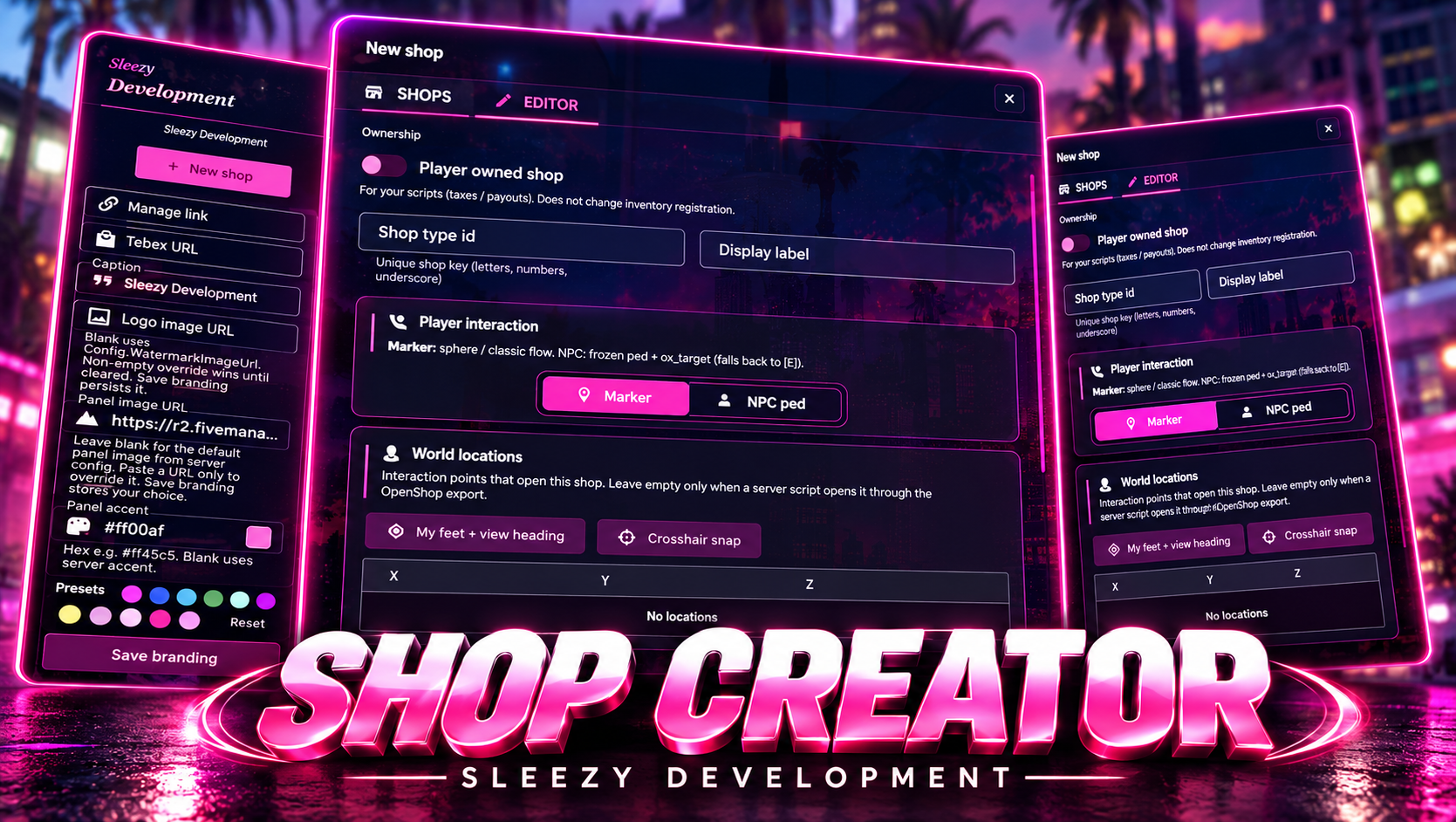
Sleezy Development • Advanced Shop Creator (ESX, QBCore, QBOX & Standalone)
Create, customize, and manage interactive shops throughout your FiveM server with the Sleezy Development Advanced Shop Creator.
Designed for roleplay communities and server owners, this system allows administrators to create fully configurable shops directly in-game using a dedicated management interface.
From convenience stores and general stores to specialized shops and custom roleplay businesses, Advanced Shop Creator gives server owners control over shop locations, inventory items, pricing, payment types, NPC vendors, map blips, and interaction settings.
Instead of manually editing coordinates, writing shop configurations, or restarting resources after every change, administrators can create and update supported shops through the in-game editor.
The system includes a searchable inventory catalog with item images, an NPC selection gallery, interactive vendor placement, marker and blip customization, a shop preview interface, persistent saving, and server-side purchase validation.
Built with multi-framework compatibility, configurable branding, supported inventory integrations, and a customizable interface.
🛍️ Advanced In-Game Shop Creator
📦 Searchable Item Catalog & Images
👤 Custom NPC Vendors & Placement
📍 Interactive Shop Locations
🗺️ Marker & Map Blip Customization
💰 Configurable Shop Prices & Payments
🎨 Custom Shop Previews & Branding
🎮 ESX / QBCore / QBOX / Standalone
⚙️ Features
- Advanced in-game shop creation system
- Dedicated administrator management interface
- Create custom shops without editing coordinates manually
- Edit existing shops
- Delete unwanted shops
- Searchable saved shop list
- Configurable shop names and identifiers
- Legal and illegal shop categories
- Player-owned shop metadata
- Configurable owner identifiers
- Multiple locations per shop
- Custom NPC vendors
- Searchable NPC model gallery
- NPC portrait previews
- Interactive NPC placement
- Adjustable NPC heading
- Custom map blips
- Searchable blip icon gallery
- Custom blip colors and sizes
- Configurable ground markers
- Visual marker selection gallery
- Adjustable marker dimensions
- Custom marker colors
- Built-in inventory item search
- Automatic installed item discovery
- Item thumbnail previews
- Item category filters
- Multiple item selection
- Individual item pricing
- Configurable payment methods
- Cash payment support
- Configurable in-game dirty-money payment support
- Live shop preview
- Preview shopping cart
- Customizable interface branding
- Editable accent colors
- Custom logo support
- Custom panel background images
- Optional Discord webhook logging
- ACE and framework administrator permissions
- Persistent shop storage
- Automatic database initialization
- JSON storage option
- Configurable security limits
- Server-side purchase validation
- Automatic framework detection
🛍️ Advanced Shop Creation
Create and configure supported shop locations through the in-game editor.
- Create new shops
- Enter a unique shop identifier
- Customize the display name
- Select the shop category
- Configure available products
- Set individual product prices
- Select payment types
- Choose an interaction method
- Add shop locations
- Configure NPC vendors
- Adjust map blips
- Customize ground markers
- Preview shop settings
- Save and register shops
- Edit existing shops
- Remove unwanted shops
Default Shop Limits
- Maximum Shops: 250
- Maximum Items Per Shop: 250
- Maximum Locations Per Shop: 32
- Maximum Item Price: $10,000,000
- Maximum Purchase Quantity: 100
Limits can be adjusted through config.lua.
📦 Advanced Inventory Item Picker
The resource includes a searchable item selection interface designed to simplify adding products to shops.
- Discover items from the configured inventory
- Search by item name
- Search by item label
- View matching items while searching
- Automatic item thumbnail loading
- View item display names
- View inventory item identifiers
- Filter items by category
- Select multiple items
- Add selected items to a shop
- Prevent duplicate item selections
- Remove individual products
- Clear the shop's item list
- Configure product prices
- Assign payment types
Item Categories
- All Items
- Weapons
- Ammunition
- Attachments
- Consumables
- Currency
- Miscellaneous
Category availability depends on the registered items and their definitions.
🖼️ Automatic Inventory Images
The item picker uses images from the selected inventory's configured image paths.
- ox_inventory image support
- qb-inventory image support
- Configurable image directory
- Item thumbnails in the selection menu
- Item images in saved stock lists
- Shop preview images
- Custom image path override
- Item name fallback when an image is unavailable
Server owners do not need to configure a separate image URL for every existing inventory item when compatible inventory image files are available.
👤 Custom NPC Vendor System
Create shops with an interactive NPC vendor.
- Select NPC interaction mode
- Search available NPC models
- Browse model names
- NPC model portrait previews
- Custom NPC model entry
- Adjustable NPC heading
- Interactive placement
- Ground positioning assistance
- Configurable interaction distance
- Automatic nearby NPC spawning
- NPC streaming distance
- Automatic vendor cleanup
- ox_target interaction
- E-key interaction fallback
NPC Model Gallery
The creator includes curated model presets and an extended searchable catalog based on FiveM ped model references.
- Browse available model names
- Search by model identifier
- View supported NPC previews
- Select a vendor appearance
- Configure NPC orientation
- Use custom model spawn names
NPC preview imagery may require access to its source, and selected models must exist in the installed game build.
🎯 Interactive NPC Placement
Position your vendors directly inside the game world.
- Select a vendor model
- Open aim-based placement mode
- Preview the NPC in-world
- Adjust placement using the gameplay camera
- Automatically determine coordinates
- Configure NPC heading
- Place the vendor at the chosen position
- Cancel placement if needed
- Return to the shop editor
- Save the configured location
Available Placement Methods
- Aim Preview & Place
- Use Current Player Coordinates
- Crosshair Position
- Manual Location Configuration
This allows administrators to place vendors without manually collecting and entering every coordinate.
📍 Multiple Shop Locations
Create several locations using the same configured shop inventory.
- Multiple shop coordinates
- Add additional locations
- Remove saved locations
- Shared inventory configuration across locations
- Custom interaction settings
- Configurable location limits
- Server-side purchase distance validation
- Routing bucket validation
- Automatic location synchronization
A single shop can be made accessible from several configured locations.
🗺️ Advanced Map Blip Creator
Customize the map appearance of your shops.
- Enable or disable shop blips
- Select custom map sprites
- Searchable blip gallery
- Browse blip identifiers
- Custom blip colors
- Visual color selection
- Adjustable blip size
- Manual sprite ID entry
- Manual color ID entry
- Blips for saved shop locations
- Automatic updates after changes
- Removal when a shop is deleted
The interface contains an extensive FiveM blip reference gallery for locating supported map icons.
Actual in-game appearance depends on the selected GTA blip sprite.
📍 Custom Ground Marker System
Create configurable ground markers for shop interactions.
- Enable custom marker styling
- Select supported marker types
- Searchable marker gallery
- Custom marker colors
- Adjustable marker scale
- Independent X, Y, and Z dimensions
- Configurable visibility distance
- Optional marker movement
- Camera-facing marker option
- Adjustable transparency
- Optional marker display alongside ox_target
Marker Settings
- Marker Type
- Marker Color
- Marker Size
- Marker Visibility
- Vertical Movement
- Camera Orientation
- Target Compatibility
Shop markers use GTA/FiveM marker functionality with configurable interaction settings.
🎮 Shop Interaction Methods
The resource supports multiple ways for players to access configured shops.
NPC Interaction
- Walk up to the shop vendor
- Target the vendor when ox_target is enabled
- Use the E-key fallback
- Open the configured shop
Marker Interaction
- Walk into the configured proximity area
- Use supported ox_target sphere interactions
- Use classic E-key interaction
- Open the configured shop
Server Resource Integration
- Open supported shops from another trusted server resource
- Configurable location-based access
- Server-authorized shop opening
- Character and proximity validation
- Routing bucket restrictions
The external shop integration uses the server-side OpenShop export.
💰 Configurable Item Pricing
Administrators can set individual prices for every product.
- Editable item prices
- Individual product pricing
- Configurable maximum prices
- Zero-price items where permitted
- Server-controlled price validation
- Quantity validation
- Automatic total calculation
- Inventory capacity checks
- Payment balance verification
- Purchase confirmation notifications
Customers cannot submit their own item prices to the server.
💵 In-Game Payment Methods
Each shop item can be configured to use a supported in-game currency.
Cash
- Standard money payment
- Framework account integration where supported
- Configurable payment mapping
- Server-side balance validation
Dirty Money
- Configurable in-game alternative currency
- ox_inventory currency item support
- Native QBCore item or account mapping
- ESX black_money account support
- Customizable currency identifier
Dirty money is a fictional in-game currency feature and does not involve real-money transactions.
Important: Dirty-money integration depends on the server's configured account or item. Custom metadata-value currencies may require additional integration.
🛒 Shop Preview System
Administrators can preview their configured shops before saving them.
- Preview shop appearance
- View configured products
- Display item images
- Review product prices
- Preview shop categories
- Test item selection within the preview
- Add preview items to a cart
- Adjust preview quantities
- Remove cart items
- Clear the preview cart
- View simulated totals
The preview cart is intended for configuration and visual testing. It does not perform real customer purchases.
🏪 Legal & Illegal Shop Categories
Organize shops into separate groups within the administrator interface.
Legal Shops
- Convenience stores
- General stores
- Food and drink shops
- Hardware shops
- Clothing-related inventory shops
- Roleplay businesses
Illegal Shops
- Fictional black-market roleplay shops
- Restricted roleplay item vendors
- Custom underground shop locations
- Server-specific special item shops
Category Features
- Legal and illegal categorization
- Filter saved shops by category
- Category labels in the creator
- Separate organization within the shop list
The legal/illegal setting is an organizational label. It does not automatically enforce job restrictions or change item legality.
👥 Player-Owned Shop Configuration
The creator includes optional fields for associating shops with player identifiers.
- Player-owned shop setting
- Owner identifier configuration
- Multiple owner identifiers
- Online player selection assistance
- Character and account identifier support
- Persistent ownership metadata
Important: Player-owned settings store ownership information for external integrations. The resource does not independently include business profits, automatic owner payouts, player management permissions, stock purchasing, or a complete player-business economy.
These features require an additional compatible server script.
🎨 Custom Interface & Branding
The resource includes a fully designed shop management interface with customizable styling.
- Dark creator interface
- Pink and purple default accents
- Custom interface title
- Sleezy Development branding
- Custom accent color
- Preset color selection
- Custom color picker
- Editable logo image
- Custom watermark image
- Custom panel background
- HTTPS image support
- Configurable management link
- Saved branding preferences
- Interactive shop editor
- Custom notification styling
- Preview interface
- Searchable saved shop list
- Organized configuration panels
- Confirmation dialogs
- Custom icons
- Dedicated scrollable sections
Interface Settings
- Accent Color
- Watermark
- Logo Image
- Background Image
- Management Link
- Storefront Link
- Saved Interface Preferences
Supported settings are saved with the shop configuration.
The storefront link is an optional interface link, not a payment-processing integration.
💾 Persistent Shop Saving
The resource supports persistent storage for saved shops and creator settings.
MySQL Storage
- oxmysql integration
- Automatic table creation
- Persistent shop records
- Saved inventory selections
- Saved shop locations
- Saved vendor settings
- Saved blip and marker configuration
- Saved branding preferences
- Database-backed configuration updates
JSON Storage
- Optional resource-file persistence
- Saved shop configuration
- Saved interface settings
- No separate shop SQL table required when JSON mode is selected
Default Database Table
sleezy_shopcreator_data
The MySQL storage option is enabled by default.
An SQL installation file is included for hosts that require manual table creation.
oxmysql remains a declared resource dependency.
🔄 Live Shop Management
Administrators can manage supported shops without restarting the resource after each save.
- Create shops
- Edit shop settings
- Add or remove products
- Update prices
- Change vendor models
- Edit map blips
- Modify interaction locations
- Delete shops
- Synchronize saved locations
- Update configured inventory registrations
Saved Configuration Protection
- Edit revision validation
- Stale editor detection
- Serialized configuration saves
- Storage write verification
- Failed save notifications
- Saved configuration rollback protection
- Invalid stored-data detection
Multiple administrators are prevented from silently overwriting stale creator data.
🔐 Administrator Permissions
Restrict creator access to authorized staff.
- ACE permission support
- QBCore administrator groups
- QBOX administrator permissions
- ESX administrator groups
- Standalone ACE access
- Configurable allowed groups
- Server-side permission validation
- Restricted configuration changes
Default Administrator Groups
ACE Permission
sleezy.shopcreator
Creator Command
/createshop — Open the shop creation and management interface.
Players without sufficient permissions cannot open or save through the administrator creator.
📤 Optional Discord Webhook Logging
Configure server-side Discord notifications for supported management actions.
- Shop created or updated
- Shop deleted
- Branding settings saved
- Custom webhook username
- Custom webhook avatar
- Separate webhook destinations
- Server-side webhook configuration
- Optional logging toggle
Discord logging is disabled by default.
Webhook URLs are stored in server_config.lua rather than the shared configuration.
🛡️ Purchase Security & Validation
The system includes server-side checks for shop transactions.
- Authoritative shop prices
- Player identity validation
- Item existence verification
- Purchase quantity validation
- Currency balance checks
- Inventory capacity checks
- Interaction distance validation
- Routing bucket validation
- Purchase request locking
- Configurable item and shop limits
- Unsupported item rejection
- Duplicate purchase protection
- Payment verification
- Failed item delivery refund handling
- Purchase review records
- Uncertain transaction protection
Native QB & ESX Purchase Recovery
The resource maintains records for native inventory transactions that require administrator review.
- Purchase preparation records
- Payment status verification
- Item delivery validation
- Refund attempt tracking
- Pending purchase review records
- Protection against automatic duplicate grants
- Console-based transaction review
Console Commands
shopcreator_reviews — View unresolved transaction records.
shopcreator_resolve [review-id] — Clear a reviewed transaction after the administrator has manually verified or corrected its outcome.
These commands are restricted to the server console.
⚡ Performance & Entity Management
- Nearby NPC streaming
- Configurable vendor streaming distance
- Automatic distant vendor cleanup
- Reduced unnecessary vendor spawning
- Configurable marker draw distance
- Managed client interaction zones
- NPC placement cancellation handling
- Automatic creator prop cleanup
- NUI focus cleanup
- Logout handling
- Resource shutdown cleanup
- Existing inventory interaction support
Default NPC Streaming Distance
Vendors are created locally when players are within the configured streaming range.
🧩 Framework Support
- ESX Legacy
- QBCore
- QBOX
- Standalone with initialized ox_inventory
- Automatic framework detection
Inventory Support
- ox_inventory
- qb-inventory on QBCore
- Standard ESX inventory
Supported Checkout Modes
QBOX + ox_inventory
Uses the installed ox_inventory shop interface and checkout system.
QBCore + qb-inventory
Uses the resource's ox_lib product and quantity selection menus, with server-controlled payment and inventory delivery.
QBCore + ox_inventory
Uses the installed ox_inventory shop interface, provided the existing QBCore/ox integration is working.
ESX + ox_inventory
Uses the installed ox_inventory shop interface.
ESX + Standard Inventory
Uses ox_lib shop selection menus with supported ESX accounts and item functions.
Standalone + ox_inventory
Uses ox_inventory shop registration with an existing compatible player-inventory initialization bridge.
The resource does not include a replacement inventory, payment system, or framework bridge installer.
📦 What's Included
- Sleezy Advanced Shop Creator Resource
- In-Game Management Interface
- Shop Creation & Editing
- Saved Shop List
- Legal & Illegal Shop Categories
- Searchable Inventory Item Catalog
- Item Thumbnail Integration
- NPC Vendor System
- NPC Model Gallery
- Interactive NPC Placement
- Shop Location Management
- Map Blip Editor
- Blip Sprite Gallery
- Custom Marker Editor
- Marker Type Gallery
- Product Price Configuration
- Cash & Dirty-Money Payment Configuration
- Live Shop Preview
- Preview Shopping Cart
- Ownership Metadata Fields
- Framework & Inventory Bridges
- Server-Side Purchase Validation
- Native Purchase Recovery Records
- Optional Discord Webhook Logging
- Custom UI Branding
- MySQL & JSON Storage Options
- Editable Configuration Files
- SQL Installation File
- Vue Interface Source
- Ready-Built NUI Files
- Third-Party Library Licenses
- Installation Instructions
- Local QA Test Suite
🏠 Perfect For
- FiveM Roleplay Communities
- Custom Convenience Stores
- General Stores
- Food & Drink Shops
- Custom Item Vendors
- Roleplay Businesses
- Hardware Stores
- Custom Weapon-Item Shops
- Black-Market Roleplay
- Custom Map Locations
- Economy-Based Servers
- Server Administrators
- Custom Business Environments
⚙️ Installation & Requirements
- FiveM Server
- OneSync Enabled
- ox_lib
- oxmysql
- ESX, QBCore, QBOX, or Compatible Standalone Environment
- Supported Inventory System
Optional Integrations
- ox_target
- Compatible custom shop-opening server scripts
Quick Installation
- Download and extract the resource.
- Place
sleezy_shopcreator in your server resources folder.
- Ensure oxmysql and ox_lib.
- Ensure your framework and inventory resources.
- Configure framework and inventory selection in
config.lua.
- Configure administrator permissions.
- Add
ensure sleezy_shopcreator after the required dependencies.
- Start the server.
- Use
/createshop as an authorized administrator.
- Create your first shop.
- Select available inventory items.
- Configure prices and payment methods.
- Add shop locations or place an NPC vendor.
- Configure optional map blips and markers.
- Save and register the shop.
- Test purchases using a non-administrator character.
The resource includes a ready-built NUI. Node.js is not required on the FiveM server.
⚙️ Important Information
This resource provides shop creation, configuration, and purchasing functionality exclusively within supported FiveM server environments.
Only items registered in the selected inventory system can be sold.
The creator supports ownership metadata, but does not independently provide business revenue distribution, restocking, employees, or player-operated business accounts.
Legal and illegal shop categories are organizational settings. Custom access restrictions require additional integration.
The built-in shop preview is for administrator configuration and does not perform actual purchases.
Standalone mode requires an existing compatible ox_inventory initialization setup.
The resource requires ox_lib and oxmysql, including when using its optional JSON shop storage.
Inventory compatibility depends on the installed framework and inventory versions.
Server owners are responsible for configuring fictional in-game currencies and item availability according to applicable platform rules.
💎 Why Choose This System?
The Sleezy Development Advanced Shop Creator gives server owners a centralized way to create and manage shops without repeatedly editing shop configuration files.
With searchable inventory items, product images, interactive NPC placement, custom markers, map blip galleries, configurable payment methods, and persistent saving, administrators can build different shop experiences directly from the in-game editor.
Instead of installing separate shop configurations for each location, server owners can create multiple locations, customize product selections, and update supported settings through one management interface.
Designed for FiveM communities looking for a customizable shop creation system with a detailed interface, framework compatibility, and practical administration tools.
Developer: Sleezy Development
Version: 1.1.0
Frameworks: ESX • QBCore • QBOX • Standalone
Resource: sleezy_shopcreator
Database: MySQL / oxmysql, Optional JSON Storage
Dependencies: ox_lib • oxmysql • OneSync
Optional Target: ox_target
Support: discord.gg/sleezydevelopment
Sleezy Development • Premium FiveM Systems
Script Preview: (1) Sleezy Development - YouTube
Discord Support: Discord