NEW UPDATES DROPPING REGULARLY — JOIN THE DISCORD FOR SUPPORT NEW UPDATES DROPPING REGULARLY — JOIN THE DISCORD FOR SUPPORT NEW UPDATES DROPPING REGULARLY — JOIN THE DISCORD FOR SUPPORT NEW UPDATES DROPPING REGULARLY — JOIN THE DISCORD FOR SUPPORT NEW UPDATES DROPPING REGULARLY — JOIN THE DISCORD FOR SUPPORT NEW UPDATES DROPPING REGULARLY — JOIN THE DISCORD FOR SUPPORT
PACKAGE

Sleezy Development • Advanced Knockout System (ESX, QBCore, QBOX & Standalone)

10.00 USD
Sleezy Development • Advanced Knockout System (ESX, QBCore, QBOX & Standalone)
DETAILS

Sleezy Development • Advanced Knockout System (ESX, QBCore, QBOX & Standalone)

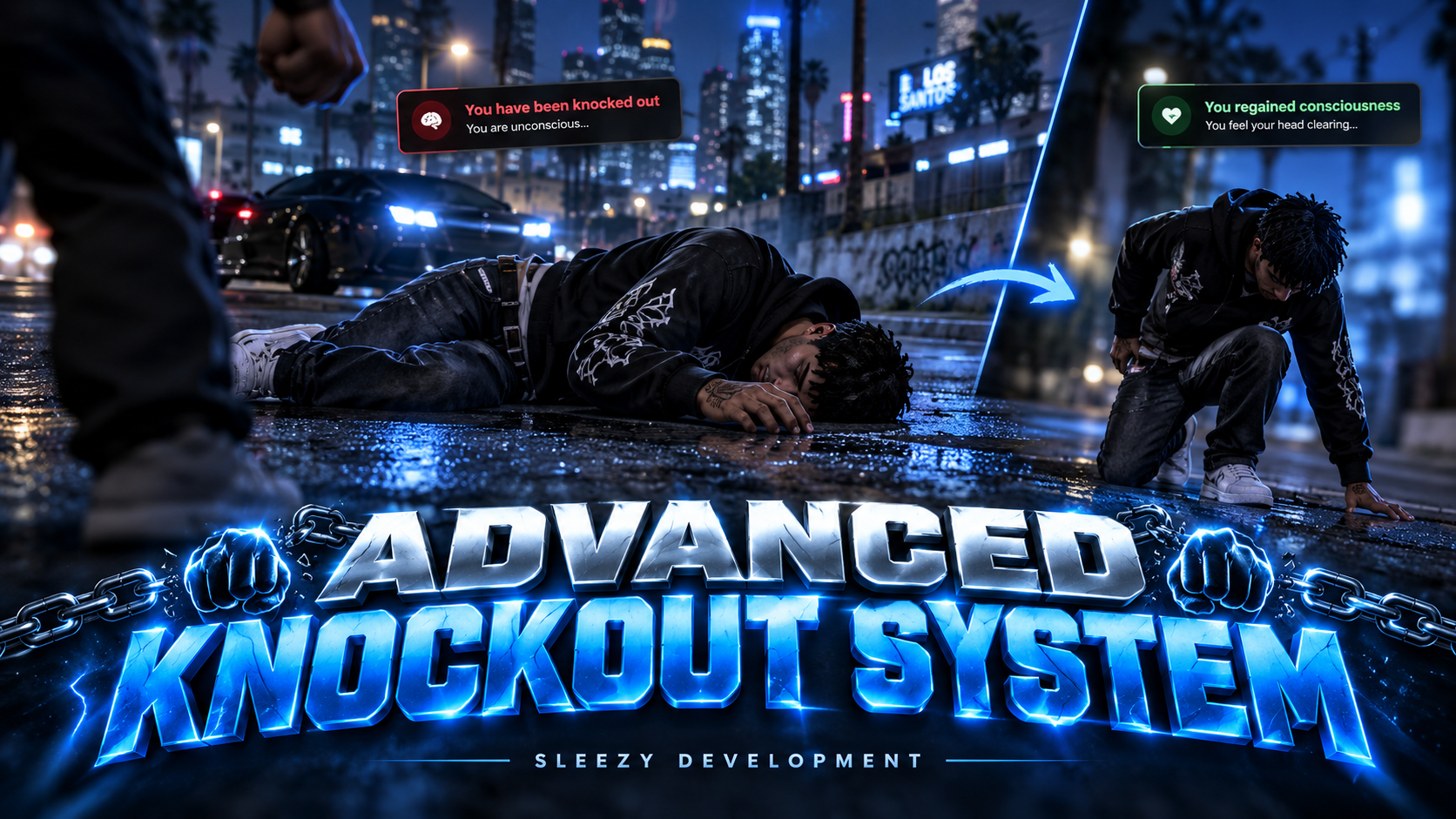
Bring more realistic combat reactions, temporary unconsciousness, and immersive recovery effects to your FiveM server with the Sleezy Development Advanced Knockout System.

Designed for roleplay communities, this system introduces configurable knockout mechanics that allow players to become temporarily unconscious after receiving qualifying melee damage.

Instead of every combat encounter immediately resulting in a standard death or hospital interaction, eligible players can enter a temporary knockout state featuring ragdoll animations, screen blackouts, impact audio, restricted movement, and automatic recovery.

After regaining consciousness, players can experience configurable dazed movement, blurred vision, camera effects, and gradual health regeneration.

The system includes configurable weapon detection, custom health thresholds, knockout timers, recovery cooldowns, administrator controls, medical compatibility hooks, and multiple notification integrations.

Built with lightweight client-side gameplay logic, server-validated administrator permissions, extensive configuration, and multi-framework support.

⚙️ Features

  • Advanced player knockout system
  • Automatic melee knockout detection
  • Configurable health thresholds
  • Custom weapon knockout configuration
  • Unarmed combat support
  • Melee weapon support
  • Configurable weapon exclusions
  • Optional forced melee knockouts
  • Temporary unconsciousness
  • Realistic ragdoll reactions
  • Blackout screen effects
  • Configurable impact sound
  • Game audio muffling
  • Adjustable knockout duration
  • Temporary damage protection
  • Automatic consciousness recovery
  • Custom wake-up animation support
  • Recovery animation fallback
  • Dazed character movement
  • Configurable blurred vision
  • Camera shake effects
  • Motion blur support
  • Screen post-processing effects
  • Configurable recovery duration
  • Gradual health regeneration
  • Adjustable regeneration limits
  • Knockout cooldown protection
  • Medical system compatibility hooks
  • Character death-state validation
  • Automatic effect cleanup
  • Custom notification integration
  • Administrator knockout commands
  • Administrator wake-up commands
  • Knockout testing tools
  • Player status monitoring
  • Framework administrator permissions
  • Standalone ACE permission support
  • Editable configuration
  • Automatic framework detection
  • No SQL database required
  • No inventory dependency

🥊 Advanced Knockout Mechanics

The system automatically monitors qualifying combat damage and can place a living player into a temporary unconscious state.

  • Detect configured melee weapon damage
  • Check the player's current native health
  • Compare health against the configured threshold
  • Validate the player's character state
  • Start the knockout sequence
  • Apply ragdoll behavior
  • Play the configured impact sound
  • Activate screen blackout effects
  • Restrict supported player controls
  • Begin the knockout countdown
  • Automatically transition into recovery

Default Knockout Settings

  • Knockout Health Threshold: 130
  • Knockout Duration: 20 Seconds
  • Recovery Cooldown: 5 Seconds
  • Temporary Protection: 1 Second
  • Automatic Recovery: Enabled

Health values use native GTA character health, which normally has a maximum of 200 for standard player characters.

The knockout threshold and duration can be customized through config.lua.

🔨 Configurable Melee Weapons

The system supports multiple melee weapon types.

Default Supported Weapons

  • Fists / Unarmed
  • Baseball Bat
  • Crowbar
  • Golf Club
  • Hammer
  • Nightstick
  • Knuckle Dusters
  • Flashlight
  • Battle Axe

Melee Configuration

  • Enable individual melee weapons
  • Disable individual melee weapons
  • Configure eligible damage sources
  • Adjust the knockout health threshold
  • Optional forced knockout behavior
  • Custom weapon-specific thresholds

Forced Melee Knockouts

When enabled, qualifying melee hits can initiate a knockout without requiring the normal health threshold.

This option is disabled by default.

🔪 Additional Weapon Configuration

Server owners can configure special weapon-specific knockout behavior.

  • Custom weapon hash configuration
  • Independent weapon thresholds
  • Configurable special weapon detection
  • Weapon exclusion list
  • Adjustable health requirements

Default Special Weapon

  • Knife
  • Knockout Threshold: 120 Native Health

Default Weapon Exclusions

  • Pistol
  • SMG

Weapon exclusions take priority over special knockout settings.

Gunfire, fall damage, and unrelated environmental damage do not automatically trigger the melee knockout system.

😵 Temporary Unconsciousness

When knocked out, the player enters a temporary unconscious state.

  • Character ragdoll behavior
  • Temporary movement restrictions
  • Combat control restrictions
  • Screen blackout
  • Impact sound effect
  • Configurable unconscious duration
  • Optional health regeneration
  • Automatic wake-up
  • Death-state monitoring

Restricted Actions

During a knockout, the resource blocks configured standard GTA controls, including supported movement, combat, weapon selection, and interaction actions.

Custom controls and actions introduced by unrelated resources may require integration with the supplied knockout state.

🎬 Knockout Screen Effects

The resource includes configurable visual effects to create a more immersive unconsciousness experience.

Blackout Effects

  • Fade screen to black
  • Configurable fade-out duration
  • Automatic fade-in on recovery
  • Adjustable transition timing
  • Optional blackout disable setting

Default Screen Settings

  • Fade Out: 500 ms
  • Fade In: 700 ms

Visual settings can be adjusted or disabled individually.

🔊 Impact Sound System

The system includes a local impact sound that plays when a player enters the knockout state.

  • Included knockout audio file
  • Automatic playback when knocked out
  • Adjustable sound volume
  • Configurable sound enable/disable
  • Local playback through the resource
  • Automatic audio stop and reset
  • Reusable audio controller

Default Sound Settings

  • Impact Sound: Enabled
  • Volume: 80%

The sound is played locally for the affected player.

No external audio service is required.

🎧 Game Audio Effects

Enhance the knockout experience with optional GTA audio-scene effects.

  • Configurable game audio muffling
  • Temporary audio-scene activation
  • Automatic audio-scene cleanup
  • Optional audio effects
  • Independent sound and audio configuration

Default Audio Settings

  • Game Audio Effect: Enabled
  • Audio Scene: CHARACTER_CHANGE_IN_SKY_SCENE

The system uses supported GTA audio scenes rather than modifying an external voice resource.

It does not replace pma-voice, SaltyChat, or other voice communication systems.

❤️ Automatic Recovery System

Players automatically regain consciousness after the configured knockout duration.

  • Configurable unconsciousness timer
  • Automatic wake-up
  • Screen restoration
  • Restore supported player controls
  • Stop temporary knockout audio
  • Optional wake-up animation
  • Transition into recovery effects
  • Configurable cooldown after waking

Default Recovery Settings

  • Unconscious Duration: 20 Seconds
  • Recovery Cooldown: 5 Seconds
  • Wake-Up Animation: Enabled

Wake-Up Animation

The resource can attempt to play a configured getting-up animation after the knockout ends.

  • Custom animation dictionary
  • Custom animation clip
  • Configurable animation duration
  • Animation loading timeout
  • Automatic fallback when unavailable
  • Cleanup when interrupted

If the configured animation cannot load, the player can use standard GTA getting-up behavior.

💊 Gradual Health Regeneration

The system includes optional health recovery during the knockout state.

  • Configurable regeneration
  • Adjustable healing amount
  • Custom regeneration interval
  • Maximum regeneration limit
  • Native health validation
  • Prevent healing above the configured limit
  • Optional regeneration toggle

Default Health Recovery

  • Regeneration: Enabled
  • Health Restored: 3 Points
  • Recovery Interval: 3 Seconds
  • Maximum Recovery Health: 160

Regeneration is capped by both the configured limit and the character's actual maximum health.

The system does not revive dead characters.

🥴 Advanced Dazed Recovery Effects

After waking up, players can experience temporary dazed movement and visual effects.

Dazed Features

  • Configurable dazed duration
  • Unsteady character movement
  • Temporary drunk-style walking
  • Blurred visual effects
  • Motion blur
  • Camera shaking
  • Screen post-processing
  • Adjustable visual intensity
  • Automatic recovery countdown
  • Normal movement restoration
  • Automatic effect cleanup

Default Dazed Settings

  • Dazed Duration: 30 Seconds
  • Effect Intensity: 0.5
  • Movement Effects: Enabled
  • Motion Blur: Enabled
  • Camera Shake: Enabled
  • Post-Processing: Enabled

Default Movement Style

move_m@drunk@verydrunk

Default Visual Effects

  • Timecycle: spectator6
  • Post-FX: ChopVision
  • Camera Shake: DRUNK_SHAKE

Every supported effect can be adjusted through the configuration.

🛡️ Temporary Knockout Protection

The resource includes optional short-term damage protection when unconsciousness begins.

  • Configurable initial protection duration
  • Optional invulnerability
  • Automatic protection expiration
  • Existing invincibility checks
  • Prevent unnecessary invincibility changes
  • Compatible cleanup behavior

Default Protection

  • 1,000 ms

This protection only applies briefly at the start of the knockout.

Normal GTA damage continues afterward. The resource does not make players permanently invulnerable while unconscious.

🏥 Medical & Death System Compatibility

The system is designed to avoid interfering with existing medical and revival mechanics.

  • Detect dead characters
  • Detect fatally injured characters
  • Check configurable downed-state flags
  • Respect existing medical states
  • Avoid reviving deceased characters
  • Cancel knockout effects after death
  • Reset supported effects after character spawning
  • Reset after supported framework logout events
  • Configurable medical reset events
  • Custom integration exports

Default Death-State Checks

  • isDead
  • isdead
  • dead
  • inLaststand
  • inlaststand
  • laststand

Important: The resource does not replace your ambulance or medical script.

If damage is already lethal before knockout detection, the existing medical or death system retains control.

Custom medical resources may require their actual revival event to be added to the configuration or connected through the supplied reset export.

🚗 Vehicle Compatibility Settings

Knockout behavior can be configured around players inside vehicles.

  • Vehicle state detection
  • Optional vehicle knockout exclusion
  • Prevent unwanted vehicle interactions
  • Configurable compatibility settings
  • Character validation

Default Setting

Vehicle knockouts are disabled.

Players inside vehicles are ignored by the knockout mechanic unless the configuration is changed.

The resource does not automatically eject players from vehicles.

🔐 Administrator Commands

Authorized administrators can manage and test the knockout system through commands.

Available Commands

/knockout [id]

  • Knock out a selected living player
  • Toggle an existing knockout
  • Target yourself or another online player
  • Server-side administrator validation

/wakeup [id]

  • Wake a knocked-out player
  • Clear remaining dazed effects when applicable
  • Restore the resource's affected controls and visual state

/knockouttest [id]

  • Start a controlled knockout test
  • Test the resource's animation and recovery behavior
  • Uses a nonfatal test health setting on standard GTA characters

/knockoutstatus [id]

  • View the detected framework
  • Check a player's reported knockout phase
  • View idle, knocked-out, or dazed state information

Server Console Commands

knockout_giveadmin [id]

  • Temporarily grant knockout administrator access to an online player

knockout_removeadmin [id]

  • Remove a temporary session grant

Temporary administrator grants expire when the player disconnects.

🔐 Administrator Permissions

  • ACE permissions
  • ESX administrator groups
  • QBCore administrator permissions
  • QBOX administrator permissions
  • Standalone ACE support
  • Server-side command authorization
  • Configurable administrator groups
  • Command cooldown protection
  • Online target validation
  • Permission denied notifications

Default ACE Permission

sleezy.knockout.admin

Default ESX Groups

  • admin
  • superadmin
  • moderator

Default QBCore / QBOX Groups

  • admin
  • god
  • mod

Default Command Cooldown

  • 1 Second

Administrator permissions can be adjusted through config.lua.

🔔 Notification Integration

The resource includes configurable notifications for knockout and recovery events.

Supported Notification Systems

  • ox_lib
  • QBCore Notifications
  • okokNotify

Available Notifications

  • Player knocked out
  • Player regained consciousness
  • Dazed recovery completed
  • Administrator permission denied

Notification Settings

  • Custom notification title
  • Configurable notification text
  • Adjustable notification position
  • Configurable notification provider

If a selected optional notification resource is unavailable, the system falls back to ox_lib notifications.

🔌 Developer Integration

The resource includes exports and events for developers integrating custom medical, HUD, or gameplay scripts.

Client Exports

IsKnockedOut()

Returns whether the local player is currently knocked out.

GetState()

Returns the local knockout phase.

Supported States

  • idle
  • knockedout
  • dazed

Reset()

Clears the local resource's active knockout and recovery effects without independently reviving the player.

Events & State

  • Local state-change notification
  • Configurable reset events
  • Medical integration reset hook
  • LocalPlayer knockout state bag
  • Server-reported status export

Other resources can use these hooks to react to the local player's knockout state.

The server-reported status is diagnostic information, not authoritative proof of combat damage.

🎨 Customization & Configuration

  • Enable or disable the system
  • Framework selection
  • Automatic framework detection
  • Custom health threshold
  • Adjustable knockout duration
  • Recovery cooldown
  • Forced melee knockout settings
  • Configurable melee weapon list
  • Special weapon thresholds
  • Weapon bypass list
  • Initial protection duration
  • Optional health regeneration
  • Regeneration interval
  • Regeneration amount
  • Maximum recovery health
  • Blackout fade duration
  • Blackout recovery duration
  • Impact sound settings
  • Sound volume
  • Audio-scene effects
  • Dazed duration
  • Movement effect intensity
  • Custom movement clipset
  • Timecycle settings
  • Motion blur
  • Camera shake
  • Post-processing effects
  • Wake-up animation
  • Animation loading timeout
  • Custom notification messages
  • Notification provider
  • Administrator command names
  • Administrator permissions
  • Custom medical reset events
  • Vehicle restrictions
  • Custom death-state keys
  • Debug logging
  • Editable config.lua

⚡ Performance & Cleanup

The resource includes state-aware processing and automatic cleanup.

  • Lightweight idle monitoring
  • Active-state frame updates
  • No continuously displayed NUI menu
  • No NPC spawning
  • No map blips
  • No target entities
  • No SQL database operations
  • Automatic effect cancellation
  • Temporary audio cleanup
  • Ragdoll state management
  • Character model change handling
  • Resource shutdown cleanup
  • Disconnect state cleanup
  • Animation timeout handling
  • Protection-state cleanup

The resource does not require an inventory system or additional world entities.

Actual performance depends on the installed server and other gameplay resources.

🧩 Framework Support

  • ESX Legacy
  • QBCore
  • QBOX
  • Standalone
  • Automatic framework detection

Framework Detection Order

QBOX → QBCore → ESX → Standalone

The knockout mechanic itself operates independently of the framework.

Framework detection is primarily used for administrator permissions.

📦 What's Included

  • Advanced Knockout Resource
  • Configurable Melee Knockout Detection
  • Custom Weapon Threshold System
  • Temporary Unconsciousness
  • Ragdoll Knockout Effects
  • Blackout Screen Effects
  • Local Impact Sound
  • Audio Muffling Integration
  • Timed Recovery System
  • Optional Wake-Up Animation
  • Dazed Movement System
  • Visual Recovery Effects
  • Gradual Health Regeneration
  • Temporary Damage Protection
  • Medical Compatibility Hooks
  • Administrator Knockout Commands
  • Administrator Wake-Up Commands
  • Knockout Testing Tools
  • Framework Permission Bridge
  • Notification Integrations
  • Developer Exports
  • Editable Configuration
  • Local Audio Files
  • Installation Instructions
  • QA Documentation
  • Automated Test Files
  • Asset Escrow Configuration

🏠 Perfect For

  • FiveM Roleplay Communities
  • Serious Roleplay Servers
  • Semi-Serious Roleplay Servers
  • Melee Combat Roleplay
  • Boxing Events
  • Fighting Competitions
  • Street Roleplay
  • Medical Roleplay
  • Character Injury Simulation
  • Server Combat Customization
  • Immersive Gameplay
  • PvP Communities

⚙️ Installation & Requirements

  • FiveM Server
  • ox_lib
  • ESX, QBCore, QBOX, or Standalone Configuration

Optional Integrations

  • qb-core notifications
  • okokNotify
  • Custom medical resources
  • Custom health systems

No SQL Database Required

No Inventory System Required

Quick Installation

  1. Download and extract the resource.
  2. Place sleezy_knockout inside your server resources folder.
  3. Ensure ox_lib is installed.
  4. Ensure your framework if applicable.
  5. Add ensure sleezy_knockout after the required resources.
  6. Configure the melee weapon list.
  7. Adjust knockout health thresholds and duration.
  8. Configure the blackout and recovery effects.
  9. Set up administrator permissions.
  10. Review medical compatibility settings.
  11. Restart the server.
  12. Test melee damage, knockout recovery, and administrator commands.

Example Server Configuration

ensure ox_lib

ensure sleezy_knockout

Administrator ACE Permission

add_ace group.admin sleezy.knockout.admin allow

⚙️ Important Information

This resource provides fictional knockout and recovery mechanics exclusively within FiveM.

It is designed for temporary unconsciousness and does not replace a medical, revival, or death system.

A knockout is not guaranteed for every melee hit. By default, an eligible melee weapon must damage a living character whose native health meets the configured threshold.

The resource does not automatically prevent lethal damage or revive players who have already died.

Health regeneration, movement effects, visual effects, and audio behavior can be configured independently.

Custom medical, health, animation, and invincibility resources may require compatibility adjustments to avoid overlapping effects.

Vehicle knockouts are disabled by default.

The knockout state is handled locally on the affected player, with server-side validation for administrator commands. The resource is not an anti-cheat or server-authoritative combat enforcement system.

The included audio effect changes the local GTA audio scene and does not modify third-party voice communication.

💎 Why Choose This System?

The Sleezy Development Advanced Knockout System adds an additional layer of interaction to melee combat and character recovery.

Instead of immediately relying on the normal death and medical flow for every eligible combat encounter, living players can temporarily lose consciousness, experience blackout effects, recover through an optional animation, and return to gameplay with configurable dazed movement.

With weapon-specific knockout settings, adjustable timers, visual effects, health regeneration, medical integration hooks, and administrator tools, the system gives server owners control over how temporary knockouts behave.

Designed for FiveM communities looking for a configurable combat and recovery feature without requiring a separate inventory or database system.

Developer: Sleezy Development
Version: 1.0.0
Frameworks: ESX • QBCore • QBOX • Standalone
Resource: sleezy_knockout
Database: Not Required
Inventory: Not Required
Dependency: ox_lib
Support: discord.gg/sleezydevelopment

Sleezy Development • Premium FiveM Systems