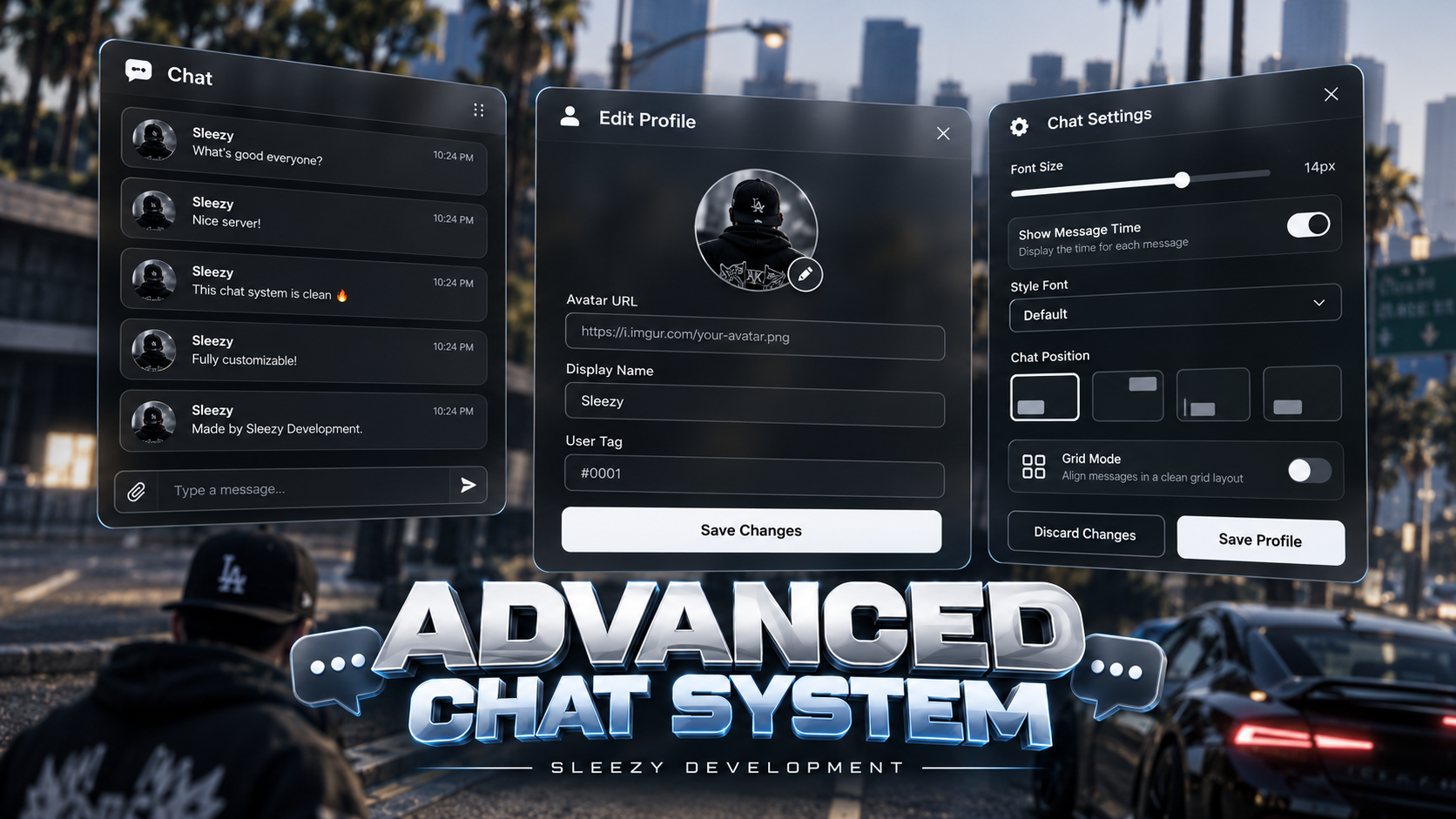
Sleezy Development • Advanced Chat System (ESX, QBCore, QBOX & Standalone)
Bring a modern, customizable, and interactive communication experience to your FiveM server with the Sleezy Development Advanced Chat System.
Designed for roleplay communities, Advanced Chat replaces the standard FiveM chat interface with a custom message-card layout, player profiles, organized communication channels, interactive message controls, and administrator management tools.
Players can communicate through global and proximity-based channels, perform roleplay actions, send emoji reactions, customize their chat appearance, manage personal profiles, and interact with messages through a dedicated interface.
Server administrators can create custom chat categories, configure channel permissions, manage player tags, restrict chat access, filter messages, and customize the communication experience directly through the in-game settings panel.
The system also supports optional Discord profile synchronization, GIF search, external phone gallery integration, and additional customization for communities looking for a more personalized chat experience.
Built with a modern interface, configurable categories, server-side message validation, persistent player settings, and multi-framework compatibility.
💬 Advanced Custom Chat Interface
🎨 Custom Chat Appearance & Layout
👤 Player Profiles & Custom Avatars
📢 10 Default Communication Categories
😊 Emoji Reactions & Interactive Messages
🛡️ Advanced Administrator Moderation
🏷️ Custom Player Tags & Discord Integration
🎮 ESX / QBCore / QBOX / Standalone
⚙️ Features
💬 Advanced Chat Interface
Replace the standard FiveM chat experience with a dedicated custom interface.
🎨 Custom Message Cards
Each message can display information based on the selected category and sender profile.
The resource uses its dedicated Sleezy Development card-style interface. Alternative full chat themes are not enabled in this version.
📢 Ten Default Chat Categories
The resource includes ten preconfigured communication channels.
1. OOC — Out of Character
Command: /ooc
2. Me — Character Actions
Command: /me
Default Radius: 15 Meters
3. Do — Roleplay Descriptions
Command: /do
Default Radius: 15 Meters
4. Global Do — Citywide Roleplay Messages
Command: /globaldo
Default Fee: $10,000 in-game currency
5. Try — Roleplay Action Attempts
Command: /try
Default Radius: 15 Meters
6. Twotter — Fictional Social Feed
Command: /twt
7. Dark Web — Anonymous Roleplay Chat
Command: /dw
Default Fee: $500 in-game currency
Default Item Requirement: Phone
Anonymous messages remain subject to server-side validation and moderation. This is an in-game roleplay feature, not an external anonymous messaging service.
8. News — Roleplay Announcements
Command: /news
Default Sending Job: reporter
9. Tootube — Fictional Content Discussion
Command: /tootube
This is a text-based roleplay communication category and does not provide external video streaming or a video-hosting service.
10. Admin — Staff Announcements
Command: /ac
🛠️ Advanced Category Creator
Authorized administrators can create and configure their own communication channels directly through the in-game settings interface.
Default Category Management Limit
Category changes are saved persistently and synchronized with connected players.
🔐 Custom Channel Permissions
Each chat category can have individual access restrictions.
Supported Permissions
Permission checks are performed server-side before messages are delivered.
💰 Configurable Paid Chat Categories
Server owners can optionally require fictional in-game currency to send messages in selected categories.
Default Paid Categories
Payment amounts can be changed or disabled.
These charges use the server's existing in-game economy. The resource does not include real-money payments or purchasable virtual currency.
📍 Proximity-Based Roleplay Chat
Create more immersive local communication through distance-restricted categories.
Local messages are delivered only to eligible players within the configured radius and routing bucket.
📝 Overhead 3D Text
Supported roleplay categories can display temporary text above the sender's character.
Overhead text can be enabled or disabled for individual categories.
👤 Advanced Player Profiles
Players can customize how they appear in chat through a dedicated profile interface.
Profile Customization
User tags are controlled by authorized staff rather than freely edited by players.
🖼️ Custom Profile Pictures
Players can use supported images for their chat avatars.
Avatar images are subject to configured format and size restrictions.
🏷️ Administrator Player Tags
Give players recognizable labels inside the chat.
Example Tags
Tags are visual labels and do not automatically provide administrator permissions.
🔗 Optional Discord Profile Integration
The resource supports Discord profile metadata synchronization when configured by the server owner.
Discord Configuration
Discord synchronization is disabled by default.
A Discord bot with appropriate guild access and a player Discord identifier are required.
Important: Discord roles are used for visual chat metadata only. They do not grant chat moderation permissions.
😊 Emoji & Reaction System
Make chat messages more interactive using the included emoji controls.
Example Reactions
Reaction functionality can be enabled or disabled through the configuration.
🖱️ Interactive Message Context Menu
Players can right-click eligible message cards while the chat is open to access additional actions.
Available Actions
Message Editing
Message Deletion
Message editing, deletion, and reactions operate on the retained message history for the active server session.
🎞️ Optional GIF Support
The system includes optional animated GIF search functionality.
GIF Integration
GIF search is disabled by default and requires a valid API key.
Availability and displayed results depend on the external GIF service and its terms.
📱 Optional Phone Gallery Integration
The system includes editable integration hooks for supported external phone resources.
Important: Phone gallery functionality is disabled by default.
Server owners must implement the corresponding server-side adapter for their phone resource before enabling it.
An independent phone system or built-in image gallery database is not included.
📞 Optional Phone Call Integration
The message interface includes an optional contact feature for compatible external phone resources.
Phone calling is disabled by default and requires an existing compatible phone resource and custom server integration.
🎨 Custom Chat Appearance
Players can adjust supported interface settings to suit their preferences.
Chat Positioning
Default Interface Style
The full chat theme is locked to the supplied card-style design to preserve its appearance. Other complete theme layouts are not advertised as available.
🛡️ Advanced Administrator Panel
The included administrator panel provides tools for managing player chat access.
🔇 Player Mute System
Administrators can temporarily or permanently prevent selected players from sending messages.
✍️ Chat Writing Restrictions
The system includes a separate write-block function.
🚫 Chat Reading Restrictions
Administrators can prevent selected players from receiving chat messages.
Default Moderation Durations
Restrictions are stored against a player's license identifier so switching characters does not automatically bypass them.
📝 Message Moderation
Authorized staff can manage retained chat messages.
🚫 Blocked Word Management
The system includes configurable server-side message filtering.
Default Filter Limit
The backend rejects messages containing blocked words rather than publishing the original prohibited text.
🔐 Administrator Permissions
The resource supports multiple administrator permission methods.
Default ACE Permission
sleezy_chat.admin
Default Administrator Groups
Server owners can customize these settings through config.lua.
🎮 Player Commands
/chat — Open the chat interface.
/closechat — Release chat focus.
/clear — Clear your local chat.
Default Keybinds
T — Open ChatEscape — Close ChatF10 — Release Chat FocusIncluded Category Commands
/ooc — Out-of-character communication/me — Character actions/do — Roleplay descriptions/globaldo — Global roleplay descriptions/try — Roleplay attempt/twt — Fictional social posts/dw — Anonymous roleplay messaging/news — News announcements/tootube — Content-related roleplay chat/ac — Staff announcementsCommands can be customized through the channel configuration.
🛠️ Administrator Commands
/clearall — Clear chat for all connected players.
The command requires administrator access when used in-game and is also available from the server console.
Additional management functions are available through the in-game administrator interface.
💾 Persistent Saving
The resource uses FiveM's built-in resource KVP storage.
Saved Information
Character-Based Profiles
License-Based Moderation
Important: Message history and reactions are retained for the active server session only. They are not restored from a database after a resource restart or player reconnection.
Default Retained Message Limit
⚡ Performance & Message Validation
The resource includes server-side checks for message delivery and moderation.
Default Message Settings
🌐 Framework Support
Framework Detection Order
QBOX → QBCore → ESX → Custom
Standalone Functionality
Core unpaid chat, proximity messages, player profiles, and ACE moderation can operate without a roleplay framework.
Paid categories, phone item checks, and certain job-based functions require a compatible framework or implementation through the editable integration bridge.
📦 Inventory Integration
A full inventory system is not required for normal chat functionality.
Supported inventory-related integrations include:
Phone item verification is primarily used for the configured anonymous chat category and compatible optional phone features.
🔌 Developer Integration
The resource includes compatibility with several commonly used FiveM chat events and exports.
Supported Chat Events
chat:addMessage
chatMessage
chat:addSuggestion
chat:addSuggestions
chat:removeSuggestion
chat:client:ClearChat
Supported Client Exports
addMessage
addSuggestion
addSuggestions
removeSuggestion
Supported Server Exports
addMessage
SetProfileMeta
GetProfileMeta
Optional Lobby Bridge
The resource also includes integration exports for a configured external menu or lobby resource.
The lobby integration requires a supported resource and additional configuration.
Some native chat template and message-hook APIs are not implemented. Resources relying on those APIs may require an adapter.
🌍 Language Support
The resource includes two configurable language sets.
Configurable Language Setting
Config.useLocale
Translations can be modified in the editable configuration.
🎨 Branding & Configuration
Server owners can customize supported settings through shared/config.lua.
📦 What's Included
🏠 Perfect For
⚙️ Requirements
Supported Environments
Optional Integrations
No SQL Database Required
No Mandatory Phone Resource
⚙️ Quick Installation
sleezy_chat inside your server's resources folder.chat resource.ensure sleezy_chat to your server configuration.T to open the chat.Example Administrator Permission
add_ace group.admin sleezy_chat.admin allow
⚙️ Important Information
This resource replaces the default FiveM chat interface and should not run alongside another active chat replacement.
The chat uses a fixed Sleezy Development card-style design. Multiple complete UI themes are not included in the current release.
The resource does not require a database. Player profiles, category settings, blocked words, and moderation restrictions are saved through FiveM resource KVP storage.
Chat message history and emoji reactions are session-only and are not permanently archived.
The included anonymous chat channel is a fictional roleplay feature and does not provide anonymity from server-side administration or logging performed by other installed resources.
Optional Discord metadata synchronization requires a Discord bot and supported player identifiers.
Optional GIF search requires an external API key and access to the configured GIF service.
Phone gallery and calling functionality require an external compatible phone resource and an implemented integration adapter.
Custom chat categories, payment accounts, framework permissions, and item checks should be tested with the server's installed resources.
Third-party scripts relying on unsupported default chat APIs may require additional compatibility work.
💎 Why Choose This System?
The Sleezy Development Advanced Chat System gives server owners more control over how players communicate throughout their community.
Instead of relying on a basic chat interface, players receive customizable profiles, interactive message cards, emoji reactions, roleplay channels, optional Discord metadata, and a dedicated appearance editor.
Administrators can create communication categories, customize channel permissions, manage player tags, filter unwanted messages, and apply moderation restrictions through the included management interface.
With proximity-based roleplay messages, configurable channel costs, character-specific profiles, persistent settings, and extensive framework support, Advanced Chat provides a customizable communication experience for FiveM communities.
Designed for server owners looking for a modern chat replacement with organized channels, interactive player features, and practical administration tools.
Developer: Sleezy Development
Version: 1.1.0
Frameworks: ESX • QBCore • QBOX • Standalone
Resource: sleezy_chat
Database: Not Required
Dependencies: ox_lib • OneSync
Languages: English • Polish
Support: discord.gg/sleezydevelopment
Sleezy Development • Premium FiveM Systems
