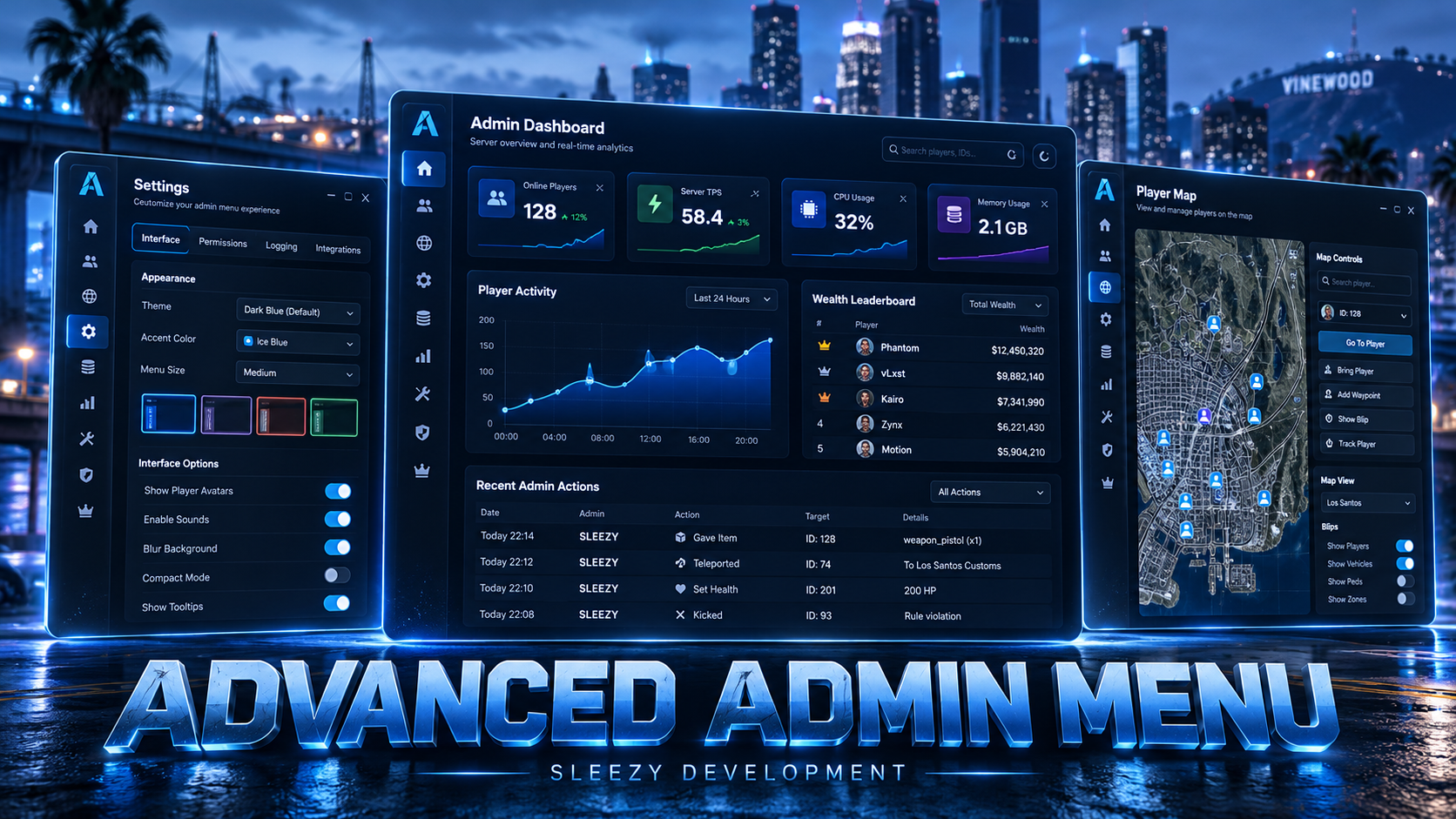
Sleezy Development • Advanced Admin Menu (ESX, QBCore, QBOX & Standalone)
Take control of your FiveM server with the Sleezy Development Advanced Admin Menu, a comprehensive administration system designed for server owners, developers, moderators, and staff teams.
Built to simplify everyday server management, Advanced Admin Menu brings player administration, staff permissions, reports, punishments, inventory management, resource controls, vehicle tools, server analytics, and development utilities together inside one interface.
Manage online and offline players, respond to support reports, assign staff permissions, review activity logs, control server resources, manage jobs and gangs, and perform administrative actions directly in-game.
The system also includes an optional Discord companion bot, allowing authorized staff to use selected administrator commands through their configured Discord server.
With a customizable interface, Discord role integration, staff activity tracking, persistent database records, world management tools, and support for multiple frameworks, Advanced Admin Menu provides a centralized workspace for server administration.
🛡️ Advanced Server Administration
👥 Online & Offline Player Management
🔐 Custom Staff Permissions & Discord Roles
📋 Player Reports & Punishment Management
📊 Server Analytics & Activity Logs
🚗 Vehicle, Inventory & Resource Management
🌎 World Tools, Freecam & Map Management
🤖 Optional Discord Administration Bot
🎮 ESX / QBCore / QBOX / Standalone
⚙️ Features
- Advanced in-game administrator menu
- Custom Sleezy Development interface
- Player search and management
- Online player information
- Offline character management
- Individual character details
- Player identifiers and character information
- Player teleportation
- Spectator mode
- Player screenshots
- Live in-game viewing tools
- Player revival and needs management
- Player inventory management
- Item giving and removal
- Cash and bank balance management
- Job and gang administration
- Vehicle management
- Vehicle spawning and repairs
- Server resource management
- Resource start, stop, and restart
- Custom player punishments
- Warnings, kicks, and bans
- Admin jail system
- Player notes
- Staff reports and ticket system
- Private administrator chat
- Staff permission groups
- Discord role permission integration
- Optional Discord companion bot
- Administrator activity logs
- Server analytics
- Player count statistics
- Map and player location tools
- Custom map blips and overlays
- Freecam and noclip
- Ped and prop placement
- Configurable world zones
- Saved teleport locations
- Staff duty tracking
- Server announcements
- Weather and time controls
- Optional Tebex store statistics
- Customizable logo
- Configurable menu command
- Custom keybind
- Editable configuration
- Persistent SQL database
- Framework auto-detection
👥 Advanced Player Management
Manage connected players from the dedicated administration interface.
- Search online players
- View player server IDs
- View character names
- View player connection information
- Inspect available identifiers
- View player job and gang information
- Review player punishments
- View saved player notes
- Manage individual players
- Execute permitted player actions
- Access inventory controls
- Open supported character information
- View available player history
Player Actions
- Revive player
- Restore hunger and thirst
- Relieve stress
- Repair a player's vehicle
- Add a supported vehicle to a garage
- Open a supported clothing menu
- Change character name
- Change character model
- Change routing bucket
- Teleport to player
- Bring player to administrator
- Return player to previous location
- Send player to a configured destination
- Spectate player
- Request a gameplay screenshot
- Initiate supported live game-view monitoring
Player actions are controlled by the selected administrator permission group.
📍 Advanced Teleportation
Move between players and configured locations using the integrated teleportation controls.
- Teleport to selected players
- Bring players to your location
- Return players to saved positions
- Teleport to map waypoint
- Send players to predefined locations
- Save frequently used teleport locations
- Access saved locations later
- Configure additional destinations
Default Destinations
- Los Santos International Airport
- Paleto Bay
- Sandy Shores
- Pillbox Hospital
- Alta Street Apartments
- Mission Row Police Department
- Legion Square
Destinations can be changed, removed, or expanded through config.lua.
🎥 Spectator & Gameplay Review Tools
The system includes several tools for authorized staff to review in-game activity.
- Spectate selected players
- Switch supported spectator targets
- View gameplay remotely
- Request in-game screenshots
- Optional live game-view streaming
- Permission-restricted surveillance actions
- Supported screenshot webhook logging
- Player action audit entries
Screenshot System
- Request a screenshot of a selected player's game
- Display captured gameplay imagery
- Optional screenshot delivery to Discord
- Screenshot action logging
- Configurable administrator permissions
Live Viewing
- WebRTC-based game-view streaming
- Authorized administrator access
- Live session initiation
- Viewer connection handling
- Session disconnect handling
Screenshot functionality requires the included screencapture dependency. Live viewing depends on compatible client support and network availability.
These tools capture in-game content and should be used according to the server's published moderation and privacy policies.
🔐 Advanced Staff Permission System
Manage administrator access through configurable permission groups.
- Create custom permission groups
- Assign permissions to staff members
- Configure individual administrative capabilities
- Add administrator accounts
- Edit staff permissions
- Remove administrator access
- Persistent staff records
- Permission-based interface access
- Restricted management actions
- Server-side permission checks
- Optional Discord role mapping
Permission Groups
The initial installation creates a SuperAdmin account for the authorized server owner.
Additional administrator groups and their permissions can be managed through the in-game interface.
Default Owner Setup Permission
sleezy.admin.setup
The first installation requires an authorized player with this ACE permission.
🤖 Discord Role Permissions
Connect configured Discord roles to administrator permission groups.
- Optional Discord integration
- Discord guild configuration
- Server-side Discord role verification
- Map Discord roles to administrator groups
- Configure role priority
- Assign matching administrator permissions
- Refresh supported access information
- Disable Discord integration when not needed
Important: Discord role permissions are optional.
Server owners can use the Admin Menu without enabling the Discord bot or Discord role integration.
📋 Player Reports & Ticket System
Players can submit reports that administrators can manage directly through the menu.
Player Reports
- Submit a report
- Select a report category
- Enter report details
- Create a staff support ticket
- Receive supported report updates
- Communicate with staff through report messages
Default Report Categories
Report Priorities
Administrator Report Tools
- View open reports
- Search reports
- Claim a report
- Unclaim a report
- Transfer a report
- Change report information
- View report messages
- Respond to players
- Resolve reports
- Close reports
- Delete eligible reports
- Review report history
- Access related player information
Default Report Command
/report
Report Configuration
- Custom report categories
- Custom priority options
- Configurable report command
- Optional Discord webhook notifications
- Automatic inactive ticket closure
- Staff notification preferences
Default Inactive Report Timeout
🔨 Punishment Management
Manage player rule violations through the integrated punishment tools.
- Warn players
- Kick players
- Temporarily ban players
- Permanently ban players
- View existing punishments
- Review punishment reasons
- Search punishment records
- Manage supported punishment entries
- View player-specific punishment history
- Apply supported offline punishments
- Record administrative actions
Punishment Types
- Warnings
- Kicks
- Temporary Bans
- Permanent Bans
- Admin Jail
Punishment availability depends on the administrator's assigned permissions.
🔒 Advanced Admin Jail
The resource includes a dedicated administrator jail system.
- Jail selected players
- Configure jail duration
- Add optional jail reasons
- Release jailed players
- Persistent jail records
- Saved jail destination
- Configurable release destination
- Jail boundary enforcement
- Offline time progression
- Administrative jail logging
Default Jail Settings
- Maximum Sentence: 10,080 Minutes
- Configurable Jail Radius: 65 Meters
- Custom Jail Coordinates
- Custom Release Coordinates
Jail duration is measured using wall-clock time, including time spent offline.
📝 Player Notes
Maintain administrative notes associated with players.
- View saved player notes
- Write player notes
- Update existing information
- Persistent note storage
- Character and player reference information
- Authorized administrator access
Useful for documenting player assistance, ongoing moderation issues, and staff observations.
💬 Private Administrator Chat
Communicate with other authorized staff through the included admin chat system.
- Administrator-only communication
- Dedicated staff chat interface
- Send messages to available staff
- View recent administrative messages
- Clear supported chat history
- New-message notifications
- Configurable staff notification preferences
📦 Advanced Inventory Management
Manage supported player inventories directly through the Admin Menu.
- View player inventories
- Open supported inventory interfaces
- Give inventory items
- Remove inventory items
- Clear player inventories
- Configure item quantities
- View available item definitions
- Search supported items
- Inventory action logging
- Framework and inventory bridge integration
Supported Inventory Integrations
- ox_inventory
- qb-inventory
- Supported ESX inventory methods
- Additional supported bridge functions
Actual inventory operations depend on the installed framework and inventory version.
💰 Player Economy Management
Authorized administrators can adjust supported in-game balances.
- Give cash
- Remove cash
- Give bank money
- Remove bank money
- Validate player availability
- Process supported framework account changes
- Log administrative economy actions
All amounts represent fictional in-game currency.
The system does not sell virtual currency or process real-money player transactions.
💼 Jobs & Gang Management
View and manage jobs and gangs through the dedicated administration section.
- Browse available jobs
- Browse configured gangs
- Search jobs and gangs
- View job members
- View gang members
- View online members
- View offline records where supported
- Assign player jobs
- Change job grades
- Remove players from jobs
- Assign gang membership
- Change gang grades
- Remove gang membership
- View available member information
Job and gang functionality depends on the installed framework and its data structures.
🚗 Advanced Vehicle Management
The Admin Menu provides tools for spawning, managing, and maintaining vehicles.
Vehicle Actions
- Spawn supported vehicles
- Repair nearby vehicles
- Flip overturned vehicles
- Refuel vehicles
- Clean vehicles
- Change vehicle colors
- Unlock nearby vehicles
- Lock nearby vehicles
- Enter the driver's seat
- Enter an available passenger seat
- Apply maximum vehicle performance upgrades
- Request vehicle keys through supported integrations
- Delete nearby vehicles
- Mass-delete eligible world vehicles
Vehicle List
- Browse supported vehicle records
- Search available vehicle definitions
- Use supported vehicle spawning controls
- View vehicle information
- Add compatible vehicles to supported garage systems
Custom garages and vehicle ownership systems may require bridge configuration.
🌎 World Tools & Entity Placement
Build and manage supported world elements through the integrated world tools.
- Spawn supported props
- Place NPCs
- Configure entity locations
- Adjust placement coordinates
- Manage saved world entities
- Create configurable world zones
- Configure zone radius
- Manage saved teleport destinations
- Remove placed entities
- Edit supported world configurations
- Automatic nearby entity streaming
- Resource cleanup handling
Default World Tool Limits
- Maximum Saved Props: 150
- Maximum Zones: 50
- Saved Teleports Per Staff Member: 30
- Placement Distance: 15 Meters
- Entity Streaming Distance: 180 Meters
World Zones
- Configurable zone coordinates
- Adjustable radius
- Safe-zone support
- Restricted combat within supported safe zones
- Routing bucket-aware configuration
- Visible zone markers
🗺️ Advanced Map Management
The resource includes map tools designed to support staff activity and server organization.
- Interactive server map
- Online player locations
- Player map markers
- Custom map blips
- Blip icon selection
- Saved map overlays
- Configurable overlay coordinates
- Area selection tools
- Map-based teleportation
- Player location updates
- Configurable map display settings
Map Overlays
- Create supported map overlays
- Save overlay information
- Edit supported overlay settings
- Remove saved overlays
- Synchronize saved overlay data
🛠️ Server Resource Manager
Authorized administrators can manage supported FiveM resources directly from the administration interface.
- View server resources
- Search available resources
- View resource names
- Check resource state
- View available resource information
- Start resources
- Stop resources
- Restart resources
- Refresh available resource information
- Restricted resource management permissions
Protected Resources
The resource manager includes restrictions for selected required and protected resources.
Resource operations can still affect dependencies and active gameplay systems. Server owners should restrict this feature to trusted technical staff.
📊 Server Analytics Dashboard
View server activity and supported economy statistics through the analytics section.
- Online player count
- Historical player count samples
- Player activity graph
- Daily activity information
- Weekly player-count calculations
- Supported server economy statistics
- Character wealth leaderboard
- Optional inventory item totals
- Configurable analytics refresh settings
- Cached analytics snapshots
Default Analytics Configuration
- Snapshot Refresh: 5 Minutes
- Idle Timeout: 15 Minutes
- Player Sampling Interval: 5 Minutes
- History Retention: 7 Days
- Wealth Leaderboard: Up to 50 Characters
Inventory totals are available only for compatible inventory database structures.
📋 Administrative Audit Logs
Review supported administrative activity through the built-in audit log system.
- Player action records
- Staff action records
- Punishment activity
- Permission changes
- Supported inventory operations
- World and map actions
- Screenshot requests
- Report activity
- Configurable log retention
- Optional external log forwarding
Default Audit Log Retention
Server owners can change the retention period through config.lua.
📤 Discord & FiveManage Logging
The system supports configurable logging providers.
Discord Webhook Logging
- Player action logs
- Administrator quick actions
- Screenshot logs
- Player reports
- Noclip activity
- Player name display toggles
- Additional action-specific webhook routing
- Configurable webhook destinations
FiveManage Integration
- Configurable API key
- Dataset selection
- Supported administrator activity logging
A valid external logging configuration is required for the selected provider.
📊 Tebex Store Information
An optional Tebex integration allows authorized staff to review supported store information through the Admin Menu.
- Store configuration
- Supported store information
- Payment statistics
- Payment history requests
- Administrative configuration access
- Restricted API credential management
This feature requires a valid compatible Tebex API configuration.
It is intended for store administration and does not independently process player purchases.
🎥 Freecam & Noclip
Navigate the game world using the included staff movement and camera tools.
- Administrator noclip
- Free camera movement
- Adjustable camera controls
- Configurable noclip behavior
- Optional invisible player model
- Vehicle-related noclip configuration
- Return-to-start option
- Snap-to-ground option
- Permission-restricted access
- Optional activity logging
Default Noclip Settings
- Hide Player Ped: Disabled
- Snap to Ground on Exit: Enabled
- Return to Starting Position: Disabled
⚡ Administrator Quick Actions
Access frequently used staff utilities without opening several separate pages.
Self Actions
- Revive yourself
- Restore food and water
- Relieve stress
- Teleport to previous position
- Teleport to map marker
- Open supported clothing menu
- Clear character blood effects
- Wet or dry clothing
- Toggle invisibility
- Toggle fast running
- Toggle god mode
- Toggle super jump
- Toggle ragdoll prevention
- Toggle infinite stamina
- Toggle visible admin tag
Server Actions
- Revive connected players
- Send server-wide announcements
- Set supported weather
- Change server time
Developer Actions
- Copy vector3 coordinates
- Copy vector4 coordinates
- Get player heading
- Load supported IPLs
- Unload supported IPLs
- Access world tools
- Save teleport locations
Additional Staff Tools
- Staff duty tracking
- Entity inspection
- Configurable development utilities
- Permission-restricted Lua execution tool
The Lua execution tool runs administrator-supplied code on the server and must only be available to fully trusted server developers.
🤖 Optional Discord Administration Bot
The package includes a separate Discord companion resource.
When enabled and configured, authorized Discord staff can perform selected administrative actions using slash commands.
Discord Bot Features
- Online player list
- Paginated player information
- Server status information
- Player information lookup
- Player warnings
- Kick commands
- Temporary and permanent bans
- Player revival
- Player healing
- Vehicle repairs
- Freeze and cuff actions
- Cash and bank adjustments
- Inventory item management
- Job and gang management
- Character name changes
- Ped model changes
- Routing bucket management
Discord Permission Support
- Configurable Discord guild
- Custom administrator channel allowlist
- Role-based permission mapping
- SuperAdmin-level commands
- Admin-level commands
- Moderator-level commands
- Per-command permission requirements
- Configurable Discord embed styling
Example Discord Commands
-
/players
-
/player
-
/serverinfo
-
/kick
-
/ban
-
/warn
-
/revive
-
/give-money
-
/remove-money
-
/give-item
-
/remove-item
-
/clear-inventory
-
/set-job
-
/set-gang
Additional commands are included for supported player and server actions.
Important: The Discord bot is optional and disabled by default.
It requires a configured Discord application, bot token, guild ID, suitable Discord permissions, and the included Node.js 22 runtime configuration.
The main in-game Admin Menu does not require the companion bot.
🎨 UI & Branding Customization
Customize the Admin Menu to better match your server's identity.
- Custom menu logo
- Local logo image support
- HTTPS logo support
- Custom interface styling
- Editable theme stylesheet
- Server name configuration
- Custom menu command
- Custom keybind
- Configurable page visibility
- Editable player-facing text
- Language configuration
- Editable permission groups
- Custom notification settings
- Configurable audit logging
- Discord integration settings
- Adjustable world tool limits
Default Menu Controls
/admin — Open the Admin Menu.
Page Down — Open the Admin Menu using the default keybind.
Default Branding Configuration
Config.Branding.Logo = 'brand.svg'
Server owners can replace the logo with a supported local asset or HTTPS image.
🌍 Language Support
The package contains two locale files.
Locale files can be edited for additional custom wording.
💾 Persistent Database System
The resource uses oxmysql to store administration-related information.
Persisted Information Includes
- Administrator accounts
- Staff permission groups
- Punishment records
- Player reports
- Report messages
- Staff chat records
- Administrative audit logs
- Player notes
- Map overlays
- Saved world tool data
- Configured Tebex information
- Player activity samples
First-Run Installation
The system includes a guided first-time installation process.
- Authorized owner verification
- Server name configuration
- Database migrations
- Initial SuperAdmin creation
- Permission registration
- Installation completion checks
An authorized owner must complete setup before the full administration menu becomes available.
🔐 Security & Permissions
- Initial owner ACE verification
- Server-side staff access checks
- Custom permission groups
- Permission-restricted actions
- Discord role mapping
- Separate Discord bot role permissions
- Administrator action logging
- Player session validation
- Protected resource management
- Configurable IP display
- Database-backed administrative records
- Report and punishment history
- Restricted server configuration access
Default Privacy Setting
Player IP address display is disabled in the Admin Menu by default.
Server owners remain responsible for configuring access to sensitive player information and captured gameplay footage.
🧩 Framework Support
- ESX
- QBCore
- QBOX
- Standalone with supported bridge limitations
- Automatic framework integration
Inventory Integrations
- ox_inventory
- qb-inventory
- ps-inventory for supported functions
- Compatible ESX inventory methods
- Additional editable bridge functionality
Additional Integrations
- Discord
- FiveManage
- Tebex API
- Compatible clothing systems
- Supported vehicle-key systems
- Compatible garage systems
- Supported medical resources
Some integrations depend on the installed framework and available third-party APIs.
📦 What's Included
- Sleezy Advanced Admin Menu Resource
- Custom In-Game Administration UI
- Player Management Tools
- Online & Offline Character Management
- Player Teleportation
- Spectator Mode
- Screenshot & Live Viewing Tools
- Player Inventory Management
- Job & Gang Management
- Vehicle Administration
- Resource Management
- Player Reports & Ticket System
- Player Notes
- Punishment Management
- Admin Jail
- Private Admin Chat
- Staff Permission Groups
- Discord Role Integration
- Server Analytics Dashboard
- Administrative Audit Logs
- Tebex Store Information Integration
- Map & Blip Management
- World Tools
- Prop & Ped Placement
- Freecam & Noclip
- Staff Duty Tracking
- Saved Teleports
- Administrator Quick Actions
- Optional Discord Companion Resource
- Discord Slash Commands
- Discord Bot Configuration
- Editable Configuration Files
- English & Spanish Locales
- Database Setup & Migrations
- Asset Escrow Configuration
🏠 Perfect For
- FiveM Roleplay Communities
- Serious Roleplay Servers
- Semi-Serious Roleplay Servers
- Server Owners
- Staff Management Teams
- Player Support Teams
- Moderators
- Developers
- Server Administration
- Player Report Management
- Staff Training
- Community Management
- Server Maintenance
⚙️ Installation & Requirements
Required
- FiveM Server
- OneSync Enabled
- ox_lib
- oxmysql
- screencapture
- MySQL-Compatible Database
Supported Frameworks
- ESX
- QBCore
- QBOX
- Standalone with configured integrations
Optional
- Discord Companion Bot
- Discord Role Verification
- FiveManage Logging
- Tebex API Integration
- Compatible Inventory and Clothing Resources
- Compatible Medical and Garage Resources
Quick Installation
- Download and extract the Admin Menu package.
- Place
sleezy_admin inside your server resources folder.
- Install and ensure ox_lib, oxmysql, and screencapture.
- Confirm OneSync and the database connection are configured.
- Configure the menu command and keybind.
- Add the owner setup ACE permission.
- Ensure
sleezy_admin after its dependencies.
- Restart the server.
- Join using the authorized owner account.
- Open
/admin or press Page Down.
- Complete the first-run installation.
- Configure staff permission groups.
- Review administrator access to sensitive actions.
- Configure optional logging and Discord integration.
- Test the management pages with properly assigned staff roles.
Owner Setup ACE Example
add_ace group.owner sleezy.admin.setup allow
The authorized owner must belong to the corresponding ACE group.
Optional Discord Companion
- Install
sleezy_admin_discordbot separately.
- Configure its Discord application settings.
- Enable the bot in its configuration.
- Configure private credentials.
- Set administrator role mappings.
- Start the companion after
sleezy_admin.
- Test its authorized Discord commands.
⚙️ Important Information
This resource provides FiveM server administration and moderation tools for authorized server staff.
The initial installation requires a valid owner ACE permission and working database access.
The Discord companion is optional and is not required for normal in-game administrator functionality.
External integrations, including Discord roles, Tebex statistics, garages, clothing, inventory, and medical actions, require compatible dependencies and configuration.
Screenshot and live game-view tools are designed for server moderation. Server operators should disclose relevant recording practices and control access to captured player information.
The resource includes sensitive administrator features, including inventory changes, economy adjustments, resource management, and a permission-gated Lua executor. These capabilities should be restricted to trusted personnel.
The menu's resource manager can start, stop, and restart supported server resources, but is not a replacement for a complete hosting control panel.
The package includes database migrations and an installation flow. Database backups are recommended before deployment to an established server.
💎 Why Choose This System?
The Sleezy Development Advanced Admin Menu brings a wide range of server administration tools together in a single resource.
Instead of managing players, reports, punishments, permissions, vehicles, resources, and server activity through separate interfaces, authorized staff can access these functions from one administration panel.
With custom staff groups, player management, detailed reports, persistent punishment records, resource controls, world tools, server analytics, audit logs, and optional Discord integration, Advanced Admin Menu provides a centralized way to organize day-to-day server administration.
Designed for FiveM communities looking for a customizable administration experience with detailed management tools, persistent records, and support for multiple server frameworks.
Developer: Sleezy Development
Version: 1.0.0
Frameworks: ESX • QBCore • QBOX • Standalone
Resource: sleezy_admin
Optional Companion: sleezy_admin_discordbot
Database: MySQL / oxmysql
Dependencies: ox_lib • oxmysql • screencapture • OneSync
Menu Command: /admin
Default Keybind: Page Down
Support: discord.gg/sleezydevelopment
Sleezy Development • Premium FiveM Systems
Script Preview: (1) Sleezy Development - YouTube
Discord Support: Discord