Sleezy Development • Advanced Bearbrix Workshop (ESX, QBCore, QBOX & Standalone)
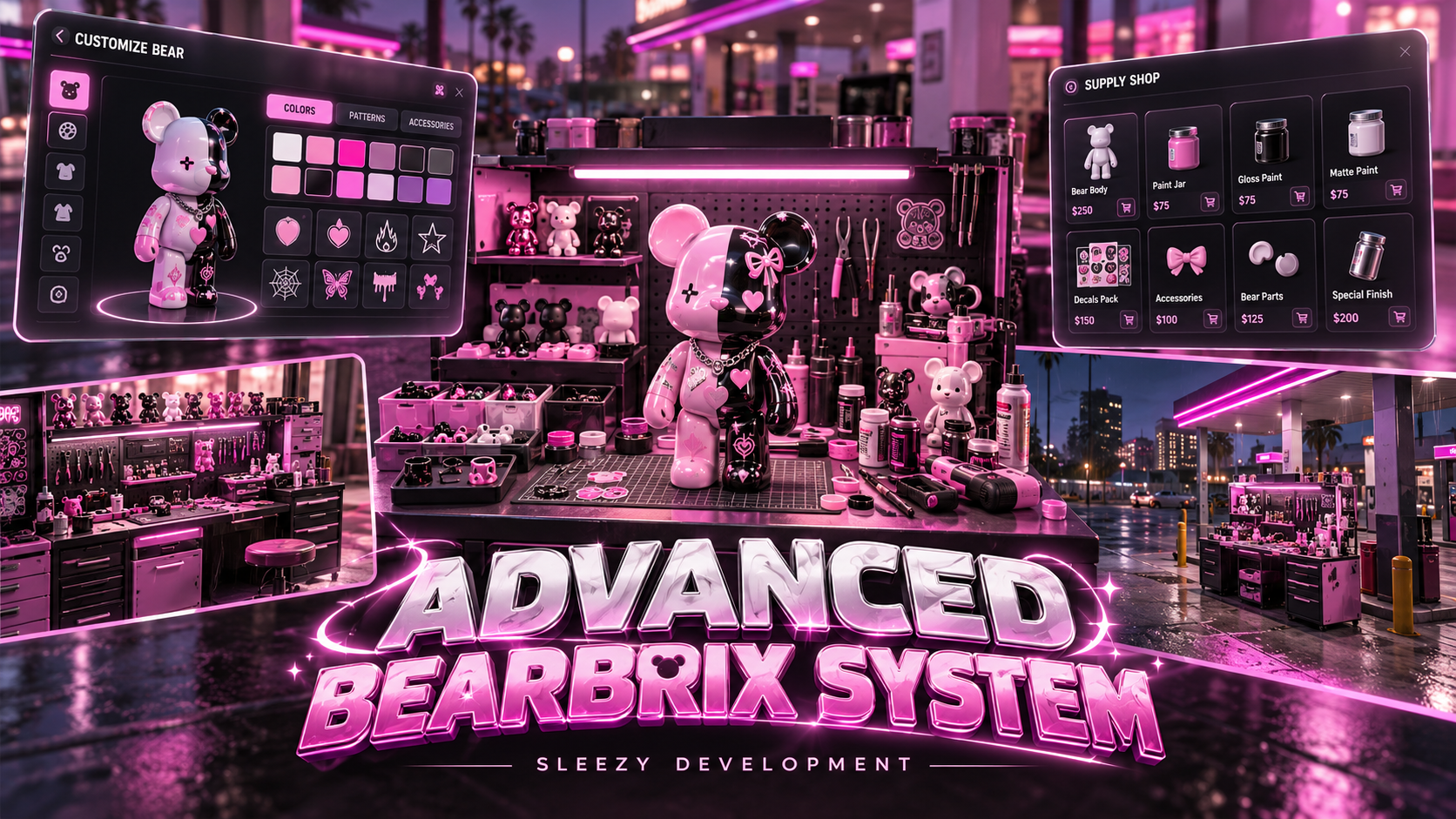
Bring interactive collectible crafting, custom bear painting, wearable accessories, and NPC selling activities to your FiveM server with the Sleezy Development Advanced Collectible Bear Workshop.
Designed for immersive roleplay communities, this system allows players to purchase crafting materials, create collectible bear figures, customize their own designs, package completed creations, and sell finished products to in-game customers.
Players can visit a dedicated supply shop, purchase the required materials, use a crafting workstation, complete an interactive painting experience, and turn their finished creations into sealed collectible boxes.
Once a box is opened, players can keep their collectible, equip it as a shoulder accessory, exchange it with other players through supported inventory systems, or sell it to NPC customers for configurable in-game currency.
The system includes five preset collectible designs, a sixth customizable bear, six-part interactive painting, portable crafting tables, inventory-based collectible boxes, character attachments, animated NPC exchanges, and configurable workshop settings.
Built with a custom purple-themed interface, original procedural painting functionality, streamed collectible models, persistent item metadata, and multi-framework integration.
🎨 Advanced 3D Bear Painting
🧸 Six Collectible Bear Options
📦 Sealed Collectible Boxes
🛍️ Interactive Crafting Supply Shop
🛠️ Portable Crafting Workstations
💜 Wearable Shoulder Collectibles
💰 NPC Selling & Customer Interactions
🎮 ESX / QBCore / QBOX / Standalone
⚙️ Features
- Advanced collectible crafting system
- Five preset collectible designs
- One customizable bear design
- Interactive 3D painting interface
- Six individually paintable body sections
- Configurable paint color palette
- Mouse-controlled painting
- Interactive model rotation and tilt
- Adjustable painting camera
- Custom brush cursor
- Painting coverage requirements
- Minimum crafting duration
- Configurable crafting recipes
- Reusable paintbrush item
- Interactive material supply shop
- Cash and bank payment support
- Multiple supply materials
- Configurable item prices
- Dedicated workshop location
- Portable crafting tables
- Interactive table placement
- Table rotation and pickup
- Configurable placement limits
- Sealed collectible boxes
- Inventory-based box opening
- Individual collectible items
- Custom paint metadata
- Wearable shoulder accessories
- Shoulder attachment positioning
- Multiplayer attachment synchronization
- Configurable attachment visibility
- NPC collectible selling
- Walking customer NPCs
- Animated collectible handoffs
- Configurable selling prices
- Customer rejection chances
- Sale cancellation
- Server-side inventory validation
- Persistent table locations
- Transaction recovery handling
- ox_target and qb-target support
- Built-in E-key interaction
- Customizable interface branding
- Automatic framework detection
- No SQL database required
🧸 Collectible Bear Collection
The workshop includes six configurable collectible options.
Rose
- Preset collectible design
- Individual streamed 3D model
- Dedicated collectible item
- Matching sealed box
- Custom inventory artwork
- Wearable shoulder display
Cloud
- Preset collectible design
- Individual model appearance
- Dedicated collectible item
- Matching collectible box
- Custom inventory image
- Shoulder attachment support
Hearts
- Decorative heart-themed appearance
- Custom streamed collectible model
- Dedicated inventory item
- Matching box design
- Shoulder accessory support
Wild
- Dark decorative collectible appearance
- Individual 3D model
- Dedicated collectible item
- Matching sealed box
- Custom inventory artwork
- Wearable accessory support
Shadow
- Dark collectible styling
- Custom model appearance
- Dedicated collectible item
- Matching sealed box
- Custom inventory artwork
- Shoulder attachment support
Your Creation
- Customizable neutral bear
- Six individually paintable sections
- Configurable color combinations
- Interactive 3D painting
- Individual color metadata
- Custom collectible box
- Wearable shoulder display
The five preset models retain their supplied decorative appearance after crafting.
The Your Creation option preserves the selected colors on the completed collectible.
🎨 Advanced 3D Painting Workshop
Players can customize and prepare their collectible through the dedicated painting interface.
- Interactive 3D bear preview
- Select available paint colors
- Paint individual body sections
- Drag the brush across the model
- Rotate the bear using mouse controls
- Tilt the model for different viewing angles
- Zoom in and out
- View painting progress
- Complete individual sections
- Save the selected color configuration
- Finish the crafting process
Six Paintable Sections
- Head
- Torso
- Left Arm
- Right Arm
- Left Leg
- Right Leg
Each section can be painted individually using the configured color palette.
Default Painting Settings
- Eight available paint colors
- 65% required coverage per section
- Minimum 1-second interaction per section
- 20-second minimum total crafting duration
- Configurable crafting session timeout
Players must move the brush across the model to complete each section. Simply holding the mouse button in one position does not complete the painting interaction.
🖱️ Painting Controls
- Left Mouse — Paint the selected section
- Right Mouse Drag — Rotate and tilt the bear
- Mouse Wheel — Zoom
- Color Swatches — Select paint colors
- Rotation Buttons — Adjust model viewing angle
- Escape — Close the interface
The painting interface includes model previews, progress information, and configurable crafting controls.
🛠️ Configurable Crafting Modes
Server owners can choose how each collectible is crafted.
Interactive Mode
- Full painting interaction
- Individual body-section progress
- Custom paint colors
- Mouse-controlled painting
- 3D preview
- Configurable completion requirements
Progress Mode
- Simplified timed crafting
- Configurable crafting duration
- No manual painting requirement
- Standard recipe validation
- Automatic completion when eligible
Crafting Options
- Enable or disable crafting
- Set a global crafting mode
- Override individual collectible modes
- Adjust crafting durations per design
- Disable individual collectibles
- Configure required materials
- Adjust paint completion settings
All six designs use interactive crafting by default.
📦 Crafting Materials & Recipes
Players must obtain the required materials before creating a collectible.
Available Supply Items
- Resin Pellets
- Assembly Screws
- Crafting Metal
- Oak Strips
- Paint
- Paintbrush
- Crafting Table
Default Crafting Recipe
- 5 Resin Pellets
- 2 Assembly Screws
- 2 Crafting Metal
- 2 Paint
- 1 Reusable Paintbrush Required
The paintbrush is required but is not consumed when crafting succeeds.
Recipe ingredients are removed after successful crafting validation.
🛍️ Interactive Supply Shop
Purchase workshop materials through the included supplier interface.
- Dedicated supply shop location
- Configurable shop coordinates
- Optional supplier NPC
- Custom NPC model
- Configurable map blip
- Item images
- Individual product prices
- Shopping cart
- Quantity selection
- Cash payments
- Bank payments where supported
- Server-side purchase validation
- Inventory capacity checks
- Purchase confirmation
- Configurable shop interaction distance
Default Supply Prices
- Resin Pellets — $17
- Assembly Screws — $13
- Crafting Metal — $8
- Oak Strips — $11
- Paint — $14
- Paintbrush — $65
- Crafting Table — $2,500
All prices use fictional in-game currency and can be changed through config.lua.
🏪 Separate Shop & Workshop Interfaces
The system uses separate interactions for purchasing supplies and crafting collectibles.
Supply Shop
- Purchase crafting materials
- Purchase paintbrushes
- Purchase portable workbenches
- Manage shopping cart
- Complete supported purchases
Crafting Workshop
- Select a collectible design
- Review crafting requirements
- Begin crafting
- Complete painting or progress interactions
- Receive a sealed collectible box
Selling collectibles and managing owned items take place outside the crafting interface.
🛠️ Portable Crafting Tables
Players can purchase and place their own crafting stations.
- Purchasable crafting table item
- Physical 3D workshop model
- Configurable portable table support
- Interactive placement preview
- Rotate table before placement
- Confirm table placement
- Cancel placement
- Server-side placement distance validation
- Table ownership tracking
- Configurable maximum tables
- Pickup by eligible owner
- Return table to inventory
- Persistent table locations
Default Portable Table Settings
- Maximum 2 portable tables per player
- Maximum placement distance of 3 meters
- Owner-only pickup enabled
Portable table locations are saved using FiveM resource KVP storage.
📦 Sealed Collectible Box System
Successfully crafted bears are awarded as individual sealed inventory boxes.
- Dedicated box item for each design
- Matching box artwork
- Inventory-based box rewards
- Individual box opening
- Convert sealed boxes into collectible items
- Server-side inventory verification
- Exact inventory slot validation
- Custom color metadata preservation
- Duplicate reward protection
- Inventory capacity checks
Box Interaction
- Craft an eligible collectible.
- Receive its matching sealed box.
- Open the box through your inventory.
- Receive the corresponding collectible.
- Keep, equip, exchange, or sell the item.
Custom painted bear colors are retained through supported inventory metadata.
💜 Wearable Shoulder Collectibles
Players can equip their collectibles as shoulder accessories.
- Use collectible directly from inventory
- Attach the bear to the player character
- Configurable shoulder position
- Adjustable attachment offsets
- Custom rotation settings
- Forward-facing orientation
- Dynamic character attachment
- Multiplayer appearance synchronization
- Switch between owned collectibles
- Unequip the active collectible
- Automatic cleanup when appropriate
Default Shoulder Settings
- Configurable character bone attachment
- 25-meter display distance
- Maximum 4 nearby visible preset attachments per client
- Adjustable facing direction
- Configurable custom bear size
Custom Painted Accessories
The customizable bear uses its saved color metadata for the rendered shoulder display.
The custom model is rendered using procedural geometry rather than a conventional streamed collectible model.
🎮 Inventory-Based Collectibles
The resource includes usable inventory items for the collectible boxes, bears, and crafting tables.
- Use a sealed box to open it
- Use a bear to equip it
- Use the equipped bear again to remove it
- Equip a different bear
- Use a table item to begin placement
- Preserve supported custom color metadata
- Verify ownership and inventory contents server-side
💰 NPC Collectible Selling
Players can sell eligible collectibles to NPC customers.
- Sell finished bear items
- Sell unopened collectible boxes
- Configurable item eligibility
- Customer interaction
- Inventory item selection
- Configurable selling prices
- Server-generated sale offers
- Optional customer rejection
- Animated item handoff
- Server-side sale validation
- Cash payment rewards
- Configurable sale cooldowns
- Failed sale cleanup
Default Sale Configuration
- Minimum Price: $250
- Maximum Price: $450
- Sale Interaction Duration: 4.5 Seconds
- Sale Cooldown: 15 Seconds
- Customer Rejection Chance: 10%
- Selling Anywhere: Enabled
All values are configurable.
🚶 Walking Customer System
By default, the resource can create a dedicated customer NPC who approaches the player for a sale.
- Spawn a nearby customer
- Configurable customer models
- Customer walks toward the player
- Adjustable walking speed
- Configurable arrival distance
- Customer arrival timeout
- Animated item transfer
- Customer departure behavior
- Automatic NPC cleanup
- Sale cancellation during approach
- Failed route handling
Default Customer Settings
- Minimum Spawn Distance: 12 Meters
- Maximum Spawn Distance: 20 Meters
- Arrival Timeout: 45 Seconds
- Automatic Departure Cleanup: 8 Seconds
Alternative Nearby NPC Mode
Server owners can switch to a mode where players sell directly to an existing eligible civilian.
This mode requires a compatible nearby NPC rather than spawning a dedicated approaching customer.
🤝 Animated Collectible Handoffs
The NPC selling system includes a visual item transfer.
- Bear appears in the player's hand
- Item transfer toward the customer
- Customer displays the collectible
- Server validates the transaction
- Inventory item is removed
- In-game currency is awarded
- Customer leaves after completion
Failed or interrupted transactions are handled through the resource's cancellation and recovery logic.
🎮 Available Commands
/brixshop — Open the supply shop when eligible and near the configured location.
/sellbrix — Select a collectible from inventory to sell.
/sellbrix [slot] — Select an eligible item from a specific inventory slot.
/cancelbrixsale — Cancel a customer approach request.
/removebrix — Remove the currently equipped shoulder collectible.
Commands can be renamed or disabled through config.lua.
🎨 UI & Branding Customization
The resource includes a dedicated workshop and supplier interface.
- Custom purple-themed design
- Editable interface title
- Configurable development branding
- Custom accent color
- Product image cards
- Collectible previews
- Interactive painting canvas
- Custom painting controls
- Material shopping cart
- Quantity controls
- Configurable item labels
- Dedicated navigation icons
- Scrollable product interface
- Progress indicators
- Compact sale selection
- Responsive UI layout
- Configurable interface behavior
⚙️ Custom Configuration
Server owners can configure:
- Framework detection
- Inventory selection
- Interaction provider
- Command names
- Workshop locations
- Supplier locations
- NPC models
- Shop blip settings
- Cash and bank availability
- Material item names
- Material prices
- Crafting recipes
- Crafting duration
- Painting coverage requirements
- Available paint colors
- Individual collectible availability
- Portable crafting table limits
- Table ownership settings
- Shoulder positioning
- Attachment rotation
- Attachment visibility
- NPC sale prices
- Customer rejection chance
- Customer models
- Selling cooldowns
- Customer walking distance
- Customer arrival timeouts
- Allowed selling locations
- Branding and interface colors
🛡️ Server-Side Validation
The resource includes validation for important inventory and crafting operations.
- Character identity verification
- Shop distance checks
- Server-side item prices
- Account balance verification
- Inventory item validation
- Material quantity checks
- Reusable brush verification
- Crafting duration checks
- Paint color validation
- Server-side craft session tokens
- Duplicate completion prevention
- Exact inventory slot validation
- Customer NPC validation
- Selling distance checks
- Routing bucket checks
- Item reservation handling
- Server-authorized sale prices
- Payment validation
- Failed transaction recovery
- Table ownership checks
- Placement distance verification
- Character session protection
- Resource shutdown cleanup
The painting interface tracks brush movement and coverage as a gameplay interaction. It is not represented as an anti-cheat system.
💾 Persistent Saving & Recovery
- Persistent portable crafting tables
- Saved table ownership
- Character-specific inventory metadata
- Custom bear paint colors
- Supported pending recovery claims
- Transaction recovery records
- Resource KVP persistence
- No dedicated SQL database required
Custom color metadata persists through compatible ox_inventory and qb-inventory setups.
Native ESX inventory can support the five preset collectibles but does not provide the required per-item metadata behavior for fully custom-painted bears.
🧩 Framework Support
- ESX
- QBCore
- QBOX
- Standalone with compatible inventory configuration
- Automatic framework detection
Inventory Support
- ox_inventory
- qb-inventory
- Native ESX inventory for preset collectibles
- Editable custom inventory bridge
Standalone Mode
Standalone operation uses ox_inventory with configured inventory currency items.
Cash payments use a configured item, while bank payments are disabled by default.
Custom inventory providers require a compatible implementation through the included editable bridge.
🎯 Interaction Support
- ox_target
- qb-target
- Built-in E-key proximity interaction
- Configurable interaction distance
Target resources are optional when using the built-in interaction system.
📦 What's Included
- Advanced Collectible Bear Workshop Resource
- Five Preset Collectible Models
- Custom Paintable Bear
- Interactive 3D Painting System
- Six-Part Painting Canvas
- Configurable Color Palette
- Crafting Recipe System
- Supply Shop Interface
- Shopping Cart
- Crafting Material Definitions
- Reusable Paintbrush Item
- Portable Crafting Table Model
- Table Placement System
- Sealed Collectible Boxes
- Box Opening System
- Shoulder Accessory System
- NPC Selling System
- Walking Customer Interactions
- Animated Bear Handoffs
- Inventory Item Artwork
- ox_inventory Installation Definitions
- qb-inventory Installation Definitions
- ESX Item SQL
- Framework & Inventory Bridges
- Editable Configuration
- UI Source Files
- Installation Documentation
- Local Test Suite
- Asset Escrow Configuration
🏠 Perfect For
- FiveM Roleplay Communities
- Collectible Crafting Activities
- Custom Roleplay Businesses
- Creative Workshops
- Character Accessories
- Player Trading
- In-Game Collectible Shops
- Lifestyle Roleplay
- Social Roleplay Servers
- Crafting-Based Economy Systems
- Community Events
- Character Customization
- Custom Server Activities
⚙️ Requirements
- FiveM Server
- OneSync Enabled
- ox_lib
- Compatible Framework or Standalone Integration
- Supported Inventory System
Optional Integrations
- ox_target
- qb-target
- Custom inventory or economy bridge
No SQL Database Required
⚙️ Installation
- Extract the resource into your FiveM server's resources folder.
- Keep the folder name as
sleezy_bearbrix.
- Ensure ox_lib and your selected framework are installed.
- Install the appropriate inventory item definitions.
- Copy the provided inventory images.
- Configure the supply shop and workshop coordinates.
- Adjust crafting recipes and collectible settings.
- Set up NPC selling options.
- Configure your preferred interaction system.
- Add
ensure sleezy_bearbrix after its dependencies.
- Restart the relevant resources.
- Test material purchases, crafting, sealed boxes, wearable collectibles, and NPC sales in-game.
⚙️ Important Information
This resource provides fictional collectible crafting, painting, and selling activities exclusively within FiveM.
The five preset collectible models use supplied streamed assets. The sixth customizable bear uses procedural geometry and individually saved colors.
Custom-painted bears are display meshes without native object collision or cast shadows.
The supplied preset designs retain their decorative artwork after crafting. Only the Your Creation option stores the player's selected colors on the finished model.
Custom color persistence requires an inventory system that supports item metadata.
The resource does not include a separate collectible inventory application, a collection gallery, an external marketplace, or a real-world product redemption system.
NPC customer spawning depends on suitable pedestrian navigation locations. Some interiors and custom maps may require adjustments.
Collectible models, artwork, and associated designs must be authorized for commercial redistribution before the resource is offered for sale.
💎 Why Choose This System?
The Sleezy Development Advanced Collectible Bear Workshop combines interactive crafting, 3D painting, collectible packaging, wearable accessories, and NPC selling into one FiveM resource.
Players can purchase materials, work through an interactive creation process, customize a unique bear, open sealed boxes, wear their collectibles, and complete animated sales with in-game customers.
With portable crafting tables, configurable recipes, six collectible options, individual inventory items, persistent metadata, and multi-framework support, the system provides an additional crafting and lifestyle activity for roleplay communities.
Designed for server owners looking to introduce a detailed collectible creation experience with customizable gameplay and in-game economy integration.
Developer: Sleezy Development
Version: 1.0.5
Frameworks: ESX • QBCore • QBOX • Standalone
Resource: sleezy_bearbrix
Database: Not Required
Dependency: ox_lib • OneSync
Support: discord.gg/sleezydevelopment
Sleezy Development • Premium FiveM Systems