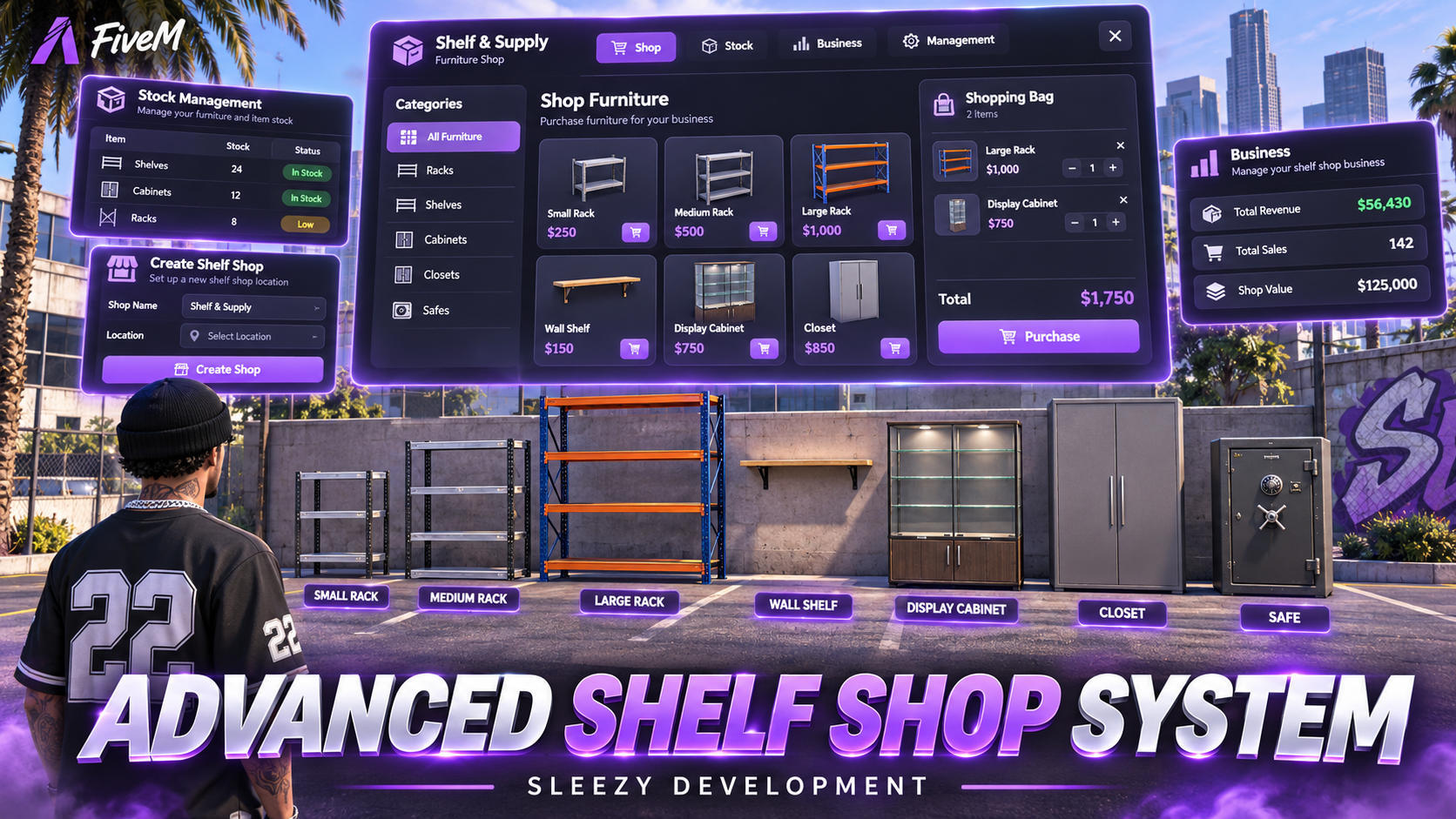
Bring interactive furniture shopping, player-owned businesses, customizable storage, and warehouse delivery activities to your FiveM server with the Sleezy Development Advanced Shelf & Supply System.
Designed for immersive roleplay communities, this system allows players to purchase furniture, place storage units throughout supported environments, organize personal belongings, and manage their own furniture businesses.
Players can browse a custom furniture showroom, purchase racks, shelves, cabinets, closets, and vaults, then place their furniture using an interactive positioning system.
The system also introduces player-owned storefronts, configurable employee permissions, business finances, wholesale inventory deliveries, PIN-protected vaults, and optional vault break-in mechanics.
Server administrators can create entire furniture stores directly in-game, customize display locations, place NPC vendors, configure warehouses, manage business ownership, and archive or permanently remove saved stores.
Built with a custom charcoal-themed interface, detailed product images, ten streamed furniture models, persistent storage, and multi-framework compatibility.
🛍️ Advanced Furniture Shopping System
📦 10 Custom Furniture & Storage Models
🏪 Player-Owned Furniture Businesses
🛠️ In-Game Shop & NPC Creator
🔐 Private Storage & PIN-Protected Vaults
🚚 Wholesale Deliveries & Supply Runs
👥 Employee & Business Management
🎮 ESX / QBCore / QBOX / Standalone
⚙️ Features
- Advanced furniture shopping system
- Custom in-game shop interface
- Ten custom furniture models
- Matching furniture product images
- Interactive furniture displays
- Searchable product catalogue
- Product categories and filters
- Configurable furniture prices
- Shopping cart and quantity controls
- Cash and bank payments
- Configurable shop locations
- Player-owned furniture businesses
- Server-operated furniture shops
- In-game shop creator
- Custom NPC vendor placement
- Interactive display placement
- Custom shop map blips
- Business purchase system
- Business ownership management
- Employee hiring and removal
- Configurable staff roles
- Role-based permissions
- Business account management
- Cash deposits and withdrawals
- Adjustable retail prices
- Store opening and closing
- Configurable business stock
- Wholesale furniture ordering
- Warehouse collection activities
- Company delivery vehicles
- Configurable delivery locations
- Vehicle-based supply runs
- Interactive furniture placement
- Furniture rotation and height adjustment
- Wall-mounted storage support
- Persistent furniture locations
- Individual furniture inventories
- Private and public storage settings
- Configurable storage capacities
- Inventory item thumbnails
- Searchable storage interface
- Item deposit and withdrawal
- PIN-protected storage vaults
- Vault PIN management
- Optional vault break-in interactions
- Configurable placement animations
- Furniture pickup and recovery
- Shop archiving and restoration
- Permanent shop deletion
- Persistent business and furniture data
- Server-side inventory validation
- Automatic framework detection
- No dedicated SQL database required
🛍️ Advanced Furniture Showroom
Players can browse available furniture through a dedicated shopping interface.
- Custom furniture catalogue
- Individual product images
- Product names and categories
- Storage capacity information
- Configurable item prices
- Available stock display
- Product search
- Category filtering
- Featured furniture display
- Interactive shopping cart
- Adjustable purchase quantities
- Shopping cart thumbnails
- Automatic total calculation
- Cash or bank checkout
- Purchase confirmation
- Inventory-based furniture delivery
Furniture Categories
- Storage Racks
- Shelves
- Display Cabinets
- Storage Closets
- Safes & Vaults
The catalogue automatically displays the furniture products configured for the selected store.
📦 Ten Included Furniture Models
The system includes ten custom streamed furniture models with matching catalogue artwork.
1. Small Storage Rack
- Four storage slots
- Compact four-tier rack
- Placeable furniture model
- Configurable storage permissions
- Custom inventory item
2. Medium Storage Rack
- Six storage slots
- Medium-sized storage unit
- Interactive placement
- Inventory-based storage
- Custom item image
3. Large Storage Rack
- Eight storage slots
- Larger rack design
- Configurable access
- Persistent item storage
- Custom furniture artwork
4. Wall-Mounted Shelf
- Four storage slots
- Wall-mounted furniture design
- Adjustable placement height
- Custom rotation support
- Individual storage inventory
5. Display Cabinet
- Four storage slots
- Custom cabinet model
- Interactive item storage
- Configurable access permissions
- Matching catalogue image
6. Small Storage Closet
- Six storage slots
- Compact closet model
- Private or public storage
- Custom inventory artwork
7. Medium Storage Closet
- Eight storage slots
- Medium storage furniture
- Interactive placement
- Persistent storage contents
8. Large Storage Closet
- Twelve storage slots
- Large storage capacity
- Custom furniture model
- Configurable item limits
9. Huge Storage Closet
- Twenty storage slots
- Largest included closet option
- Configurable storage access
- Persistent item management
10. Storage Vault
- Eight storage slots
- PIN-protected storage
- Configurable access rules
- Optional break-in functionality
- Owner-controlled PIN changes
All furniture prices, capacities, models, and storage settings can be configured.
🎮 Interactive Furniture Placement
Players can purchase furniture through supported shops and place it in suitable areas.
- Furniture delivered as inventory items
- Use an item to begin placement
- Transparent placement preview
- Move the preview with the character
- Rotate furniture before placement
- Adjust furniture height
- Ground positioning for supported models
- Wall-mounted placement support
- Confirm or cancel placement
- Automatic placement cleanup
- Persistent furniture coordinates
- Server-side placement validation
Placement Controls
-
E — Confirm placement
- Left / Right Arrow — Rotate furniture
- Up / Down Arrow — Adjust height
- Mouse Wheel — Adjust height
- Backspace — Cancel placement
Cancelling placement does not consume the furniture item.
📦 Advanced Furniture Storage
Placed furniture functions as an interactive inventory storage unit.
- Separate storage for each placed object
- Individual item storage slots
- Configurable maximum stack quantities
- Deposit inventory items
- Withdraw stored items
- Select item quantities
- Search available items
- Search stored items
- View item names and labels
- Inventory item thumbnail previews
- Item metadata preservation
- Custom item image support
- Configurable storage restrictions
- Persistent storage contents
- Server-side inventory validation
Default Storage Configuration
- Maximum 100 items per stored stack
- Weapons blocked by default
- Currency items blocked by default
- Configurable item restrictions
- Individual furniture capacity limits
Storage capacity is based on configured stack entries rather than inventory-provider weight limits.
🖼️ Storage Item Images
The resource includes item-image integration for supported inventories.
- ox_inventory item artwork
- qb-inventory item artwork
- Individual item thumbnails
- Stored-item image previews
- Selected-item display
- Searchable inventory entries
- Configurable image directory
- Custom item-image overrides
- Fallback image for missing artwork
The storage interface displays available item images to make it easier to identify what is being deposited or withdrawn.
🔐 Shelf Access Permissions
Server owners can control who is allowed to access placed storage furniture.
Owner-Only Storage
- Access restricted to the placing character
- Administrator access supported
- Other players cannot open storage
- Configurable through the resource settings
Public Storage
- Nearby eligible players can access storage
- Shared item deposits and withdrawals
- Suitable for shared roleplay environments
- Server-side proximity validation
Default Shelf Access
Owner Only
Vaults have their own separate access settings and are not required to use the same permissions as ordinary shelves.
🔒 PIN-Protected Storage Vaults
The included vault provides additional storage security through a configurable PIN system.
- Custom numeric vault PIN
- PIN setup during placement
- PIN verification before opening
- Separate vault access permissions
- Server-side PIN validation
- Configurable PIN length
- Incorrect PIN attempt limits
- Temporary lockouts
- Configurable access session duration
- Owner-controlled PIN changes
- Automatic previous-access revocation
- Persistent lock configuration
Default Vault Settings
- PIN Length: 4–8 Digits
- Maximum Incorrect Attempts: 5
- Lockout Duration: 60 Seconds
- Access Session: 120 Seconds
- PIN Protection: Enabled
Players must enter the configured PIN when opening a locked vault.
🔑 Vault PIN Management
The placing character can change the vault PIN using the included command.
/vaultlock — Change the PIN on an eligible nearby owned vault.
Changing the PIN immediately invalidates previously issued access.
PIN values are kept in server-side resource state and are not included in public furniture snapshots.
PIN data is not encrypted at rest, so administrators must protect server storage and backups.
🔓 Optional Vault Break-Ins
Server owners can enable an additional fictional vault-entry activity.
- Optional vault break-in setting
- Configurable required inventory item
- Timed interaction
- Custom progress animation
- Adjustable success chance
- Configurable cooldown
- Server-side item verification
- Distance validation
- Routing bucket validation
- Failed attempt handling
- Temporary access after success
- No ownership transfer
- No PIN disclosure
Default Break-In Settings
- Disabled by Default
- Required Item:
lockpick
- Attempt Duration: 30 Seconds
- Cooldown: 5 Minutes
- Success Chance: 65%
- Tool Consumption: Enabled
When enabled, successful attempts grant temporary access to the vault inventory. They do not grant ownership or furniture pickup rights.
Server owners can disable this feature entirely.
🎬 Furniture Interaction Animations
The resource includes configurable interaction animations for supported furniture actions.
- Furniture placement progress
- Furniture pickup progress
- Storage opening interaction
- Item transfer progress
- Vault interaction progress
- Cancelable actions
- Automatic cleanup after interruption
Default Animation Durations
- Placement: 1.8 Seconds
- Pickup: 1.6 Seconds
- Storage Transfer: 0.65 Seconds
- Opening Storage: 0.7 Seconds
The system uses GTA character animations and ox_lib progress controls.
The furniture models themselves do not include animated opening doors or physical carrying animations.
🏪 Player-Owned Furniture Businesses
Players can purchase eligible storefronts and operate their own furniture businesses.
- Purchasable storefronts
- Character-bound ownership
- Configurable business purchase price
- Individual business accounts
- Stock management
- Retail price adjustments
- Business opening and closing
- Employee management
- Wholesale deliveries
- Business transaction history
- Ownership administration
Business Features
- Purchase available businesses
- Receive supported customer sales into the business balance
- Deposit business funds
- Withdraw authorized business funds
- Manage available furniture stock
- Set individual product prices
- Hire employees
- Assign worker and manager roles
- Order additional products
- Manage delivery activities
Unowned player businesses cannot complete regular customer transactions until purchased or assigned to an owner.
🏢 Server-Operated Stores
Server owners can also create stores without player ownership.
- Server-managed furniture sales
- Configurable product prices
- Optional unlimited stock
- Finite stock configuration
- Administrator restocking
- No player-owned business account
- Custom storefront locations
Customer payments from server-operated stores are removed from the in-game economy rather than transferred into a player business balance.
👥 Employee & Staff Management
Business owners can hire players and configure their responsibilities.
- Hire online characters
- Remove employees
- Assign staff roles
- Change supported staff permissions
- Manage business access
- Restrict financial controls
- Configure restocking permissions
- Manage employee access to business panels
Default Employee Roles
Stock Worker
- Access authorized restocking features
- Participate in supply runs
- No financial withdrawal permission
- No general employee management permission
Manager
- Manage supported business settings
- Manage eligible employees
- Handle restocking operations
- No financial withdrawal permission by default
Business Owner
- Full business management
- Staff management
- Price management
- Deposit and withdrawal permissions
- Wholesale order management
Default Employee Limit
- 20 staff members per business
Staff permissions are validated by the server. A manager cannot assign permissions above their own authority.
💰 Business Finances
Manage individual furniture businesses through the finance interface.
- Dedicated business account
- View available balance
- Cash deposits
- Supported bank deposits
- Authorized withdrawals
- Transaction history
- Sales income tracking
- Configurable account support
- Server-side payment validation
- Insufficient funds protection
Default Supported Accounts
Standalone setups can use a configured inventory currency item instead of framework money accounts.
🚚 Wholesale Supply Runs
Restock your business by placing wholesale orders and collecting goods from a configured warehouse.
- Interactive wholesale order interface
- Select furniture products
- Configure order quantities
- View wholesale prices
- Calculate order costs
- Business balance validation
- Configurable vehicle capacity
- Company delivery vehicles
- Warehouse pickup locations
- GPS route guidance
- Collection interaction
- Return delivery location
- Configurable unloading progress
- Automatic stock updates
- Failed delivery cancellation
- Business account refunds for eligible cancellations
Wholesale Delivery Process
- Open the business supply-run interface.
- Select the furniture to restock.
- Confirm the order using business funds.
- Collect or use an eligible delivery vehicle.
- Follow the GPS route to the warehouse.
- Collect the assigned furniture shipment.
- Drive the same vehicle back to the business.
- Complete the unloading interaction.
- Receive the ordered products in business stock.
Default Supply Settings
- 30-minute order duration
- Maximum vehicle load of 30
- Four-second unloading duration
- One active order per business
- One assigned order per character
Supported Default Delivery Vehicles
Delivery vehicles and warehouse coordinates are configurable.
🚛 Delivery Vehicle Integration
- Optional company vehicle spawning
- Configurable delivery vehicle models
- Custom vehicle spawn locations
- Vehicle heading configuration
- Supported vehicle key integration
- Custom key/fuel adapter hooks
- Option to use an existing eligible vehicle
- Driver validation
- Vehicle model verification
- Routing bucket checks
- Automatic route cleanup
The same validated vehicle must be used for warehouse collection and shop delivery.
Custom key and fuel resources may require configuration using their documented exports.
🛠️ Advanced In-Game Shop Creator
Administrators can create furniture businesses directly inside FiveM.
- Create new furniture shops
- Set custom shop names
- Configure player-owned or server-operated mode
- Set business purchase price
- Configure initial stock
- Configure shop radius
- Set customer interaction point
- Set management location
- Configure delivery point
- Select warehouse location
- Configure company vehicle spawn
- Place product display models
- Place optional shop NPCs
- Customize NPC scenarios
- Configure shop map blips
- Save shops without restarting the resource
- Edit saved shops
- Archive existing shops
- Restore archived shops
- Permanently delete eligible shops
Shop Creator Command
/createshelfshop
Only administrators with the configured ACE permission can access the creator.
📍 Interactive Shop Placement
The creator includes location-capture and ghost-placement tools.
- Walk to a location to capture coordinates
- Interactive furniture display preview
- Rotate displayed furniture
- Adjust display height
- Confirm or cancel individual placements
- Place NPC vendors
- Select NPC models
- Set NPC heading
- Choose available NPC scenarios
- Capture customer and management points
- Capture warehouse and delivery locations
- Save the completed store
Default Creator Limits
- Maximum Dynamic Shops: 25
- Displays Per Shop: 60
- NPCs Per Shop: 4
- Maximum Shop Radius: 200 Meters
All limits are configurable.
📁 Shop Archiving & Restoration
Administrators can temporarily remove stores from active gameplay without losing their saved business information.
Archive Shop
- Remove visible shop displays
- Remove shop NPCs
- Hide shop map blips
- Disable shop interactions
- Preserve business ownership
- Preserve business funds
- Preserve staff records
- Preserve stock information
Restore Shop
- Restore saved shop definition
- Restore shop displays
- Restore configured NPCs
- Restore map blips
- Restore interaction locations
- Keep previously saved business information
🗑️ Permanent Shop Deletion
Authorized administrators can fully remove eligible dynamically created shops.
- Permanently delete shop definitions
- Remove associated display locations
- Remove NPCs and map blips
- Delete business ownership records
- Delete saved business balances
- Delete staff and stock records
- Delete transaction ledger
- Remove associated shop interactions
- Require confirmation using the shop name
Important: Permanent deletion is irreversible and does not refund the removed business balance.
Active supply runs and unresolved transactions must be completed or resolved before deleting a shop.
Previously purchased and placed player furniture remains separate from the deleted storefront.
🎨 Custom UI & Branding
The resource includes a custom charcoal-themed interface designed for furniture shopping and business management.
- Modern dark panels
- Purple accent color
- Featured furniture showroom
- Large product artwork
- Product category tabs
- Searchable catalogue
- Shopping cart
- Item thumbnails
- Stock management interface
- Business finance panel
- Employee management panel
- Wholesale ordering
- Storage management
- Inventory item search
- Storage transfer controls
- Custom notification messages
- Editable interface branding
- Configurable accent color
Management Pages
- Furniture Shop
- Stockroom
- Employees
- Finances
- Supply Runs
- Furniture Storage
Available management sections depend on the player's permissions.
🛡️ Administrator Permissions
- ACE permission support
- Server-side administrator validation
- Restricted shop creation
- Restricted shop editing
- Shop archiving and deletion
- Business ownership assignment
- Business ownership clearing
- Administrative transaction recovery
- Console-based recovery tools
Default Administrator Permission
sleezy.shelfshop.admin
ACE Example
add_ace group.admin sleezy.shelfshop.admin allow
🎮 Available Commands
/shelfshop — Open a nearby furniture shop.
/shelfmanage — Open nearby authorized business management.
/shelfruns — Open nearby supply-run management.
/cancelshelfrun — Cancel an eligible active delivery.
/createshelfshop — Open the administrator shop creator.
/shelfadmin [shop-id] [player-id] — Assign a business to an online character.
/shelfadmin [shop-id] clear — Clear business ownership and staff.
/vaultlock — Change an eligible owned vault PIN.
Recovery Commands
/shelfrecovery — Review interrupted transaction records through authorized server-console access.
/shelfrecovery resolve [record-id] — Clear an audited recovery record after manual reconciliation.
Command names for shop, business, creator, and delivery controls can be configured through config.lua.
💾 Persistent Storage & Recovery
The resource saves its own data using FiveM KVP storage.
- Saved shop definitions
- Business ownership
- Business balances
- Employee assignments
- Stock quantities
- Furniture placement coordinates
- Stored inventory items
- Vault access configuration
- Saved vault PINs
- Shop archive status
- Transaction history
- Interrupted transaction records
Transaction Protection
- Server-side inventory validation
- Business fund verification
- Duplicate purchase protection
- Item quantity validation
- Inventory capacity checks
- Character ownership validation
- Storage capacity enforcement
- Storage access checks
- Transaction journaling
- Normal failure rollback
- Interrupted transaction records
- Manual recovery tools
The system retains uncertain transactions for administrator review rather than issuing unverified duplicate refunds.
🧩 Framework Support
- ESX Legacy
- QBCore
- QBOX
- Standalone with configured inventory integration
- Automatic framework detection
Inventory Support
- ox_inventory
- qb-inventory
- Native ESX Inventory
- Custom inventory adapter support
Standalone Configuration
Standalone servers can use ox_inventory with configured inventory-based money items.
Bank account support requires an additional compatible integration.
🎯 Interaction Support
- ox_target
- qb-target
- Built-in E-key interactions
- Configurable interaction distances
Target resources are optional when using the built-in proximity system.
📦 What's Included
- Advanced Shelf & Supply Resource
- Custom Furniture Shop UI
- 10 Streamed Furniture Models
- 10 Furniture Product Images
- Five Custom UI Icon Images
- Furniture Shopping System
- Interactive Shopping Cart
- Furniture Placement System
- Persistent Storage Furniture
- Item Image Integration
- PIN-Protected Vault System
- Configurable Vault Break-Ins
- Storage Access Permissions
- Furniture Interaction Animations
- Player-Owned Storefronts
- Server-Operated Shops
- Business Account System
- Staff & Role Management
- Stock Management
- Wholesale Supply Runs
- Delivery Vehicle Integration
- In-Game Shop Creator
- Interactive NPC Placement
- Store Display Placement
- Shop Archiving
- Shop Restoration
- Permanent Shop Deletion
- Administrative Management Commands
- Transaction Recovery Tools
- Framework & Inventory Bridges
- Editable Configuration
- ox_inventory Item Entries
- qb-inventory Item Entries
- ESX Item SQL
- Installation Documentation
- Local Test Suite
- Asset Escrow Configuration
🏠 Perfect For
- FiveM Roleplay Communities
- Player-Owned Furniture Stores
- Furniture Shopping
- Custom Housing Interiors
- Roleplay Businesses
- Apartment Furnishing
- Storage Rooms
- Personal Storage
- Warehouse Roleplay
- Furniture Delivery Activities
- Business Management
- Custom Interior Decoration
- Social Roleplay Servers
- Server Administrators
⚙️ Installation & Requirements
- FiveM Server
- OneSync Enabled
- ox_lib
- Compatible Framework or Standalone Integration
- Supported Inventory System
Optional Integrations
- ox_target
- qb-target
- Supported Vehicle Key Resources
- Custom Fuel Systems
- Custom Economy or Inventory Bridge
No Dedicated SQL Database Required
⚙️ Quick Installation
- Download and extract the resource.
- Place
sleezy_shelfshop inside your server resources.
- Ensure your framework and inventory dependencies.
- Install the provided furniture item definitions.
- Copy the included furniture images to your inventory image directory.
- Configure your cash and bank accounts.
- Configure the storage and vault access settings.
- Grant the administrator ACE permission.
- Add
ensure sleezy_shelfshop after its dependencies.
- Restart the server.
- Use
/createshelfshop to create your first furniture store.
- Configure its displays, NPCs, management, warehouse, and delivery locations.
- Save the store.
- Test purchasing, placement, storage, and business functions in-game.
Fresh installations start without any pre-placed furniture store. An administrator must create the initial shop.
⚙️ Important Information
This resource provides fictional furniture shopping, storage, and business-management gameplay exclusively within FiveM.
The included ten furniture models are streamed directly by this resource. Do not start another furniture pack containing duplicate definitions for the same models.
Furniture storage uses a count-based storage system rather than a direct inventory-provider weight stash.
Placed furniture and its stored contents persist through restarts when the resource's server KVP data is preserved.
Vault access and ordinary shelf access are configurable separately. Optional vault break-ins are disabled by default.
Business delivery runs require correctly configured warehouse, return, and vehicle locations.
Player-owned shops support business management and staff permissions but do not automatically provide framework jobs or employee payroll.
The resource does not include custom MLO interiors, a housing system, a general inventory replacement, or a separate business banking resource.
Changing the resource name or deleting the server's KVP records can affect existing saved business, furniture, and inventory data.
💎 Why Choose This System?
The Sleezy Development Advanced Shelf & Supply System combines furniture shopping, interactive placement, persistent storage, player-owned businesses, and wholesale deliveries into one resource.
Instead of offering furniture as basic decorative objects, the system allows players to purchase functional storage units, customize their placement, manage access permissions, and use protected vaults for selected belongings.
Business owners can manage employees, configure product prices, maintain stock, and complete vehicle-based supply runs to keep their stores operating.
With a custom showroom interface, ten furniture models, configurable storage, an in-game shop creator, and extensive server settings, Shelf & Supply provides multiple roleplay activities while giving administrators control over their city's furniture businesses.
Developer: Sleezy Development
Version: 1.2.0
Frameworks: ESX • QBCore • QBOX • Standalone
Resource: sleezy_shelfshop
Database: Not Required for Resource State
Dependencies: ox_lib • OneSync
Furniture Models: 10
Support: discord.gg/sleezydevelopment
Sleezy Development • Premium FiveM Systems